92
MR-8HD/CD Owner’s Manual (Data export to a personal computer)
The MR-8HD/CD is equipped with the USB port for direct connection to a personal computer
using a USB cable.
The USB connection allows you to export the stereo WAV file data, which is converted from a pair
of mono WAV files on tracks 7/8, to your computer. The exported data can be played back or
edited using a computer's music software application, or used as a source when burning an
original audio CD using a CD-R/RW drive. You can also use this exporting capability for backing
up data to a personal computer when the remaining space of a hard disk becomes small.
Connection to a personal computer
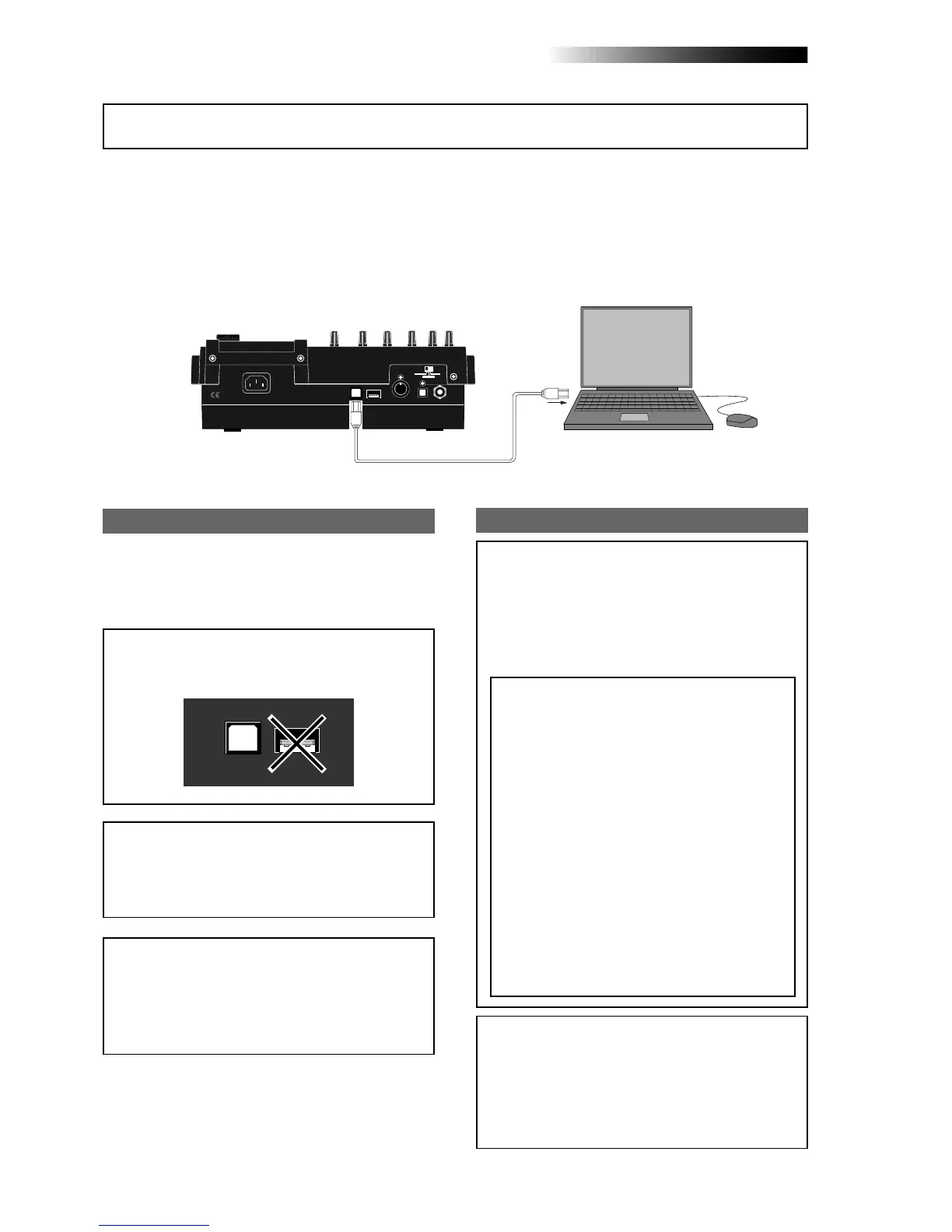
Connect the [USB] port of the MR-8HD/CD to
the USB port of a personal computer using a
USB cable, as shown above. (A USB cable is not
supplied with the MR-8HD/CD.)
Windows Me/2000/XP machine supporting USB
connection
USB cable
<Note>:
Only Windows Me, 2000 and XP comput-
ers, as well as Macintosh computers with OS X or
higher, can be used with the MR-8HD/CD.
Other computers cannot be used. Check your com-
puter before making connection.
Notes on exporting a file
<Note on backup>
When exporting song data on the hard disk to a
personal computer for backup, always export the
whole song folder. You cannot export individual
track data. See page 95 for details. See “
Archiving a
song
” on page 95 for details about song data
backup.
<Notes on USB connection with Mac OS>
When making USB connection with a Macintosh
computer, note that only Mac OS X or higher is
supported. Do not connect to a Macintosh com-
puter with the earlier version. The song data on
the MR-8HD/CD may be damaged.
INPUT A SEL
USB USB HOSTAC-IN
DIGITAL
OUT FOOT SWMIDI OUT
GTR CLEAN
MIC/LINE
GTR DIST
PC
USB USB HOST
<Caution>:
Use the [
USB
] port for connection to a
personal computer. Do not connect the [
USB HOST
]
port to a personal computer.
<Note>:
You can export only a stereo WAV file
which is converted from a pair of mono WAV
files on tracks 7/8, as described earlier in "WAV
file conversion". A mono WAV file or undo file
cannot be exported to a personal computer.
See the next page for details about the export-
able files.
<Disk protection>
By default, the “
disk protect
” function which is
effective in the USB mode is set to “
On
”.
In this condition, the MR-8HD/CD can export
data to a personal computer but cannot im-
port data from a computer. This is for pro-
tecting the MR-8HD/CD internal hard disk
from importing a file from a computer inap-
propriately and destroying the MR-8HD/CD
song data.
You can enable or disable this function, how-
ever, we recommend using the MR-8HD/CD
by setting it to “
On
”.
If you use the MR-8HD/CD by setting the “disk
protect” function to “
Off
”, read “
Archiving a
song
” on page 95 before using. See page 94
for details about how to make the “
disk protec-
tion
” setting.
Exporting data to a personal computer
* All company names and model names mentioned
in this manual are trademarks or registered trade-
marks of their respective holders.



 To Next Page