126
MR-8HD/CD Owner’s Manual (Other functions)
As described earlier on page 47, when both the auto punch in/out and loop modes are active,
the pre-roll and post-roll are effective in the loop function.
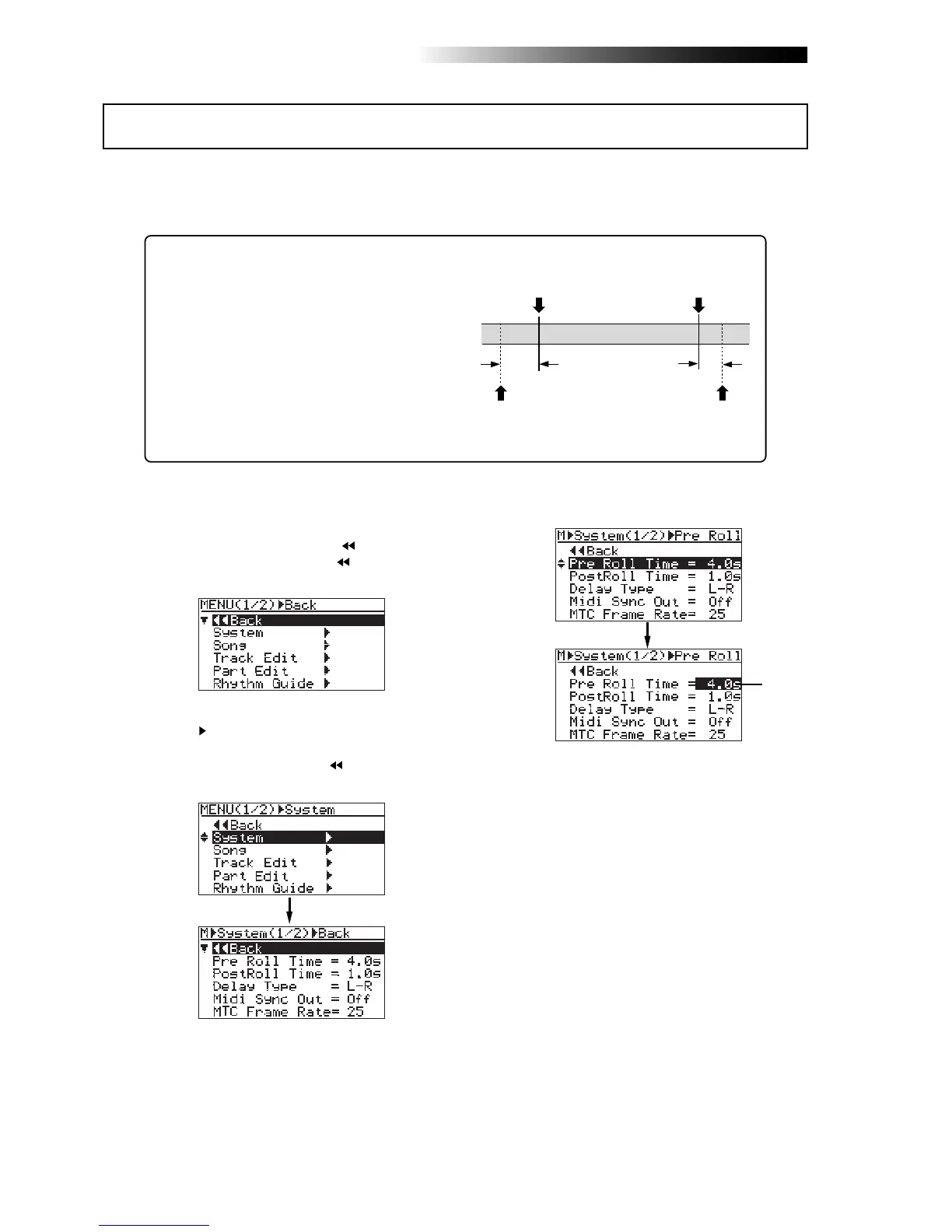
You can set the pre-roll and post-roll time value by the following procedure.
When both the auto punch in/out and loop modes are
active, the loop starts from "the LOCATE A point minus
the pre-roll time" and ends by "the LOCATE B point
plus the post-roll time". The pre-roll time is initially set
to four seconds, while the post-roll time is set to one
second.
In other words, with the default pre-roll and post-roll
time settings, when executing auto punch in/out, the
MR-8HD/CD starts playback four seconds before the
punch-in point, and ends playback one second after
the punch-out point.
1) While the recorder is stopped, press the
[MENU/ENTER] knob to enter the menu mode.
The display now shows the first page of the
menu selection screen, where "
Back" is
highlighted initially (selecting "
Back" returns
to the previous screen).
2) Rotate the [MENU/ENTER] knob to select
"System
", and press the [MENU/ENTER] knob.
The display now shows the first page of the
system menu screen, where "
Back" is
highlighted.
3) Rotate the [MENU/ENTER] knob to select
"Pre Roll Time=*.*s" and press the
[MENU/ENTER] knob.
The currently selected pre-roll time (by default,
"4.0s") flashes. You can now set the desired
pre-roll time.
4) Rotate the [MENU/ENTER] knob to select the
pre-roll hold time, and press the [MENU/ENTER]
knob.
The pre-roll time setting is confirmed and the
display returns to the previous screen. To set
the post-roll time, follow the procedure below.
5) Rotate the [MENU/ENTER] knob to select
"Post Roll Time" and press the [MENU/ENTER]
knob.
The currently selected post-roll time (by
default, "1.0s") flashes. You can now set the
desired post-roll time.
You can select between "0.1s" and "10s" in 0.1
second steps.
6) Rotate the [MENU/ENTER] knob to select the
post-roll hold time, and press the [MENU/ENTER]
knob.
The post-roll time setting is confirmed and the
display returns to the previous screen.
7) Press the [STOP] key to exit the menu mode.
LOCATE A
Point
LOCATE B
Point
4 sec.
1 sec.
LOOP START
point
LOOP END
point
You can select between "0.1s" and "10s" in 0.1
second steps.
Pre-roll/post-roll time setting
Flashing



 To Next Page