71
MR-8HD/CD Owner’s Manual (Track bouncing)
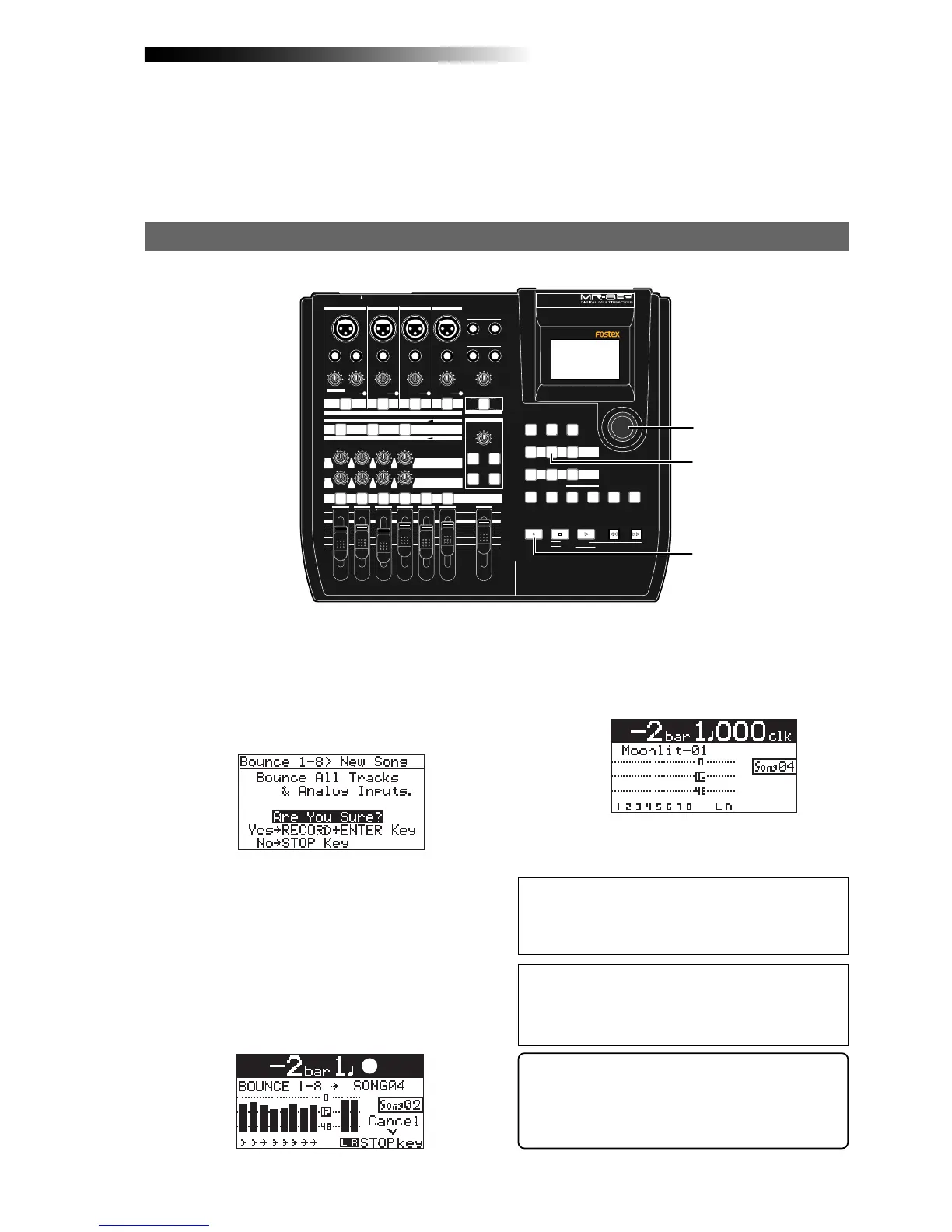
After finishing rehearsal, let's carry out actual track bouncing.
1) While the recorder is stopped, press the
[1-8 > NEW SONG] key.
2) Press the [MENU/ENTER] knob while holding down
the [RECORD] key.
Actual track bouncing
MIN MAX
100
LR
100
LR
100
LRRL
MIN
MAX
LINE MIC LINE MIC LINE MIC LINE MIC
REC SELECT
010
1
2
3
4
5/6 MASTER
MAX
MAX
MIN
MIN
7/8
LOCATE REC END
A-B PLAY
LOCATE ABS ZERO
PLAYSTOP
RECORD
REWIND F FWD
GUIDE
RHYTHM
CONTRAST
1-8 >
SONG
NEW
1-6 > 7/8
1-4 > 5/6 STEREO
WAV FILE
BOUNCE
POWERFUL
MASTERING
B / OUT
A / IN
LOCATE
STOREPLAY MODEAUTO PUNCH
NATURAL BRIGHT
TIME BASE
SELECT
UNDO/REDO
7/8 >
MENU / ENTER
SIMULATION
DYNAMIC CONDENSER TUBE
MIC
PAN
EFFECT
REVERB / DELAY TIME
HALL
ROOM
PLATE DELAY
PHONES VOL
L
STEREO OUT
R
2
PHONES
1
MAXMIN
BAL
BALBAL
TRIM
UNBAL
PEAK
TRIM
UNBAL
PEAK
TRIM
UNBAL
PEAK
PEAK
DISTORTION
GUITAR
/GUITAR
INPUT A SELECT
INSERT
BAL
UNBAL
TRIM
INPUT A
INPUT B INPUT C INPUT D
ON/
OFF
POWER
ABC1 DEF2 GHI3
JKL4 MNO5
PQR6 STU7 VWX8 YZ9 +-_0
DELETE
TO STEREO BUSS
EFFECT SEND
ON/
OFF
ON/
OFF
ON/
OFF
60'S COMBO
US METAL
BRIT STACK
AMP
SIMULATION
INPUT A
1
2
2
<Note>:
To cancel track bouncing in the middle,
press the [
STOP
] key. Pressing the [
STOP
] key au-
tomatically deletes the new song created in step 2
above and turns off the bounce mode.
<Note>:
When you are going to execute track bounc-
ing, if there is not enough space on the hard disk
or 99 songs already exist on the disk, a warning
message appears and the operation is canceled.
<Track bouncing while mixing signals from [INPUT A]
through [INPUT D]>
When you bounce tracks 1 through 8 to tracks 7/8
of the new song, you can also mix signals from [IN-
PUT A] through [INPUT D] together (see page 72).
You can check the result by following the pro-
cedure described in “Checking the bounced
signals on tracks 7/8” on page 69.
4) After finishing rehearsal, press the [STOP] key
to stop the recorder and locate it to the
beginning of the song.
Track bouncing starts. The mixed (bounced) sig-
nals are recorded to tracks 7/8 of a new song.
The screen example below shows that tracks 1
through 8 of Song02 (whose name is “Moonlit”)
is now being bounced to tracks 7/8 of the new
song (Song04). Meters 1 through 8 show the play-
back levels of tracks 1 through 8, while the L and
R meters shows the recording levels of tracks 7/
8 of Song04.
The [1-8 > NEW SONG] key lights up and the
display shows the screen below. If you execute
track bouncing, press the [MENU/ENTER] knob
while holding down the [RECORD] key.
If you cancel track bouncing, press the [STOP]
key.
and use the [MASTER] fader to adjust the mas-
ter recording levels of the bounced signals ap-
propriately while checking meters L/R. See
"Using effects" on page 57 for details about
the delay/reverb and mastering effects.
When track bouncing to a new song completes,
the recorder automatically stops and the dis-
play shows the home screen of the new song.
The song name of the new song is given by the
name of the original song with “-**” (** is a
two-digit number).
Do not move the controls and faders after fin-
ishing rehearsal. Use the track faders (1
through 8) to control the track output levels,



 To Next Page