18
MR-8HD/CD Owner’s Manual (Names and functions)
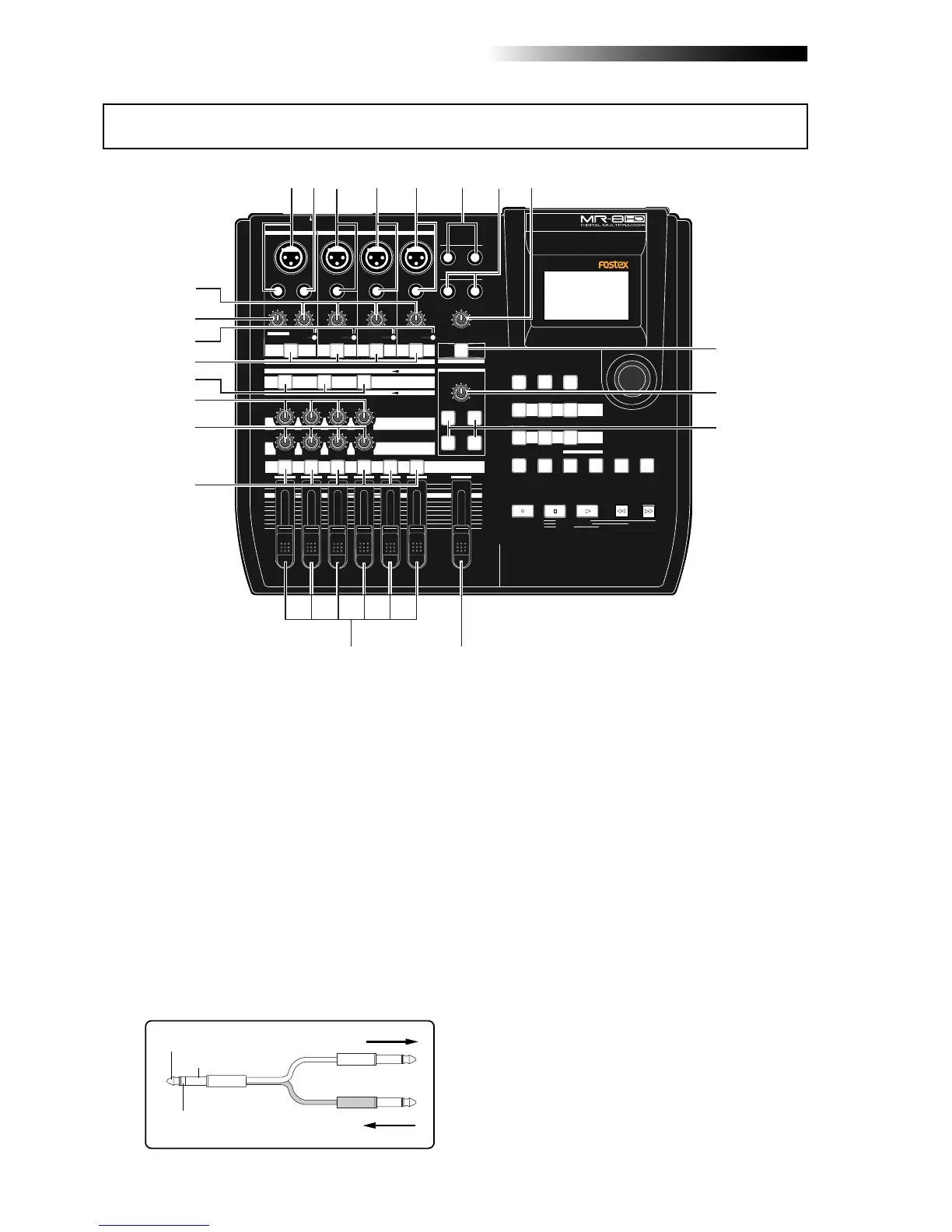
1. [INPUT A] input connectors
(XLR connector and phone jack)
MIN MAX
100
LR
100
LR
100
LRRL
MIN
MAX
LINE MIC LINE MIC LINE MIC LINE MIC
REC SELECT
010
1
2
3
4
5/6 MASTER
MAX
MAX
MIN
MIN
7/8
LOCATE REC END
A-B PLAY
LOCATE ABS ZERO
PLAYSTOP
RECORD
REWIND F FWD
GUIDE
RHYTHM
CONTRAST
1-8 >
SONG
NEW
1-6 > 7/8
1-4 > 5/6 STEREO
WAV FILE
BOUNCE
POWERFUL
MASTERING
B / OUT
A / IN
LOCATE
STOREPLAY MODEAUTO PUNCH
NATURAL BRIGHT
TIME BASE
SELECT
UNDO/REDO
7/8 >
MENU / ENTER
SIMULATION
DYNAMIC CONDENSER TUBE
MIC
PAN
EFFECT
REVERB / DELAY TIME
HALL
ROOM
PLATE DELAY
PHONES VOL
L
STEREO OUT
R
2
PHONES
1
MAXMIN
BAL
BALBAL
TRIM
UNBAL
PEAK
TRIM
UNBAL
PEAK
TRIM
UNBAL
PEAK
PEAK
DISTORTION
GUITAR
/GUITAR
INPUT A SELECT
INSERT
BAL
UNBAL
TRIM
INPUT A
INPUT B INPUT C INPUT D
ON/
OFF
POWER
ABC1 DEF2 GHI3
JKL4 MNO5
PQR6 STU7 VWX8 YZ9 +-_0
DELETE
TO STEREO BUSS
EFFECT SEND
ON/
OFF
ON/
OFF
ON/
OFF
60'S COMBO
US METAL
BRIT STACK
AMP
SIMULATION
INPUT A
1
2
4
5
67
8
9
10
11
1213
14
15
16
17
18
19
20
21
3
3. [INPUT B] input connectors
(XLR connector and phone jack)
TIP: SEND
RING: RETURN
GND
From the effect output.
To the effect input.
You can connect a microphone, keyboard,
etc. to the [INPUT C] input.
Both the [BAL] XLR connector and [UNBAL]
phone jack are provided so you can use the
appropriate connector according to the
sound source.
If you connect sources to both the XLR con-
nector and phone jack, the phone input takes
priority (see page 33).
4. [INPUT C] input connectors
(XLR connector and phone jack)
You can connect a microphone, keyboard,
etc. to the [INPUT B] input.
Both the [BAL] XLR connector and [UNBAL]
phone jack are provided so you can use the
appropriate connector according to the
sound source.
If you connect sources to both the XLR con-
nector and phone jack, the phone input takes
priority (see page 33).
Connects an external effect processor (typi-
cally, a compressor/limiter, etc.).
For connection between the MR-8HD/CD and
the effect processor, use a Y-cable as shown
below (see page 59).
2. [INSERT] connector (TRS phone jack)
Both the [BAL] XLR connector and [UNBAL/
GUITAR] phone jack are provided. You can
connect a guitar, microphone, keyboard, etc.
If you connect sources to both the XLR con-
nector and phone jack, the phone input takes
priority. When using the [INPUT A] section,
select the [INPUT A SELECT] switch on the
rear panel appropriately according to your
usage (see page 33).
Top panel 1



 To Next Page