34
MR-8HD/CD Owner’s Manual (Basic operations)
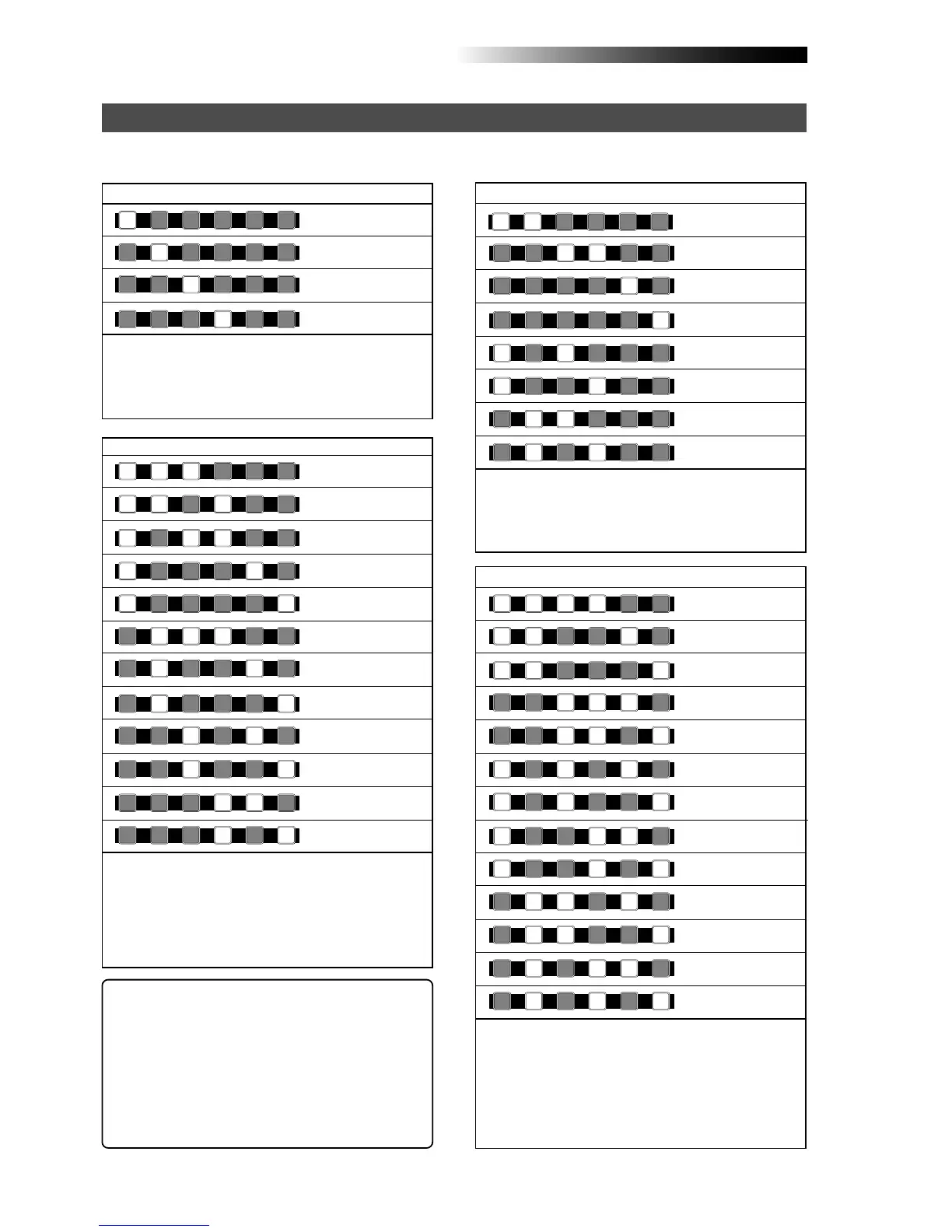
The following shows the recording track combinations and available input channel(s) by the number
of tracks simultaneously recorded.
Recording track combinations and available input channel(s)
Recording to a single track
Only [INPUT A] is available.
You can record only the [INPUT A] channel signal to the
selected track. The channels from [INPUT B] to [INPUT
D] are not available.
[INPUT A], [INPUT B] and [INPUT C] are available.
The [INPUT A] channel signal is assigned to the track
with the lowest number, the [INPUT B] signal assigned
to the track with the next lowest number, and the [IN-
PUT C] signal is assigned to the track with the highest
number.
All input channels are available.
The [INPUT A] channel signal is assigned to the track
with the lowest number, the [INPUT B] signal assigned
to the track with the next lowest number, the [INPUT C]
signal is assigned to the track with the second highest
number, and the [INPUT D] signal is assigned to the
track with the highest number.
Recording to two tracks simultaneously
Recording to four tracks simultaneously
Recording to three tracks simultaneously
Track 1
Track 2
Track 3
Track 4
Trk 1, 2 and 3
Trk 1, 2 and 4
Trk 1, 3 and 4
Trk 1, 5 and 6
Trk 1, 7 and 8
Trk 2, 3 and 4
Trk 2, 5 and 6
Trk 2, 7 and 8
Trk 3, 5 and 6
Trk 3, 7 and 8
Trk 4, 5 and 6
Trk 4, 7 and 8
Trk 1 and 2
Trk 3 and 4
Trk 5 and 6
Trk 7 and 8
Trk 1, 2, 3 and 4
Trk 1, 2, 5 and 6
Trk 1, 2, 7 and 8
Trk 3, 4, 5 and 6
Trk 3, 4, 7 and 8
Trk 1, 3, 5 and 6
Trk 1, 3, 7 and 8
Trk 1, 4, 5 and 6
Trk 1, 4, 7 and 8
[INPUT A] and [INPUT B] are available.
The [INPUT A] channel signal is assigned to the track
with the lower number, while the [INPUT B] channel sig-
nal is assigned to the track with the higher number.
Trk 1 and 3
Trk 1 and 4
Trk 2 and 3
Trk 2 and 4
Trk 2, 3, 5 and 6
Trk 2, 3, 7 and 8
Trk 2, 4, 5 and 6
Trk 2, 4, 7 and 8
1
2
3
4
1
2
3
1
2
4
1
4
3
1
5/6
1
7/8
2
5/6
2
7/8
3
5/6
3
7/8
4
5/6
4
7/8
4
2
3
2
1
4
3
5/6
7/8
3
1
4
1
3
2
4
2
4
32
1
2
1
5/6
2
1
7/8
4
3
5/6
4
3
7/8
3
1
5/6
3
1
7/8
4
1
5/6
4
1
7/8
2
3
7/8
2
3
5/6
2
4
5/6
2
4
7/8
<Example of input assignment to tracks>
If you make recording to tracks 2, 4, 7 and 8, input-to-
track assignment is as follows.
INPUT A -> Track 2
INPUT B -> Track 4
INPUT C -> Track 7
INPUT D -> Track 8



 To Next Page