20
MR-8HD/CD Owner’s Manual (Names and functions)
MIN MAX
100
LR
100
LR
100
LRRL
MIN
MAX
LINE MIC LINE MIC LINE MIC LINE MIC
REC SELECT
010
1
2
3
4
5/6 MASTER
MAX
MAX
MIN
MIN
7/8
LOCATE REC END
A-B PLAY
LOCATE ABS ZERO
PLAYSTOP
RECORD
REWIND F FWD
GUIDE
RHYTHM
CONTRAST
1-8 >
SONG
NEW
1-6 > 7/8
1-4 > 5/6 STEREO
WAV FILE
BOUNCE
POWERFUL
MASTERING
B / OUT
A / IN
LOCATE
STOREPLAY MODEAUTO PUNCH
NATURAL BRIGHT
TIME BASE
SELECT
UNDO/REDO
7/8 >
MENU / ENTER
SIMULATION
DYNAMIC CONDENSER TUBE
MIC
PAN
EFFECT
REVERB / DELAY TIME
HALL
ROOM
PLATE DELAY
PHONES VOL
L
STEREO OUT
R
2
PHONES
1
MAXMIN
BAL
BALBAL
TRIM
UNBAL
PEAK
TRIM
UNBAL
PEAK
TRIM
UNBAL
PEAK
PEAK
DISTORTION
GUITAR
/GUITAR
INPUT A SELECT
INSERT
BAL
UNBAL
TRIM
INPUT A
INPUT B INPUT C INPUT D
ON/
OFF
POWER
ABC1 DEF2 GHI3
JKL4 MNO5
PQR6 STU7 VWX8 YZ9 +-_0
DELETE
TO STEREO BUSS
EFFECT SEND
ON/
OFF
ON/
OFF
ON/
OFF
60'S COMBO
US METAL
BRIT STACK
AMP
SIMULATION
INPUT A
22
23
24
25 26 27
28
29
30
31
32
33
34
35
36
37
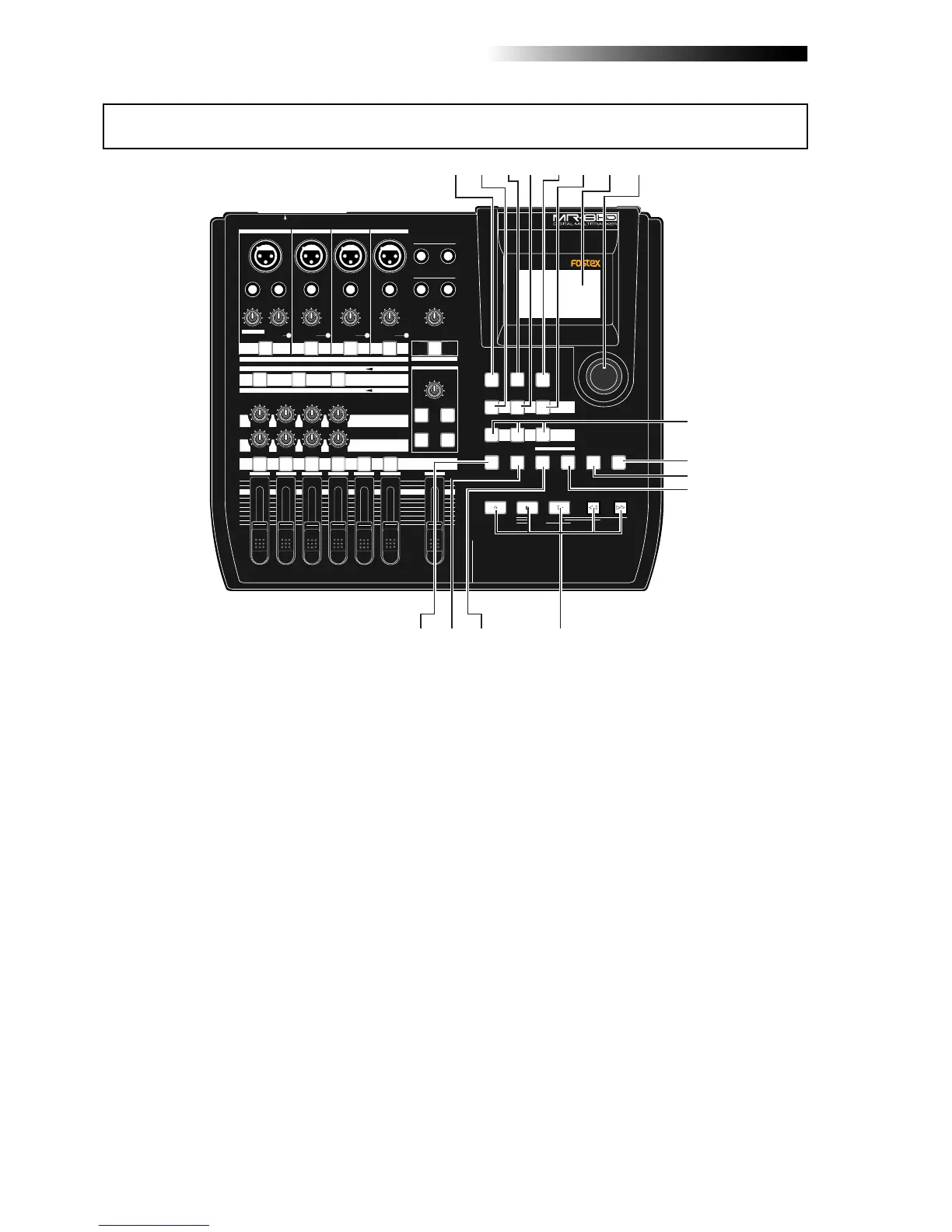
22. [RHYTHM GUIDE] key
Switches on/off of the rhythm guide func-
tion (see page 76). Each press of the switch
alternates on and off. A long press of the
key enters the rhythm guide menu, in which
you can set the rhythm guide parameters
(see page 76).
23. [BOUNCE 1-4 > 5/6, 1-6 > 7/8] / A B C 1 key
Selects the bounce mode (see pages 66 and
68).
In the menu mode, this key is used for char-
acter entry of A, B, C, a, b, c and 1 (see pages
32 and 99).
24. [TIME BASE SEL] key
Selects the time base shown on the display
(see page 24). Each press of the key switch
between "time" and "bar/beat".
25. [BOUNCE 1-8 > NEW SONG] / D E F 2 key
Selects the bounce mode (see page 70).
In the menu mode, this key is used for char-
acter entry of D, E, F, d, e, f and 2 (see pages
32 and 99).
26. [CONTRAST] key
By rotating the [MENU/ENTER] knob while
holding down this key, you can adjust the
display contrast (see page 25).
27. [7/8 > STEREO WAV FILE] / G H I 3 key
This key is used when converting a mono
WAV file recorded on tracks 7/8 to a stereo
WAV file (see page 90). A converted stereo
WAV file can be exported to a USB-connected
personal computer (see page 92), or can be
burned to an audio CD using the internal
CD-R/RW drive or an external CD-R/RW
drive (see the supplementary manual "How
to use the CD-R/RW drive").
In the menu mode, this key is used for char-
acter entry of G, H, I, g, h, i and 3 (see pages
32 and 99).
28. LCD display
This 132 x 64 dot LCD display shows vari-
ous information (see page 24).
29. [MENU/ENTER] rotary / push knob
Pressing this knob enters the menu mode.
In the menu mode, rotating this knob se-
lects the item or numeric value, while press-
ing this knob confirm the setting/selection.
Top panel 2



 To Next Page