42
MR-8HD/CD Owner’s Manual (Basic operations)
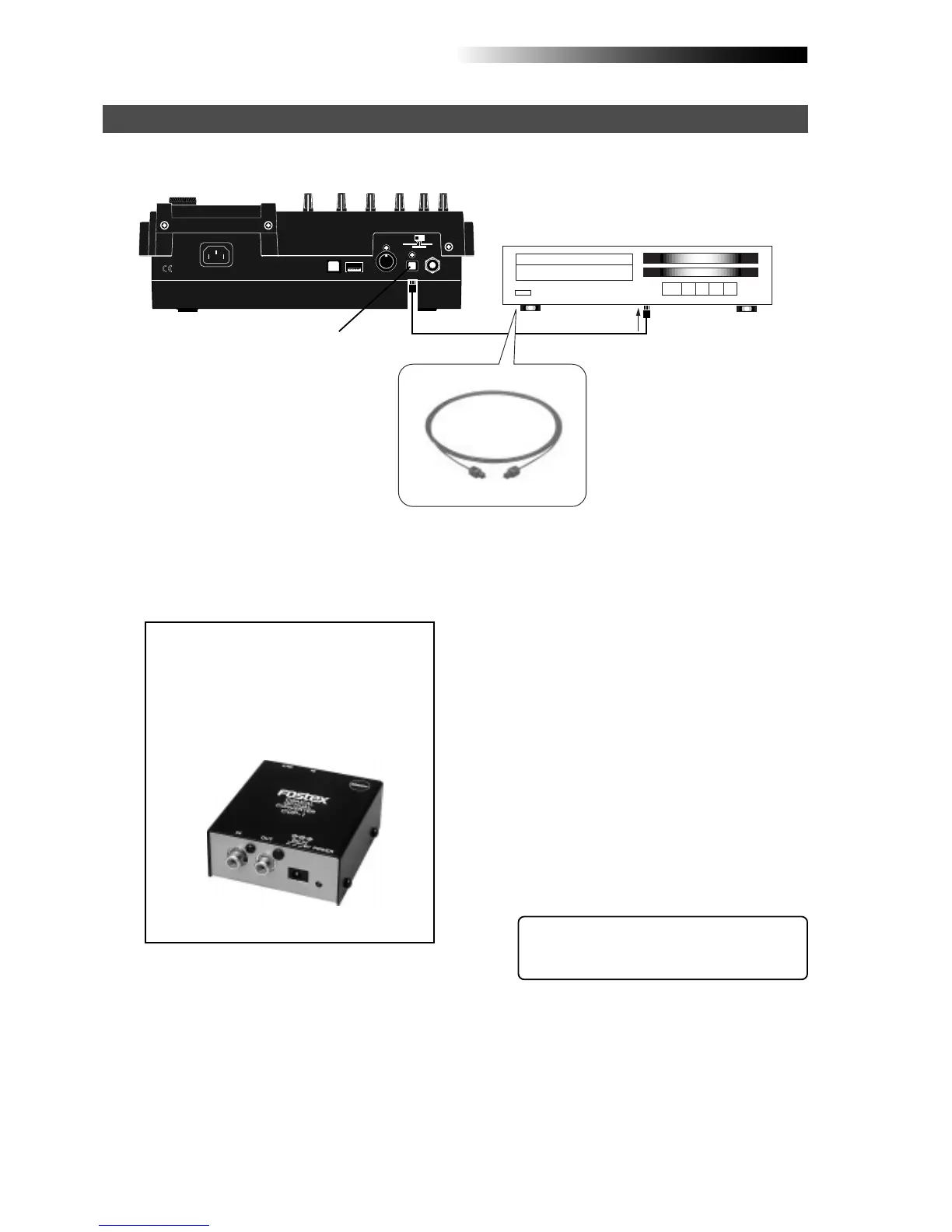
1) Connect the [DIGITAL OUT] connector of the
MR-8HD/CD to the digital input connector of a
digital master recorder using an optical cable.
<Note>:
The [
DIGITAL OUT
] connector of the
MR-8HD/CD is the Toslink optical type.
If your digital recorder provides only the
coaxial type connector, use the Fostex COP-
1/96 kHz coaxial-optical converter.
Contact Fostex or our dealer for details
about the Model COP-1/96 kHz.
The following describes how to make mixdown recording to an external digital recorder.
<Tip>: By sliding up or down the MR-8HD/
CD [MASTER] fader gradually, you can fade
in or fade out recording.
INPUT A SEL
USB USB HOSTAC-IN
DIGITAL
OUT FOOT SWMIDI OUT
GTR CLEAN
MIC/LINE
GTR DIST
Digital master recorder
MR-8HD/CD
Mixdown to a digital recorder
Optical cable
2) Set the master recorder to accept the digital
input.
Make sure that the recorder accepts the digital
signal output from the MR-8HD/CD, which is
44.1-kHz, 16-bit, S/P DIF signal.
Generally, a digital recorder cannot adjust the
digital input level.
3) While playing back the MR-8HD/CD, rehearse
mixing down the recorded sounds by adjusting
the level and panning of each track, applying
effects to tracks 1 through 4 and applying the
mastering effects to the L/R stereo mix, etc.
See "Using effects" on page 57 for details about
the delay/reverb and mastering effects.
You can also mix sound sources connected to
[INPUT A] through [INPUT D] during mixdown.
See page 72 for details.
4) Use the [MASTER] fader of the MR-8HD/CD to
adjust the output level.
Adjust the level appropriately so that the level
meter of the master recorder shows "0" when
the MR-8HD/CD outputs the biggest signal.
If the level meter exceeds "0", the sound may
be distorted.
5) Start the master recorder recording and then start
the MR-8HD/CD playing back.
6) After finishing recording, stop both recorders.
[DIGITAL OUT]
Model COP-1/96kHz



 To Next Page