12
3 : SETUP GUIDE
SETUP FOR BOTH PRE AND POST EFFECTS
SIGNAL FLOW:
Optionally connect 1–2 optional expression pedals such as Fractal Audio Systems EV-1 .
Connect OUT [POST] R to a
second amp for stereo post (oponal)
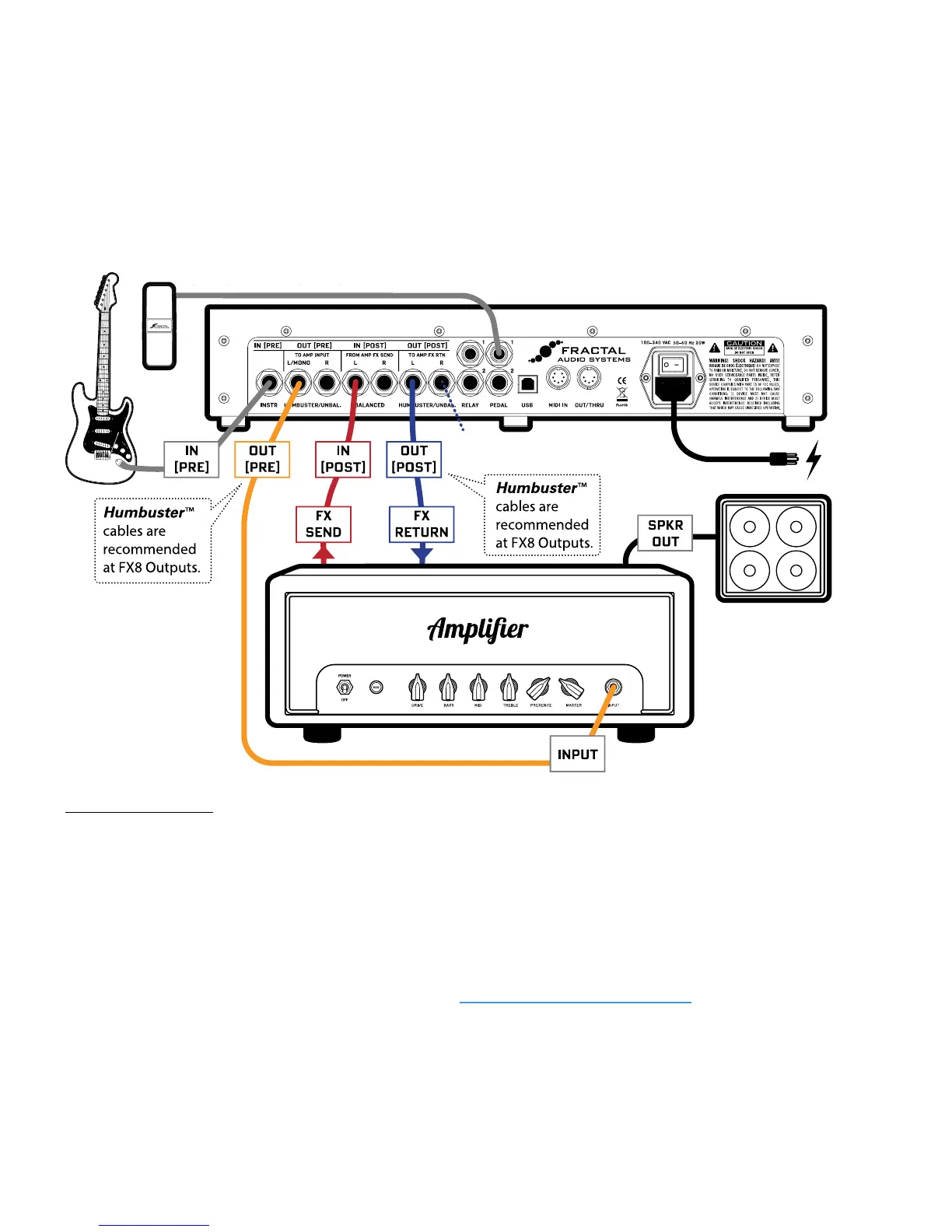
The GUITAR is connected to IN [PRE] on the FX8. Signal is processed by eects designated as “PRE” and then
routed to OUT [PRE] LEFT, which is connected to the guitar INPUT of your amplier. Your amp outputs
signal to its rear-panel FX SEND jack. This is connected to IN [POST] LEFT on the FX8. The signal is now
processed by eects designated as “POST” and routed to OUT[POST]LEFT, which is connected to your
amplier’s FX RETURN jack. You could easily connect OUT [POST] RIGHT to the FX RETURN of a second
amp for stereo (or connect OUT [POST] LEFT and RIGHT to the dual inputs of a stereo power amp).The
amplier’s SPEAKER output is connected as usual to its speaker cabinet.
Humbuster™ cables help reduce ground loop hum. See “Humbuster Cables” on page 4 for details.
A head is shown in the above diagram. A combo with an eects loop is equally suitable for this type of setup.
NOTE: For this setup, you’ll probably want to make one global change.
Open the GLOBAL menu (press SETUP followed by Footswitch 1) and nd the SETTINGS page.
NAV to
GLOBAL LOOPER LOCATION and then use VALUE to select “OUT POST”.
Press EXIT twice to save and return to Stompbox Mode.
This is the most exible FX8 setup, taking full advantage of the unit’s capability for separate “PRE” and
“POST” eect chains. Connecting in this manner is also known as the “Four Cable Method” or “4CM.” Find
factory presets for this type of setup in Banks C and D (plus other banks as well).



 To Next Page