23
5 : CREATING PRESETS
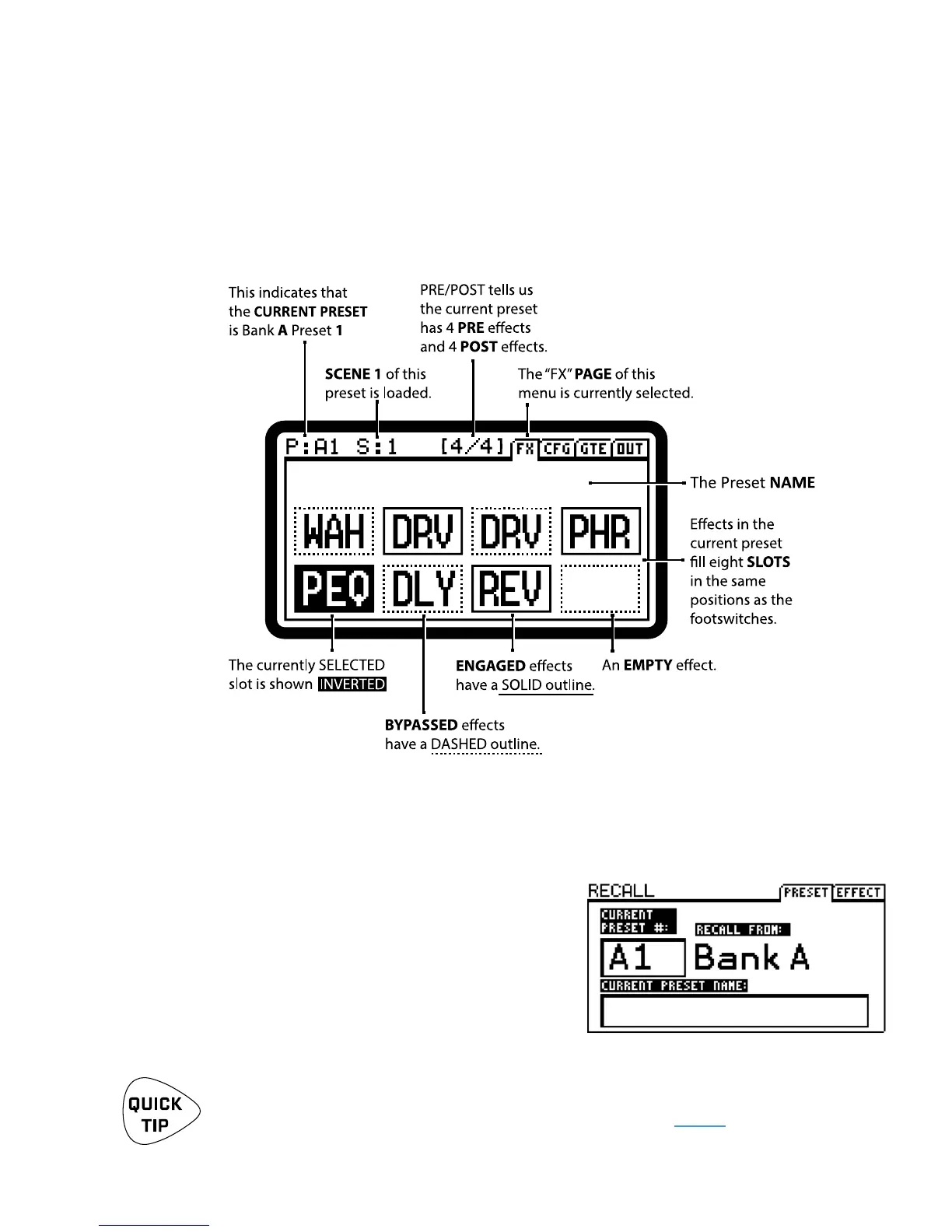
While playing, you will generally use the FX8 on the “FX” page of its main menu. We call this “Stompbox
Mode” because the footswitches turn eects on and o like traditional stompboxes. (In other modes,
footswitches select scenes, presets, and more.) The FX8 starts up in Stompbox Mode and returns to it when
you leave any other mode. Get to know the stompbox mode display:
The Stompbox Mode display indicates the current Preset by bank and number (ex: A1, A2 … B1, B2 … ).
The PRESET/A knob can be used to change presets.
You can also press and hold the PRESET/BANK footswitch
to open the RECALL: PRESET screen (shown at right).
Use BANK UP and BANK DN to select the desired bank,
and footswitches 1–8 to load the desired preset.
Tap PRESET/BANK again to cancel and return to the
current preset in Stompbox Mode.
Want to stay in Preset Select mode so you can switch from preset to preset with single
footswitch taps? Check out “STICKY PRESET/BANK SELECT MODE” on page 8.
STOMPBOX MODE
LOADING PRESETS
BOUTIQUE PEDALS


 To Next Page