32
6 : PRESET CONFIGURATION
Eect 1: -- (First Eect)
Eect 2: SERIES
Eect 3: SERIES
Eect 4: SERIES
Eect 5: -- (rst POST)
Eect 6: PARALLEL
Eect 7: PARALLEL
Eect 8: PARALLEL
(FX1 always series)
Eect 2: PARALLEL
Eect 3: PARALLEL
Eect 4: PARALLEL
Eect 5: PARALLEL
Eect 6: PARALLEL
Eect 7: PARALLEL
Eect 8: PARALLEL
The eects of the FX8 can be run in either series or parallel.
To edit the series/parallel conguration for the current preset, press PAGE from Stompbox Mode to turn to
the Conguration (“CFG”) page. E
Eight “FX” parameters are provided—one for each numbered slot. Select “SER” (Series) or “PAR” (Parallel) as
desired for each. Note that the rst eect and the rst POST eect are always series and cannot be changed.
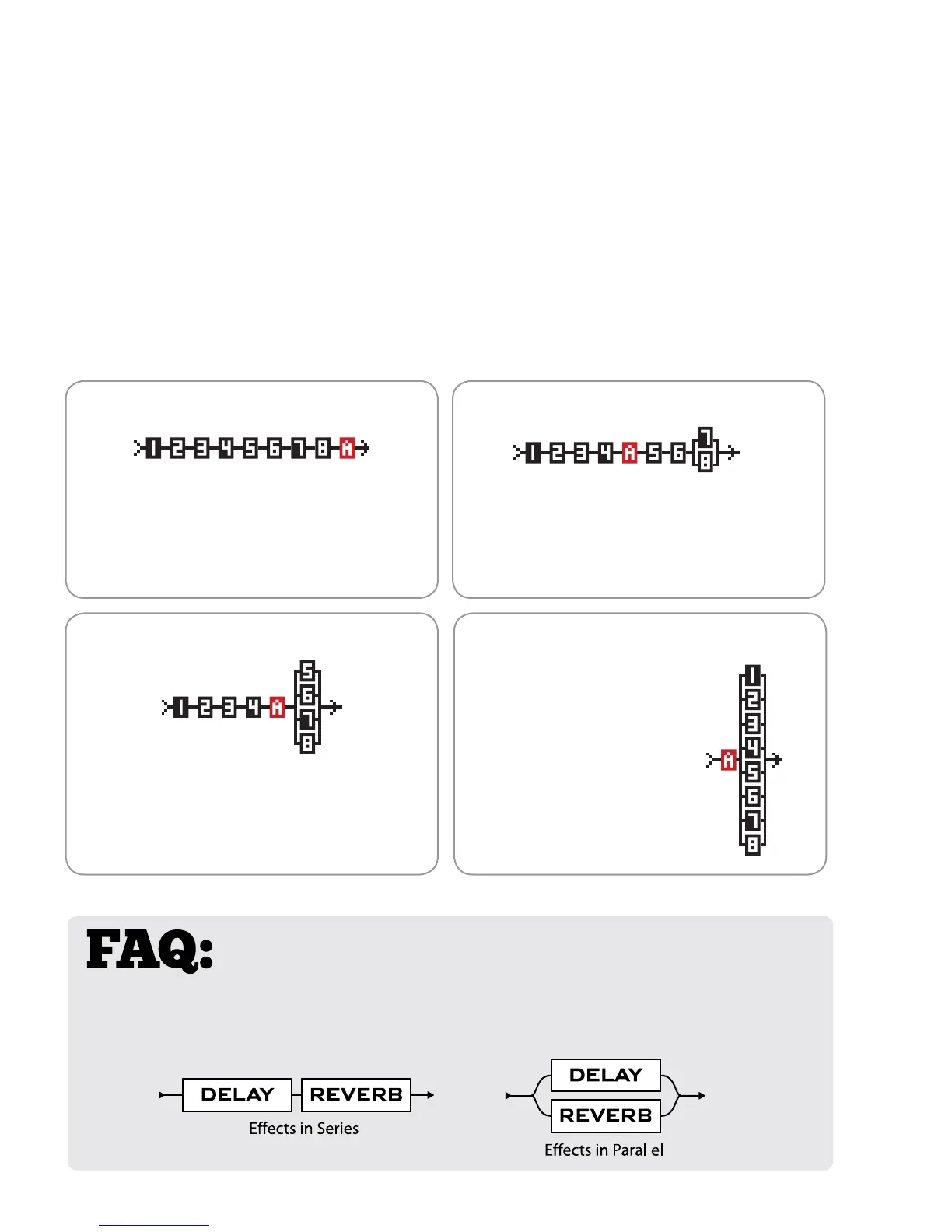
A diagram shows the current layout. The “A” block shows the position of your AMP (between PRE and POST
eects.) The “A” moves as you change the number of PRE/POST eects. Make changes while watching the layout
diagram and you’ll quickly learn how this works. Several common examples appear below:
CONFIGURE SERIES & PARALLEL
PRE Eects Only (8/0), All Fx Series.
PRE and POST (4/4), FX 6,7,8 in Parallel POST Eects Only (0/8), All FX Parallel
PRE and POST (4/4), Eect 8 in Parallel
Eect 1: -- (First Eect)
Eect 2: SERIES
Eect 3: SERIES
Eect 4: SERIES
Eect 5: SERIES
Eect 6: SERIES
Eect 7: SERIES
Eect 8: SERIES
Eect 1: -- (First Eect)
Eect 2: SERIES
Eect 3: SERIES
Eect 4: SERIES
Eect 5: -- (auto series)
Eect 6: SERIES
Eect 7: SERIES
Eect 8: PARALLEL
WHY RUN FX IN PARALLEL? If you, like most guitarists, have always
strung pedals together in a straight line, you’ll nd the FX8 replicates this setup easily.
But the freedom to route in parallel opens new options, both traditional and creative.
How does it sound? An easy example to understand is Reverb and Delay in series and in parallel. In series,
the dry sound and the delay sound BOTH pass through the reverb. In parallel, only the direct signal
passes through the reverb so the delay echoes are heard dry—no reverb.



 To Next Page