14
3 : SETUP GUIDE
SIGNAL FLOW:
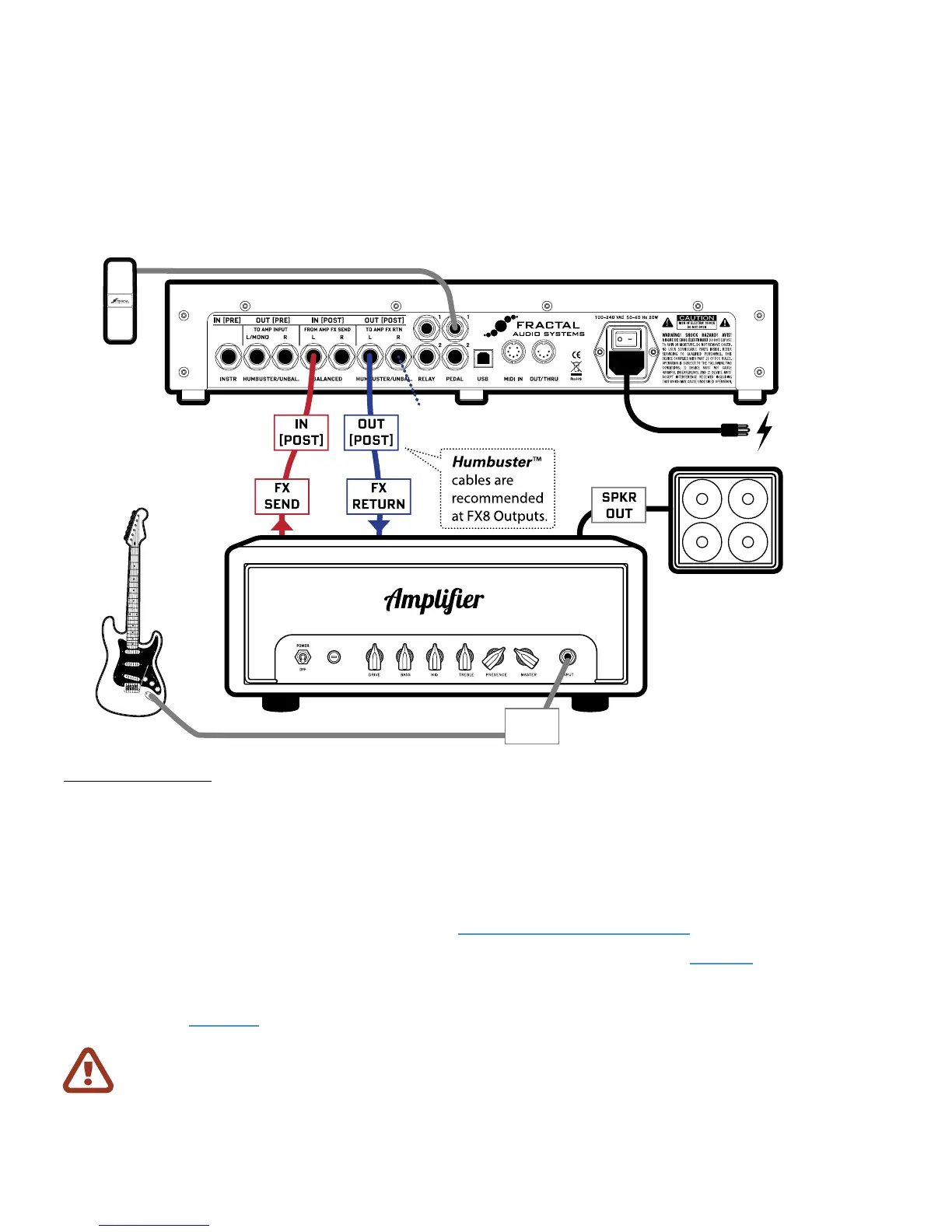
Here, signal ows out from the GUITAR to the Guitar INPUT of your amplier. Your amp’s preamp outputs
to its rear-panel FX SEND jack. This is connected to IN [POST] on the FX8. The signal is processed by the
POST eects of the FX8 and routed to OUT [POST] LEFT which is connected to your amplier’s FX RETURN.
You could easily connect OUT [POST] RIGHT to the FX RETURN of a second amp for stereo (or connect
OUT [POST] LEFT and RIGHT to the dual inputs of a stereo power amp). The amplier’s SPEAKER output
is connected to a speaker cabinet, as it normally would be. (If your amp is a combo, it has a built-in speaker.)
Humbuster™ cables help reduce ground loop hum. See “Humbuster Cables” on page 4 for details.
If you’re interested in this setup, you should also know that the PRE/POST setup on page 12 oers the
ability to use True Bypass on the PRE chain only. This gives you the exibility to have a POST ONLY setup and
still switch in any desired PRE eects such as wah, whammy, or volume as needed. Learn more about True
Bypass in section Section 8.
Here the FX8 is used in the eects loop of an amp with presets presumably congured so all eects are
POST. Find factory presets for this type of setup in Banks E and F.
SETUP FOR POST EFFECTS ONLY
Equally well-suited
for bass, acousc, etc.
Optionally connect 1–2 optional expression pedals such as Fractal Audio Systems EV-1 .
INPUT
Connect OUT [POST] R to a
second amp for stereo (oponal)
IMPORTANT: For this setup, you’ll need to make two global changes.
Open the GLOBAL menu (press SETUP followed by Footswitch 1) and nd the SETTINGS page.
First, NAV to
GLOBAL DETECTOR and then use VALUE to select “IN 2 [POST]”.
Next, NAV to GLOBAL LOOPER LOCATION and then use VALUE to select “OUT POST”.
Press EXIT twice to return to Stompbox Mode.



 To Next Page