26
Editing your
Calendar
You can create, modify, and delete Calendar events by changing to
Edit mode and using the REX PRO Wizards.
To create a new event:
1
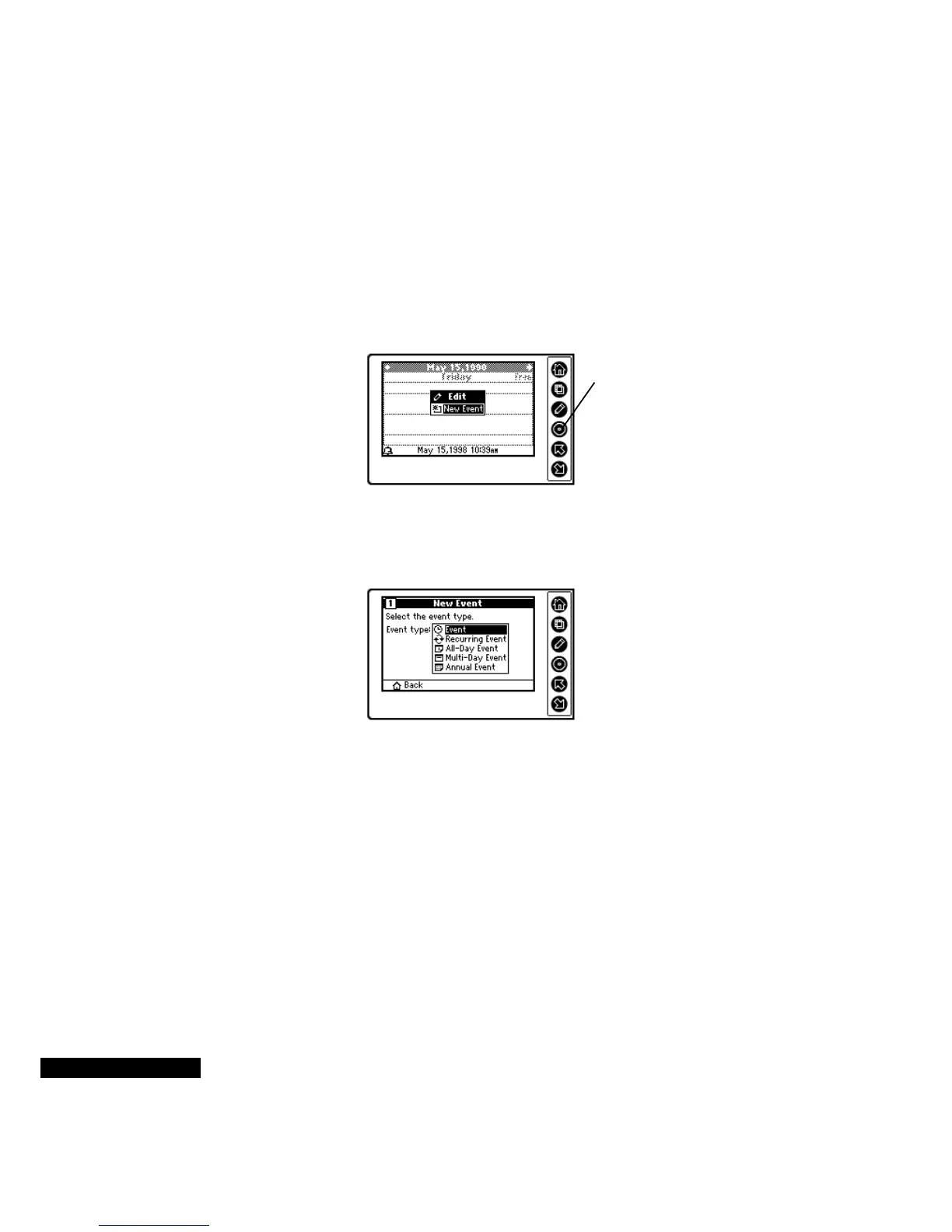
Press the Edit key in Calendar module, or in the Home screen.
2
If it is not already highlighted, highlight the New Event option, and
press the Select key.
3
Choose the New Event type by highlighting it using the Up or
Down key, and then pressing the Select key.
4
The next Wizard screen will vary, based on your user profile. You
will see a pre-set QuickList of events.
QuickLists allow you to quickly enter events or tasks into your
REX PRO without typing. These “pick lists” are based on your
user profile. You can customize these pre-defined lists in TrueSync
Desktop for REX PRO, and then synchronize them to the REX
PRO. You can also change your profile at any time in TrueSync
Desktop for REX PRO. See the TrueSync Desktop for REX PRO
User’s Guide for details.
For example, if you have a Business profile, and you choose to
create an Event, your QuickList will include: Meeting,
Appointment, Presentation, Conference Call, Flight, Conference,
Highlight the New
Event option, and
press the Select key.
Select the Event
Type from the list.



 To Next Page