door is opened or closed while this feature is active,
the timer will add an additional 10 seconds of light-
ing. This feature can be temporarily disabled by turn-
ing the ignition switch on, or by cycling the headlight
switch from the off position to one of the other two
positions.
High-Beam Headlights
To activate the high-beam headlights, press the turn
signal lever forward towards the windshield while the
low-beam headlights are on. Return the turn-signal
lever back to its neutral position to deactivate the
high beams, and return to low beam headlights.
When the high-beam headlights are on, a blue light
illuminates on the instrument cluster. For vehicles
with fog lights, switching on the high beams will
switch off the fog lights. The headlight low beams
remain on continuously during high-beam operation.
02/03/2012 f544971
1
2
34
6
7
7
8
8
9
10
5
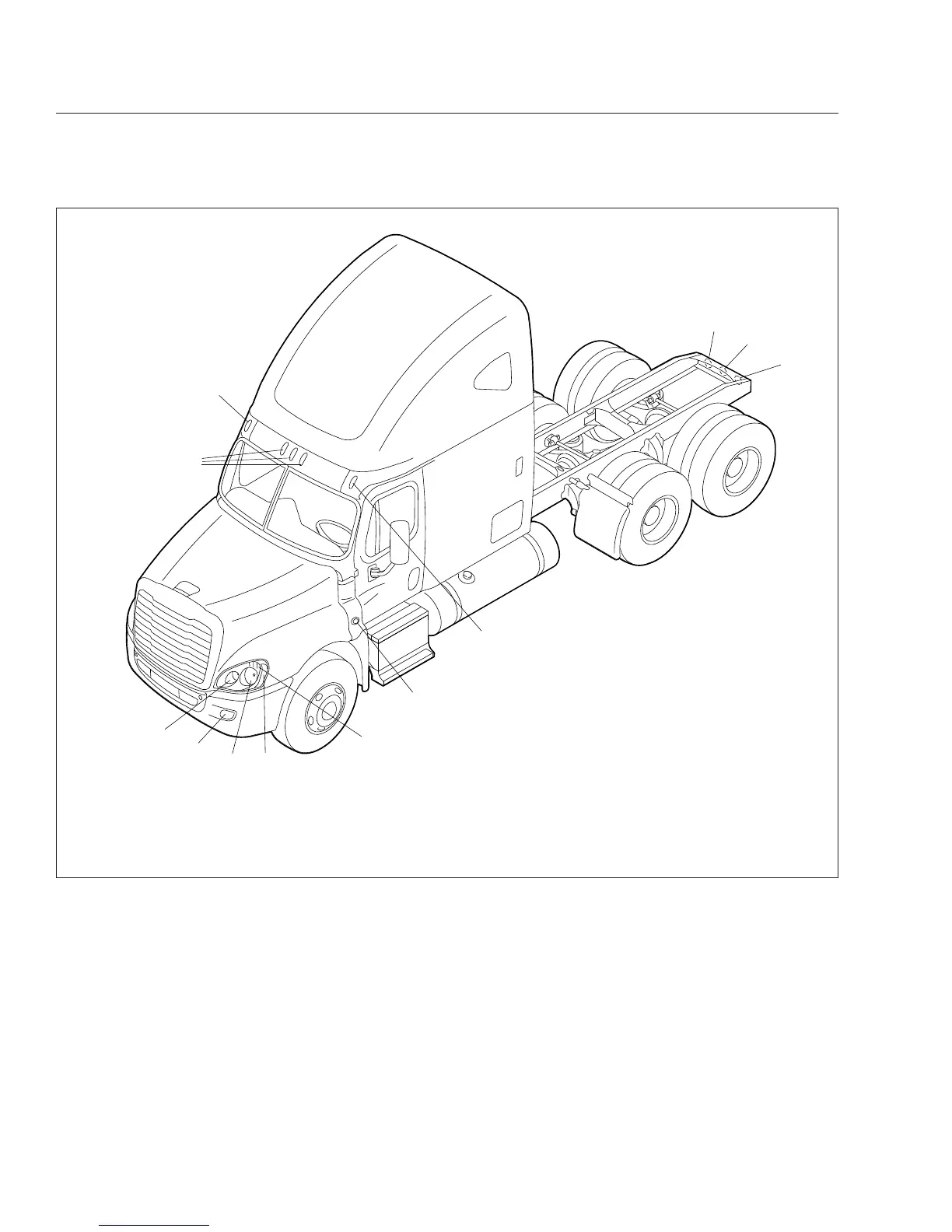
1. High-Beam Headlight
2. Fog Light, or Auxiliary High-Beam Light
3. Low-Beam Headlight
4. Marker Light
5. Turn Signal
6. Side Turn Signal and Marker Light
7. Clearance Light
8. Stop Light, Taillight, and Turn Signal
9. Back-Up Light
10. Identification Light
Fig. 5.3, Exterior Lights
Driver Controls
5.3











 To Next Page