4.4 Charging Station Procedures
4.4.1 Charging Station contacts replacement
Required tools: Philips screwdriver Procedure duration: 5 minutes
A. Remove the Robomow from the Charging Station.
B. Disconnect the Power Supply from the wall socket.
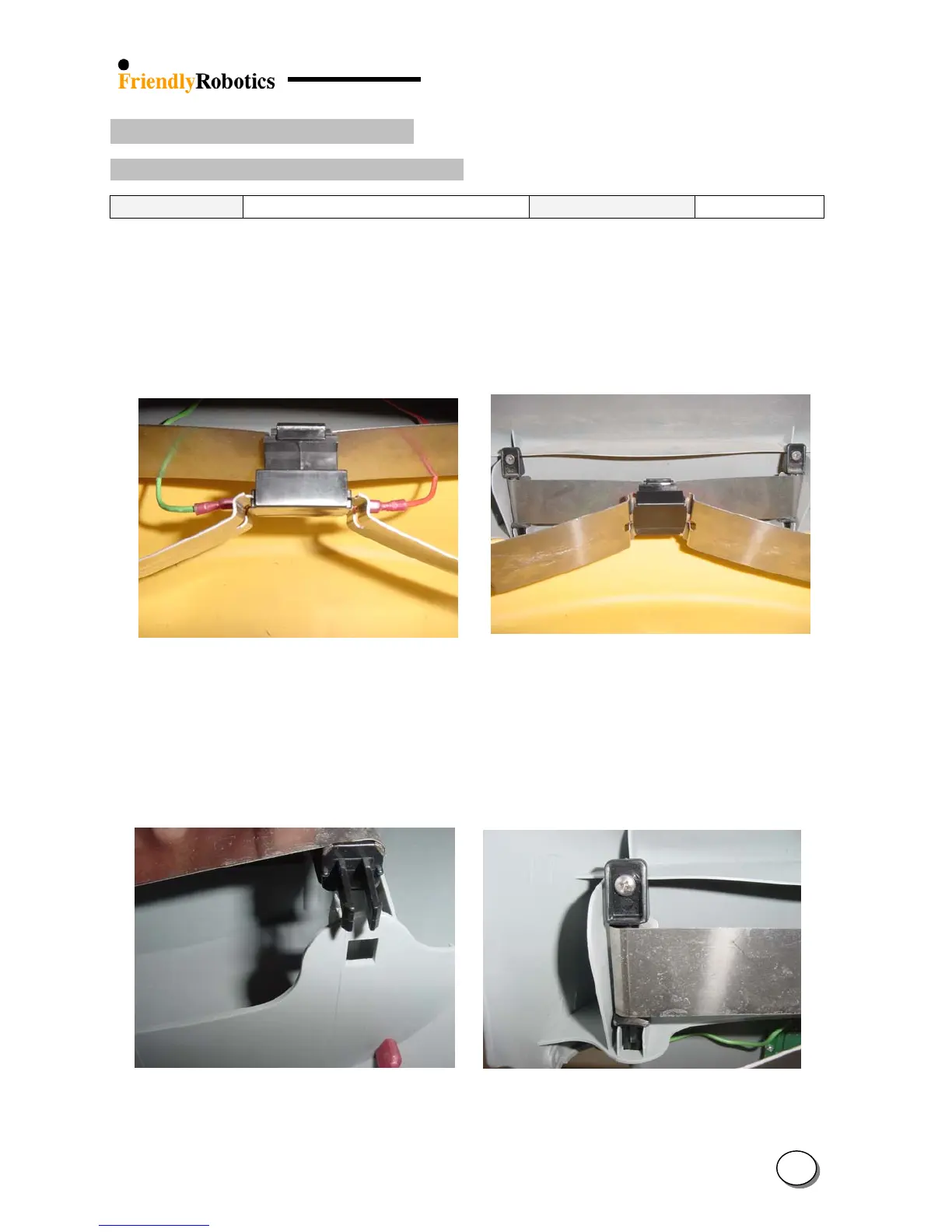
C. Disconnect the two cables (Red and Green) from the tabs on the Charging Station contacts, as
illustrated in Figure 4.4.1.1 below.
D. Open the screws at the sides of the contacts, as illustrated in Figure 4.4.1.2 below and remove
the contacts assembly from its place.
Figure 4.4.1.1 Figure 4.4.1.2
Disconnection of the contact cables Opening the contacts screws
E. Replace the docking contact assembly with a new one. Place the contacts holder above the
aperture in the cover, as illustrated in Figure 4.4.1.3 below.
F. Confirm the holder is placed in the apertures and tighten the screws. Ensure the contacts
assembly is properly placed as illustrated in Figure 4.4.1.4.
Figure 4.4.1.3 Figure 4.4.1.4
Align the contact holder against the aperture Final position of the contacts assembly
4
50








 To Next Page