4.1.5 Drive wheel replacement
Required tools: Flat screwdriver
External circlip pliers
Procedure duration: 5 minutes
A. Remove the Power Pack from the Robomow.
B. Prop the Robomow on a stand so that the drive wheels will not be touching the ground.
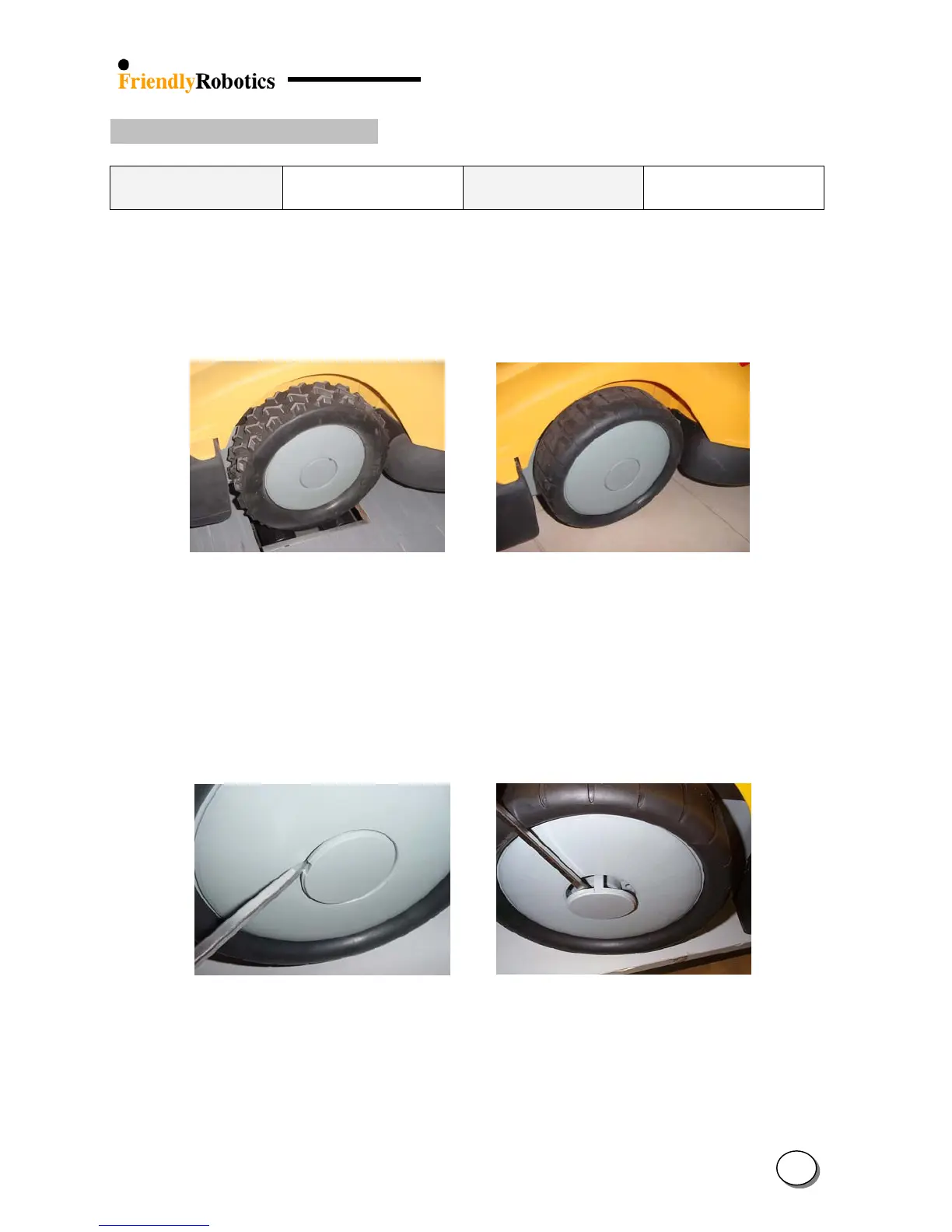
C. There are two drive wheels types: smooth wheel and knobby wheel, as illustrated in Figure
4.1.5.1. Make sure to replace the faulty wheel with the same type wheel. Failure to do so will
result in improper operation of the Robomow and might cause damage.
Figure 4.1.5.1
Knobby wheels versus Smooth wheels
D. Remove the Power Pack from the Robomow.
E. Identify the two notches on the wheel cup. Using flat screwdriver, remove the wheel cup, as
illustrated in Figure 4.1.5.2.
F. Identify the circlip located under the wheel cup and use appropriate pliers to remove it from
the shaft, as illustrated in Figure 4.1.5.3
Figure 4.1.5.2
Wheel cup removal
G. Remove the circlip and the spacer rings and store them. The number of spacer may vary
between 1 and 4. When replacing a wheel make sure to replace the same number of spacer
rings as was removed (Figure 4.1.5.3)
H. Pull the drive wheel off the spline, as illustrated in Figure 4.1.5.4.
4
8








 To Next Page