4.1 Robomow External procedures
4.1.1 Fuses replacement
Required tools: None Procedure duration: 5 minutes
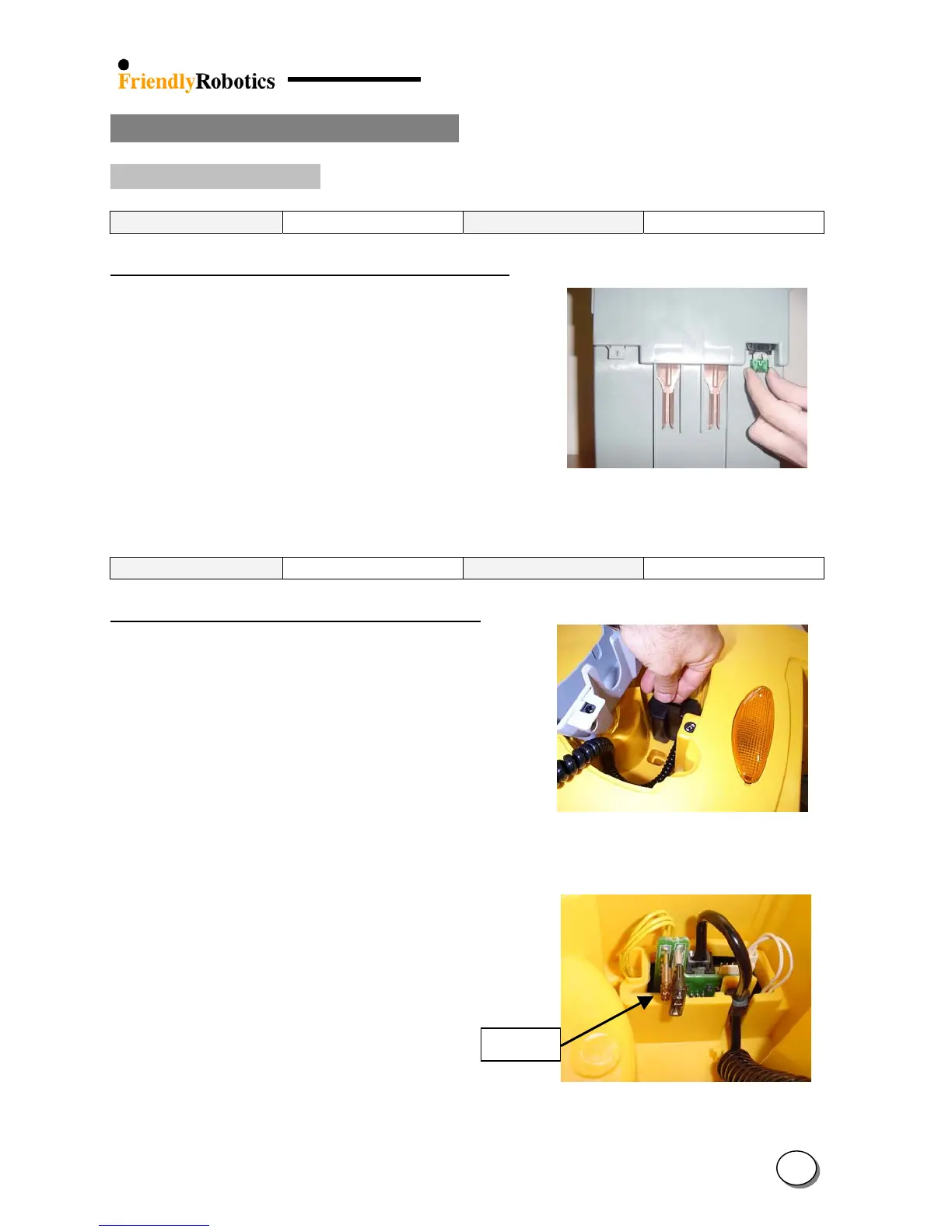
Power Pack Fuse Replacement (30A) – FUS0003A
5A Fuse
A. Remove the Power Pack from the Robomow.
B. Pull the burnt fuse directly downwards to extract.
C. Fully insert a new 30A fuse (FUS0003A).
D. Return the Power Pack and verify the
Robomow is turning on.
E. Complete the General Test as outlined in section 5.1.
Figure 4.1.1.1
30A Power Pack fuse replacement
Required tools: None Procedure duration: 5 minutes
Charging Fuse Replacement (5A) – FUS0015A
A. Remove the Power Pack from the Robomow.
B. Lift the Manual Controller to an upright position,
in its tray.
C. Squeeze the two tabs of the fuse cover, while
pulling up the fuse cover (Figure 4.1.1.2)
D. Pull out the 5A fuse (the small one) - Figure
4.1.1.3 and replace it with a good one.
E. Replace the fuse cover – make sure it is Figure 4.1.1.2
securely in place. Fuse cover removal
F. Return the Power Pack and verify the
Robomow is turning on.
F. Connect the Power Supply to the Robomow
and verify it is getting into charging state.
G. Complete the General Test as outlined
in section 5.1.
Figure 4.1.1.3
5A Charging fuse replacement
4
3








 To Next Page