3
16
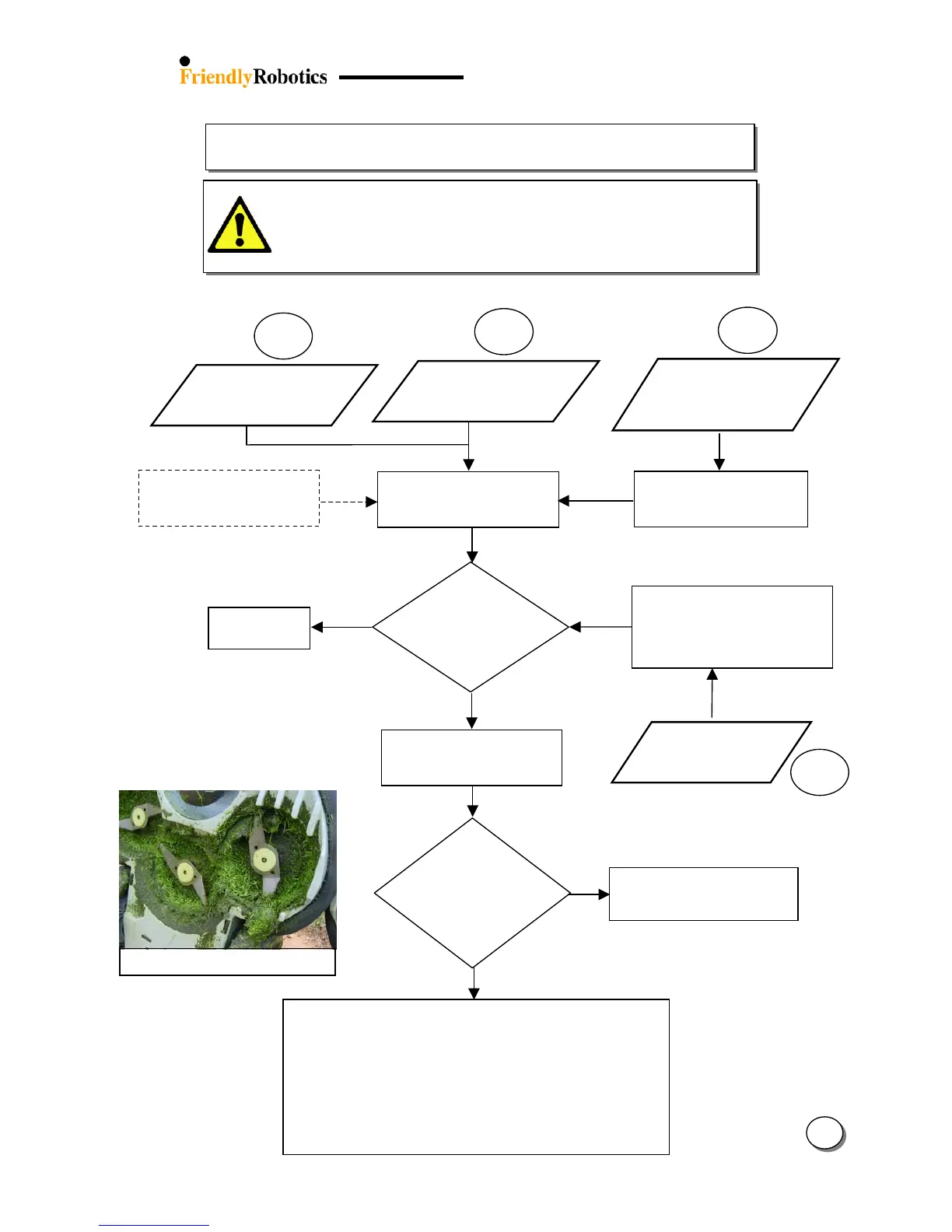
3.2.3 Mowing Problems
Important Safety Information!!!
PRIOR TO ANY OF THE ACTIONS SUGGESTED BELOW
REMOVE THE POWER PACK.
Always wear thick protective gloves when handling or cleaning around the blades
3.2.3.3
‘Check mow
height’ message
Confirm ‘Mowing’ is set to
‘on’ (under ‘User
Preferences’ menu)
is
blocking the blades
Robomow should be left to cool
off till the ‘Cooling, wait…’
messa
deck
Perform ‘Thermistors test’ under ‘Service’ menu (See section 5.3.9)
Perform ‘Mowing motors test’ and refer to fault number.
Try to rotate each blade (carefully, wearing a glove) and make sure
all blades rotate easily and freely (Dull blades should be replaced –
High cut blades – MRK0002A / Low cut blades – MRK0003A)
Remove Top Cover and check tab connections on motors and on
the Main Board
Confirms the cables are not damaged
Replace the Mowing Assembly (MSB0065B)
Replace the Main Board (SPP0019B)
Loose branches, fruits, rope
etc. on the lawn can block the
blades operation
Adjust the ground clearance
and cutting height to the
highest position and retry
3.2.3.2
3.2.3.1








 To Next Page