3
Measure the voltage (using voltmeter) on the docking contacts while the mower contacts touch the docking
contacts (should be around 36V).
If it is less then 36V continue to step 4.
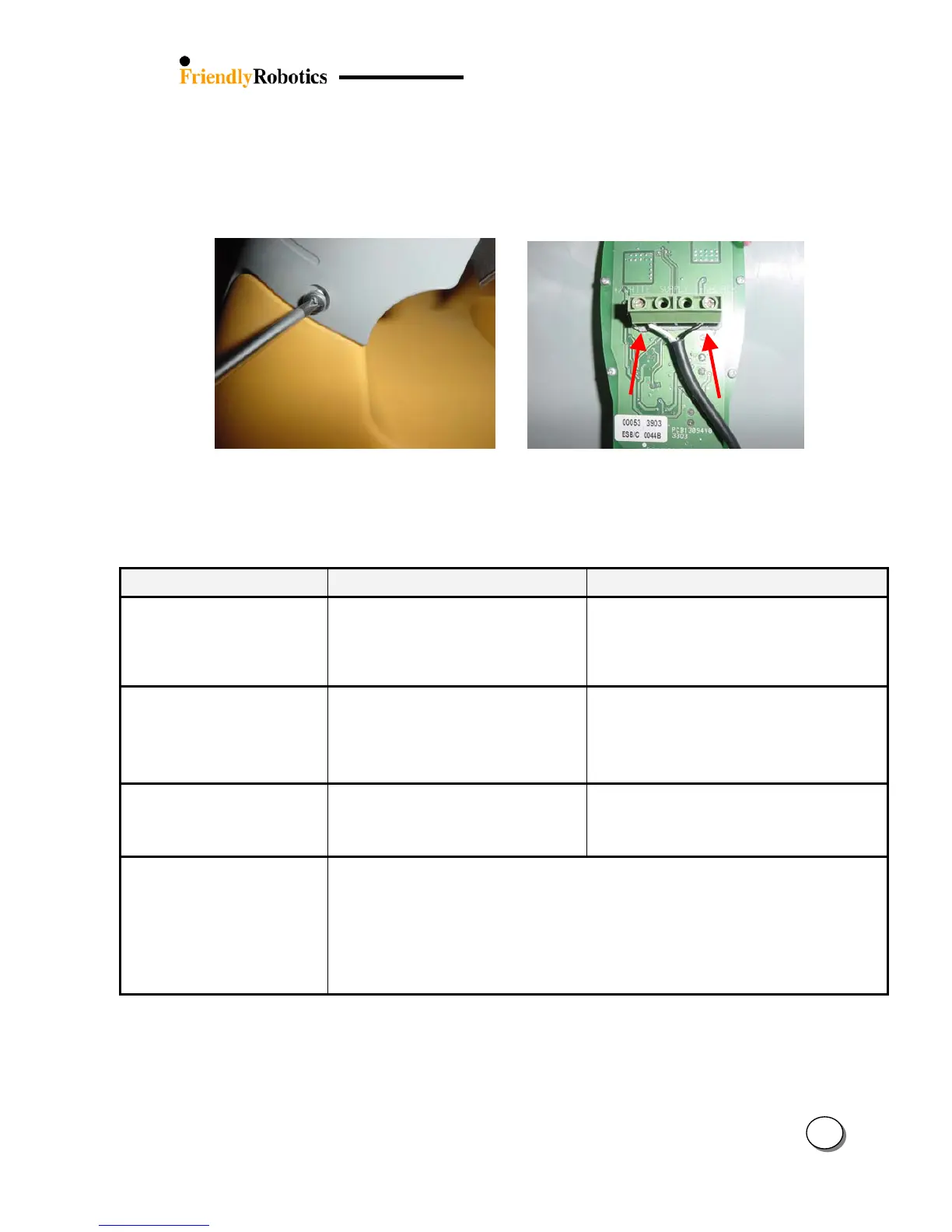
4. Disassemble the docking cover (figure 3.2.11.1) and measure the voltage on the two cables of the Power
Supply where they are connected to the Docking Board (at the points showed by the red arrows in figure
3.2.11.2). The voltage should be ~38V, if it is lower then the Power Supply is faulty.
Figure 3.2.11.1 Figure 3.2.11.2
Opening the screws to remove the cover Power Supply cable screws
5. If the output voltage of the Power Supply is ~38V replace the Docking Board.
Problem Encountered Probable Cause/Event Corrective/User Action
Robomower reached the
Charging Station when its
contacts are above the
Charging Station contacts
- Height difference between the
Charging Station base and the lawn
surface at the entrance to the Charging
Station
- Confirm the ground before the Charging
Station is leveled with the Charging Station
base – if necessary fill the ground with dirt
and level off
Robomower is operated in
the zone with the Charging
Station but stopped with
‘Recharge battery’ or ‘time
completed’ message
- The Robomower was operated from
the lawn (not from the Docking
Station) when the main display showed
‘Zone B’ or any other zone but not
‘Dock zone’
- When operating the Robomower from inside
the lawn, confirm the main display on ‘Dock
zone’
Robomower is searching for
the dock in zone with out
Charging Station
- The Robomower was operated from
the lawn in ‘Mowing’ (without ‘Edge’)
when the main display showed ‘Dock
zone’
- When operating the Robomower from inside
the lawn, confirm the main display on ‘Dock
zone’
Robomower does not
complete the edge in plot
with Charging Station
- Events such as distance limitation or number of quarters count by the compass
during edge may cause the mower to terminate the perimeter wire
- Perform ‘Edge test’ as explained in section 5.4.8.
This test displays the reason for the edge termination by the mower.
- You can always change the setting of ‘Edge to dock’ to ‘on’ (‘Service’ > ‘Settings’ menu).
This option enables the mower to complete the edge from the Charging Station
back to the Station, even if there are events during the edge, which should cause
the mower to terminate the perimeter wire
35








 To Next Page