Page59
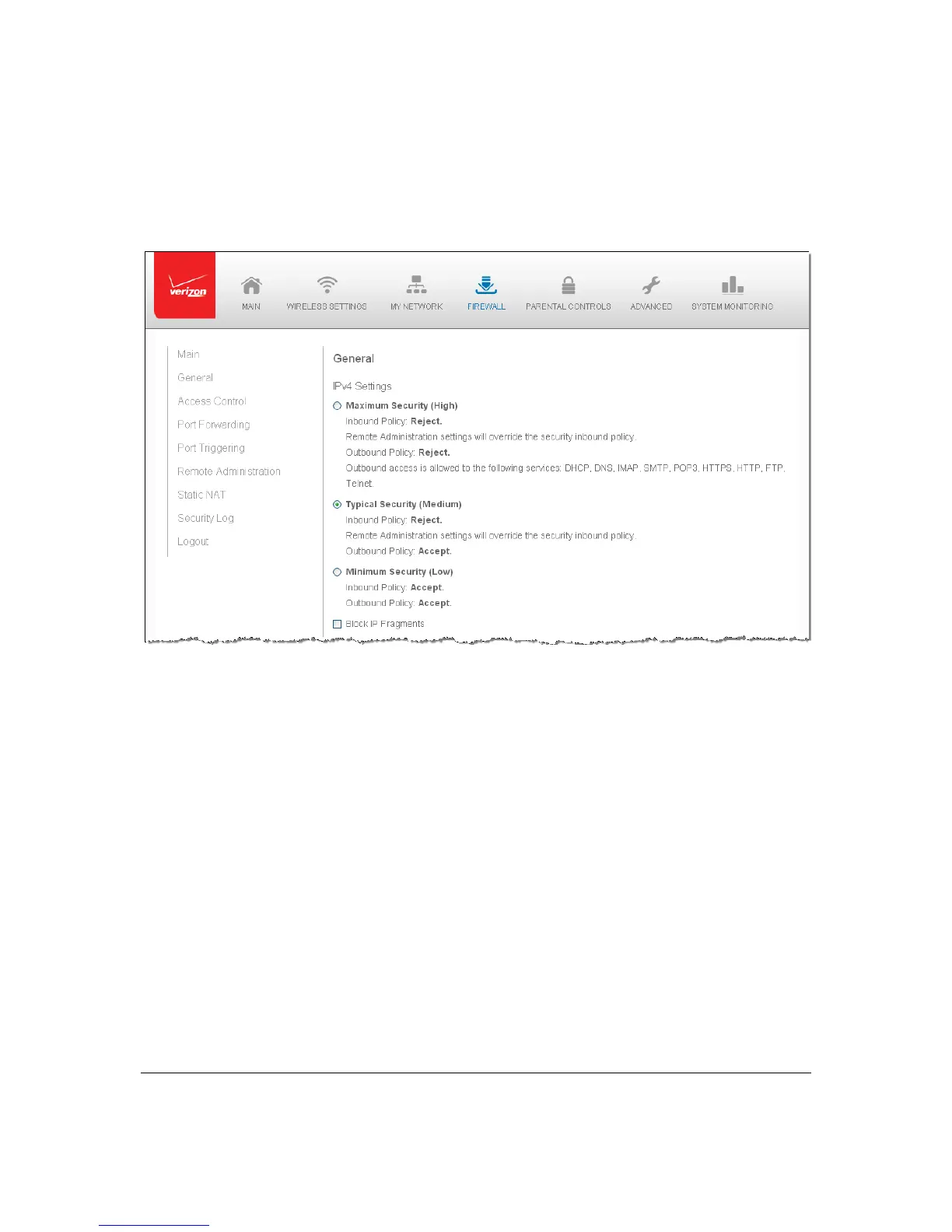
Specif yin gGeneralSettingsforIPv4orIPv6
¾ Tosetyourfirewallconfiguration:
1. Clickthe FirewallSettingsicon.TheGeneralSettingspagedisplays.
2. Select asecuritylevelbyclickingoneofth eradiobuttons.
Usin g theMinimumSecuritysettingmayexposethelocalnetworktosignificant
securityrisks,andshould onlybeused forshortperiods
oftimetoallow
temporarynetworkaccess.
3. Toprotectthelocalnetworkfro macommontypeofhackerattackthatuses
fragmenteddatapacketstosabot agethenetwork,selecttheBlockIPFragments
checkbox.
VPNoverIP S e candsome UDP‐basedservice smakelegitimateuseofIP
fragments.IP
fragmentsmustbe allowedtopassintothelocalnetworktouse
theseservices.
4. ClickApplytosavechang es.



 To Next Page