Page89
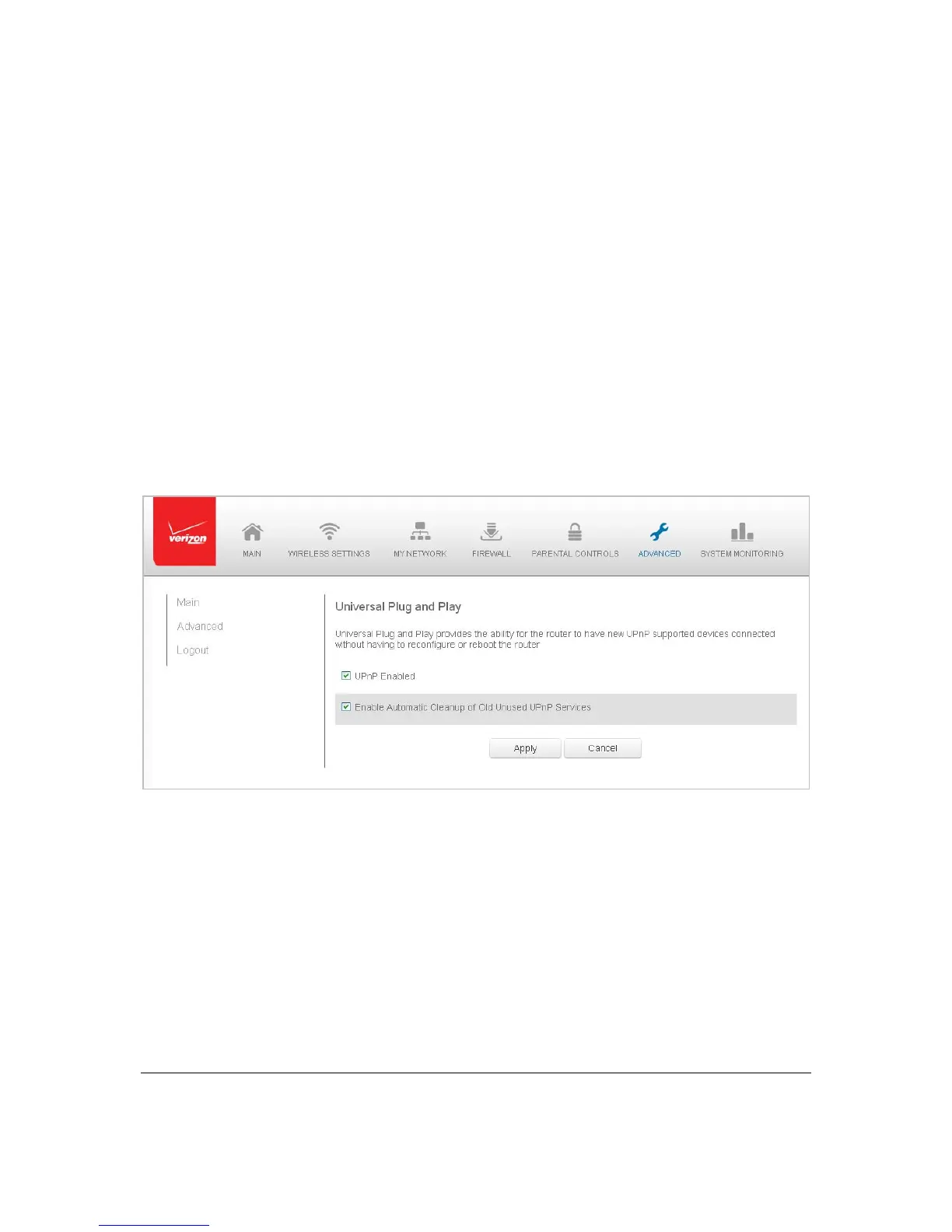
Unive rs a lPlugandPlay
YoucanuseUniversalPlugandPlay( UPnP)tosupportnewdeviceswithoutconfiguringor
rebootingyourGateway.
Inaddition,youcanenabletheautomaticcleanupofinva lid rules.Whenenabled,this
functionalityverifiesthevalidity ofallUPnPservicesand rulesevery fi veminutes.Old and
unusedUP n P definedservices
areremo ved,unlessauser‐definedruledependsonit.
UPnP servicesare notdeletedwhendisconnectingacompute rwitho utpropershutdownof
theUPnPapplications,suchasmesse nger.Ser vic e smayoft ennotbedeletedandeventually
thisle adsto theexhaustionofrulesand services ,andnonewservices
canbedefine.The
cleanupfeature locates theinvalidservicesandremo vesthem,preventingservices
exhaustion.
¾ Toac cessthissett ing:
1. Select Un iv e rs a lPlugandPlayintheAdvancedpage.
2. ToenableUPnPan d all o w UPnPservicestobedefinedonanynetworkhosts,
selectth eUPnPEnabl ed checkbox.
3. Toenableau t o m at i c cleanupofinvalidrules,sele ctEnabl eAutomaticCleanup
ofOldUnused
UPnPSer vi c e s che c k box.
4. ClickApplytosavechang es.



 To Next Page