Page61
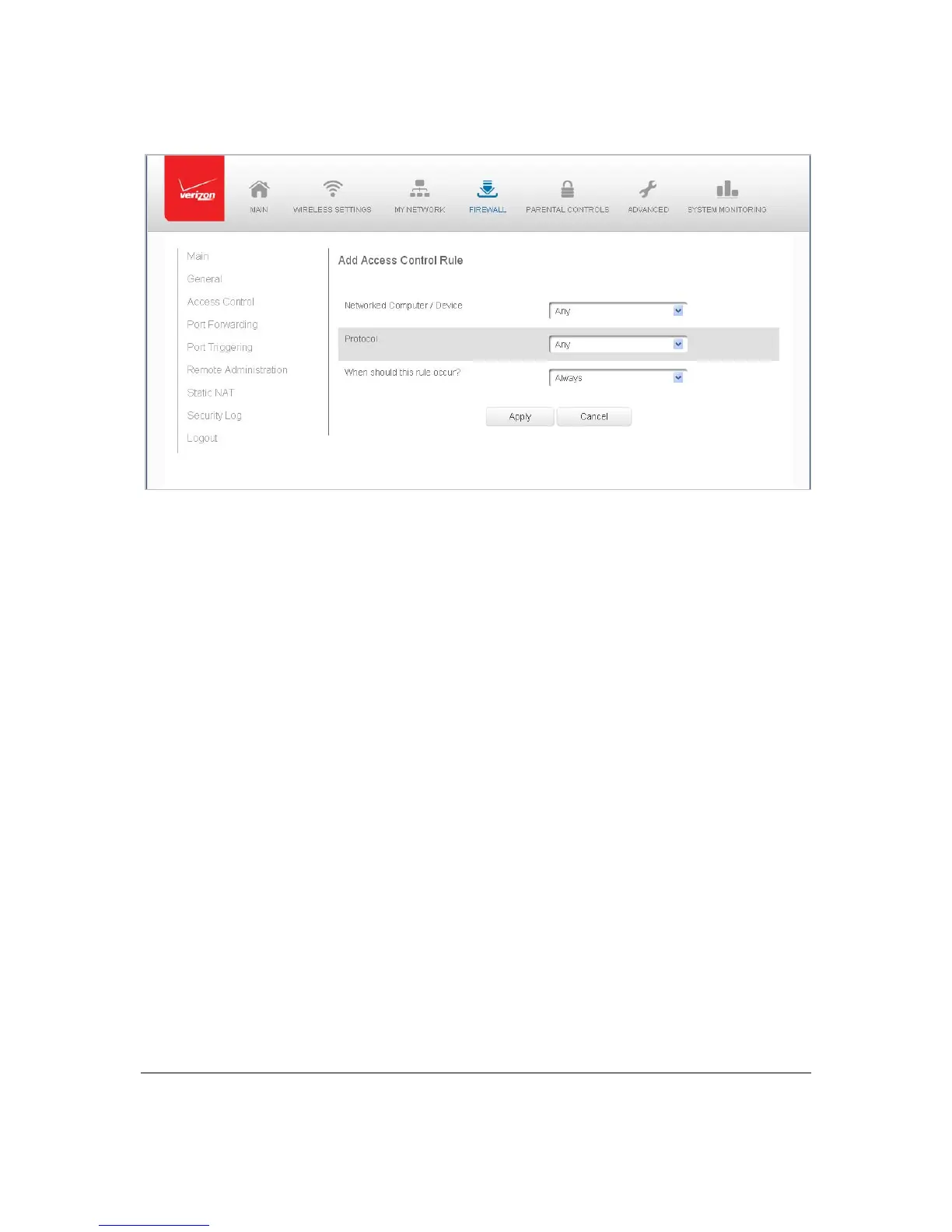
3. Toapplytheruleto:
Allnetworkeddevices–selectAn y.
Spe ci fi c devicesonly–selectUserDefined,thenclickAddandcreatea
networkobject.
4. IntheProtocolfield,se lecttheInternetprotocoltobeallowedorblocked.
Ifthese rviceis notinclud ed
inthe list ,select UserDefined. TheEditSer vi ce
pagedisplays.De fine theservice,then clickOK.The service is automatically
add ed totheAddAccessControlRulesection.
5. Speci fy whentheruleis activeas AlwaysorUserDefin edand clickAddtocre ate
theschedule.
6. Click
Applytosavechange s.The AccessControlpagedisplaysasummaryofthe
newaccess controlrule .
Disabl eAccess Control
Youcandisableanaccesscontrolandenableaccesstothese rvicewithoutremovingthe
service fromtheAccessControltable.Thiscanmakethe serviceavailabletemporarilyan d
allowyou toeasilyreinstatetherestrict io nlater.
• Todisableanac ce s s control, clearthecheckboxnexttotheservice
name.
• Toreinstatetherestriction,selectthecheckboxnexttotheservicename.
• Toremo veanaccessrestriction,selectth eservice and clickRemove.The service is
removedfromtheAccessControltable.



 To Next Page