Page68
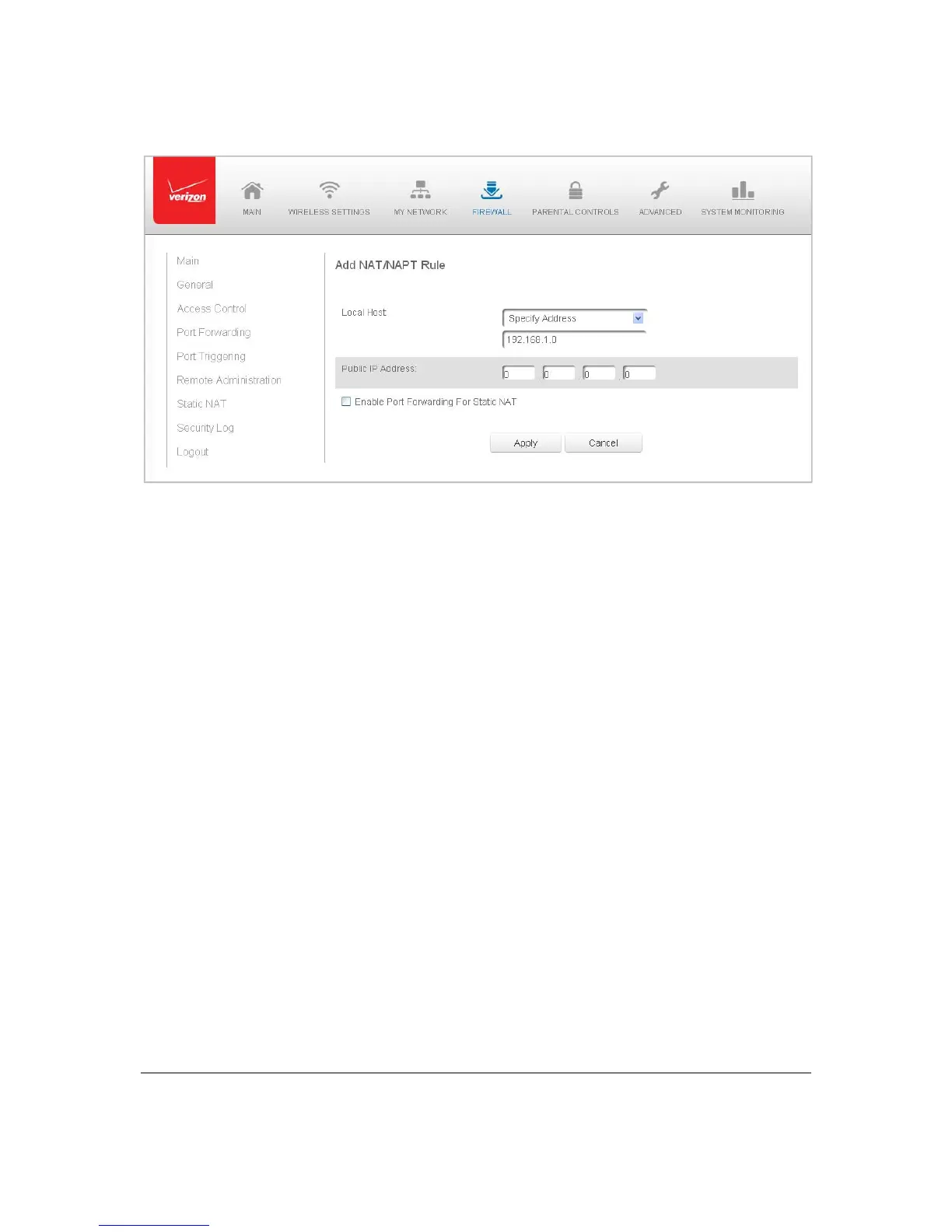
3. Select asourceadd r e s sin theSpe cifyAddressfiel dorenteranIPadd r e s s inthe
textbox.
4. Ente rthepublicIPaddre ss.
5. Ifusingportforw arding,selecttheEn a bl ePortForwardingforStaticNATcheck
box.
6. ClickApplytosavechang es.
7. Repeatthesesteps
toaddadditionalstaticIPaddresses.
SecurityLog
Youcanvi e weventsthatyourfirewallhasblockedbyaccessingthese curitylog.Your
Gatewayrepo rtsevent s,suchasattemptstoestablishinboundand outboundcon nections,
attemptstoauthenticateatanad min i st rat i ve interf ace, suchasyourGatewayGUI,firewall
configuration,andsystemstart‐up.
Thesecuritylogreportsthefollowing
information:
• Time –basedonthedateandtimeinyour Gateway
• Event–con sis ts offirewallin for mat ion ,firewallsetup,and systemlog
• EventType–describestheeventthatoccurred,su chasafragmentedpacketor
parentalcontro ls.
• Details–provide areasontheevent
occurred,such asapackethasbe enblocked
becauseofparentalcontrol.
Youcanmod i fy thetypeofeventsthatdisplayinthesecurity lo g.Thisdoe snotmodifythe
eventitself.Itsimp lych a n ge s theinformation th atdisplaysinthelog .



 To Next Page