Page80
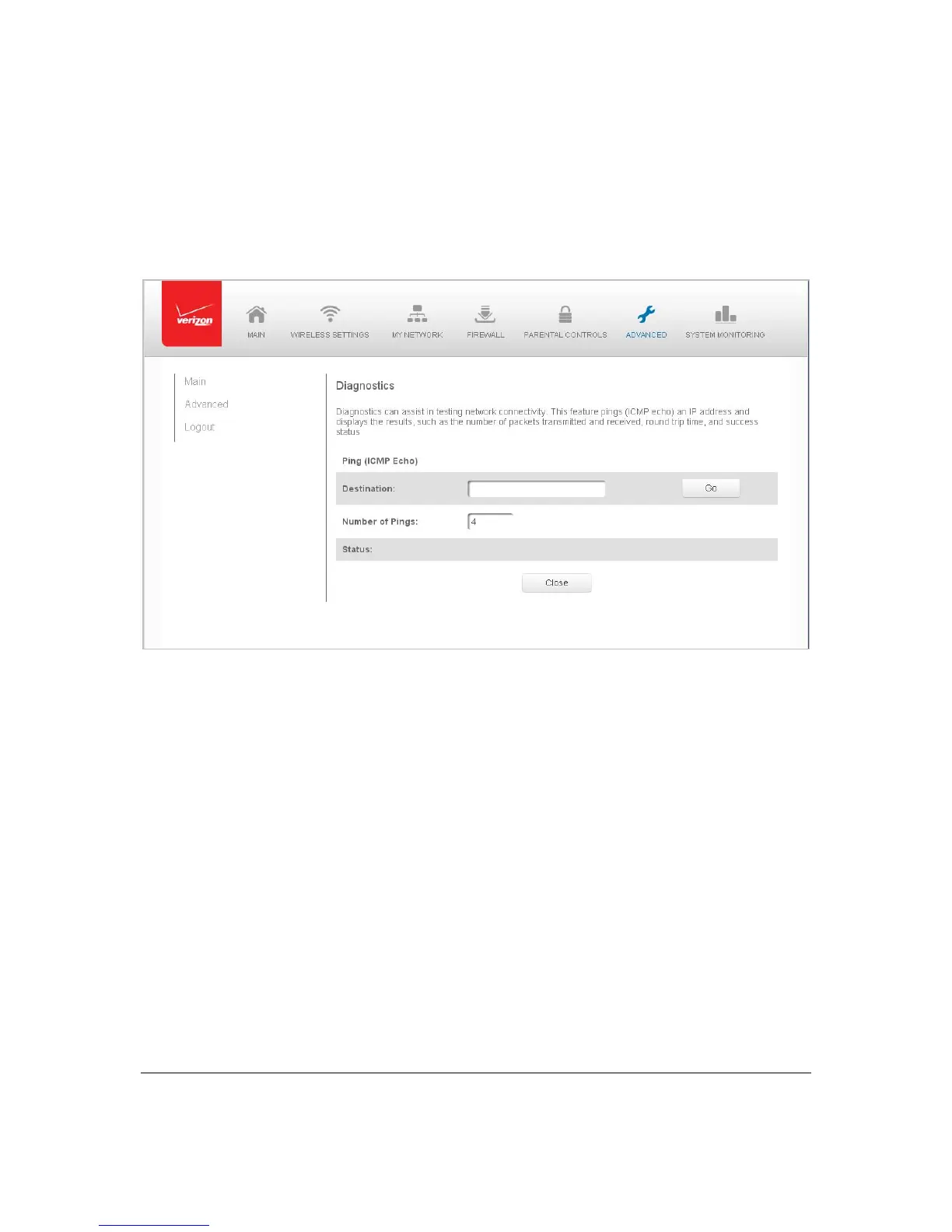
Diagn os ti c s
Youcanusediagnosticstotestnetworkconn ect iv i t y .
¾ Todiagnosenetworkconnectivity:
1. Select Diagnosticsin theAdvancedpage.
2. TopinganIPaddress,enterth eIPaddressordomainnameintheDes ti n at i on
fieldand clickGo.
Thediagnosticswilldisplaythenumberofpings,status ,packetssent,andro und
triptime.
Ifnodiagnosticst atus
displays,clickRefreshinyourwebbrowser.
3. ClickClosetoexitthesession.
RestoreDefaults
Youcanrestoreyour configurati onsettingstoyourGatewayfactorydefaultsettings.
Restoringthedefaultsettingserasesth ecurrentconfiguration,in cl ud inguserdefined
settingsand networkconnections.Allconne ctedDHCPclie ntmustrequestnewIPaddresses.
YourGatewaymustrestart.
Priortorestoring thefactorydefaults,youmaywanttosave
yourcurrentconfiguration toa
file.Thisallo wsyo utoreapplyyou rcurren tsettingsandparameterstothedefaultsettings,
asneeded.Foradditionalinformation,refe rtotheConfigurationFilesection.



 To Next Page