Page82
2. Toreboot,clickOK.YourGatewayreboots.This maytakeupto aminute.
3. ToaccessyourGatewayuserinterface,re fresh yourwebbrowser.
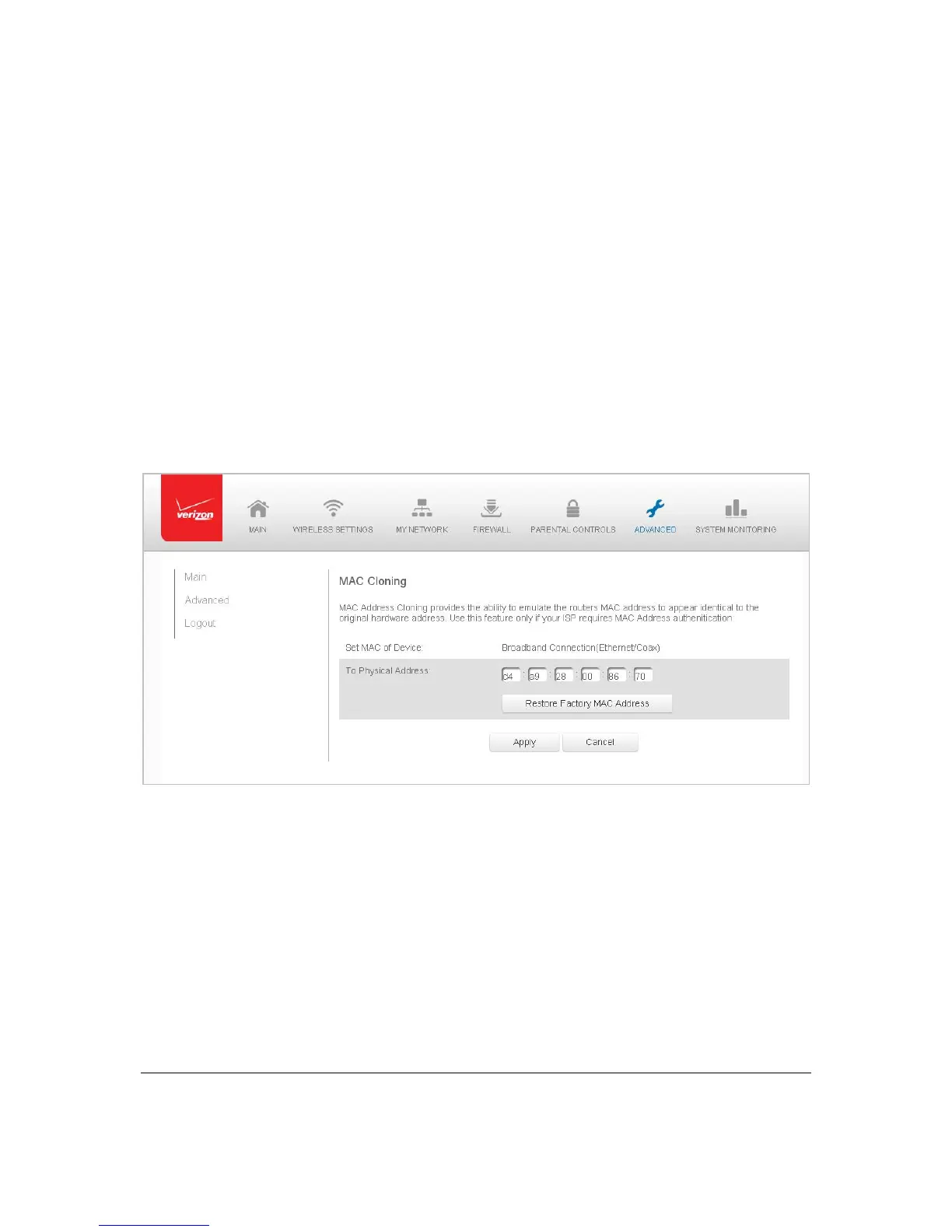
MACCl oni ng
AMACadd re s s isa hexadecimalcodethatidentifiesadeviceonanetwork.Allnetworkab le
deviceshaveauniqueMACaddress.
Whe n replacinganetworkde viceonyourGateway,youcansi mplifytheinstallationprocess
bycopyingtheMACadd r e ss ofth eexistingdevicetoyourGateway.
¾ Tocopy theMACaddre ssofth eexistingdevice:
1. Select MACCloningin theAdvancedpage.
2. IntheToPhysicalAddressfield,enterth eMAC address ofyournewdevice.
3. Tolocatethe MACaddress,refertothedocumentationfromthedevice
manufacturer.
4. ClickApplyto
savechanges.



 To Next Page