Q2ec-FM0049
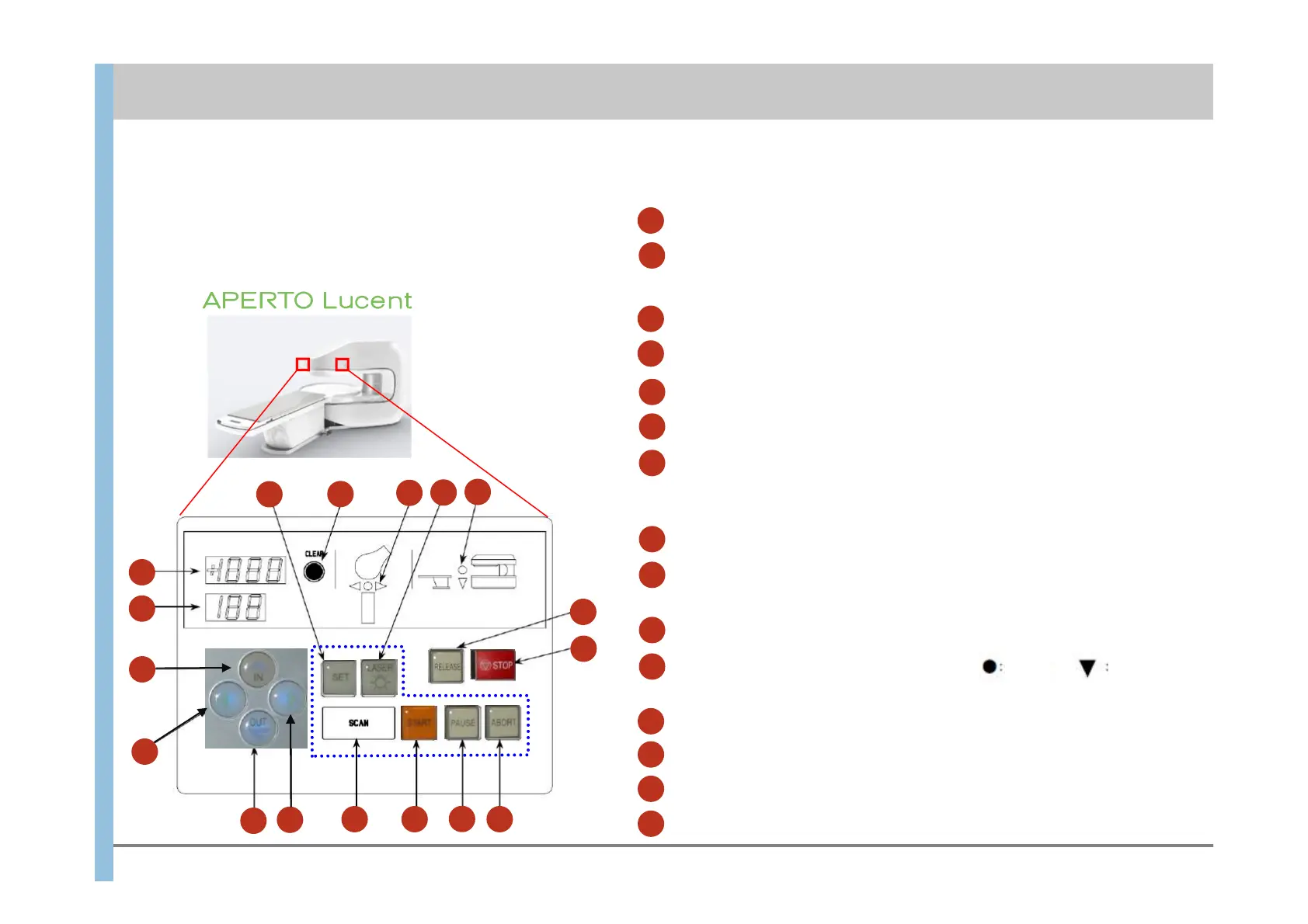
A control panel is provided on both sides of the gantry.
The control panel for APERTO Lucent is shown below as
an example.
6
3.2 Gantry and Control panel
Imaging operations
PAUSE: Temporarily stops imaging.
ABORT: Stops imaging.
START: Starts imaging.
12
13
14
Table position information
CLEAR: Resets the table position information.
3
4
Displays the table position as numeric values. The upper value shows the
vertical position, and the lower value shows the horizontal position.
RELEASE: Releases the emergency lock and enables operations.
2
STOP: Emergency Stop (Disables all operations.)
Table movement
Moves the table to the left or right.
IN: Moves the table up and into the gantry.
5
6
9
10
OUT: Moves the table out of the gantry and lowers it.
7
8
SET :
Moves the table so that the position set by the light localizer
aligns with the isocenter.
LASER: The light localizer turns on.
11
Displays shoes the vertical position.
15
Light up in scanning.
4
1
2
3
4
5
6
7
8
9
10
11
12
13
4
9
1415
1
Emergency operations
Displays shoes the horizontal position.
top
Not top
▲
▲
:left ●:center
:right
Chapter 3 Preparing for Imaging













 To Next Page