Q2ec-FM004911
6.1 Scanogram imaging
1
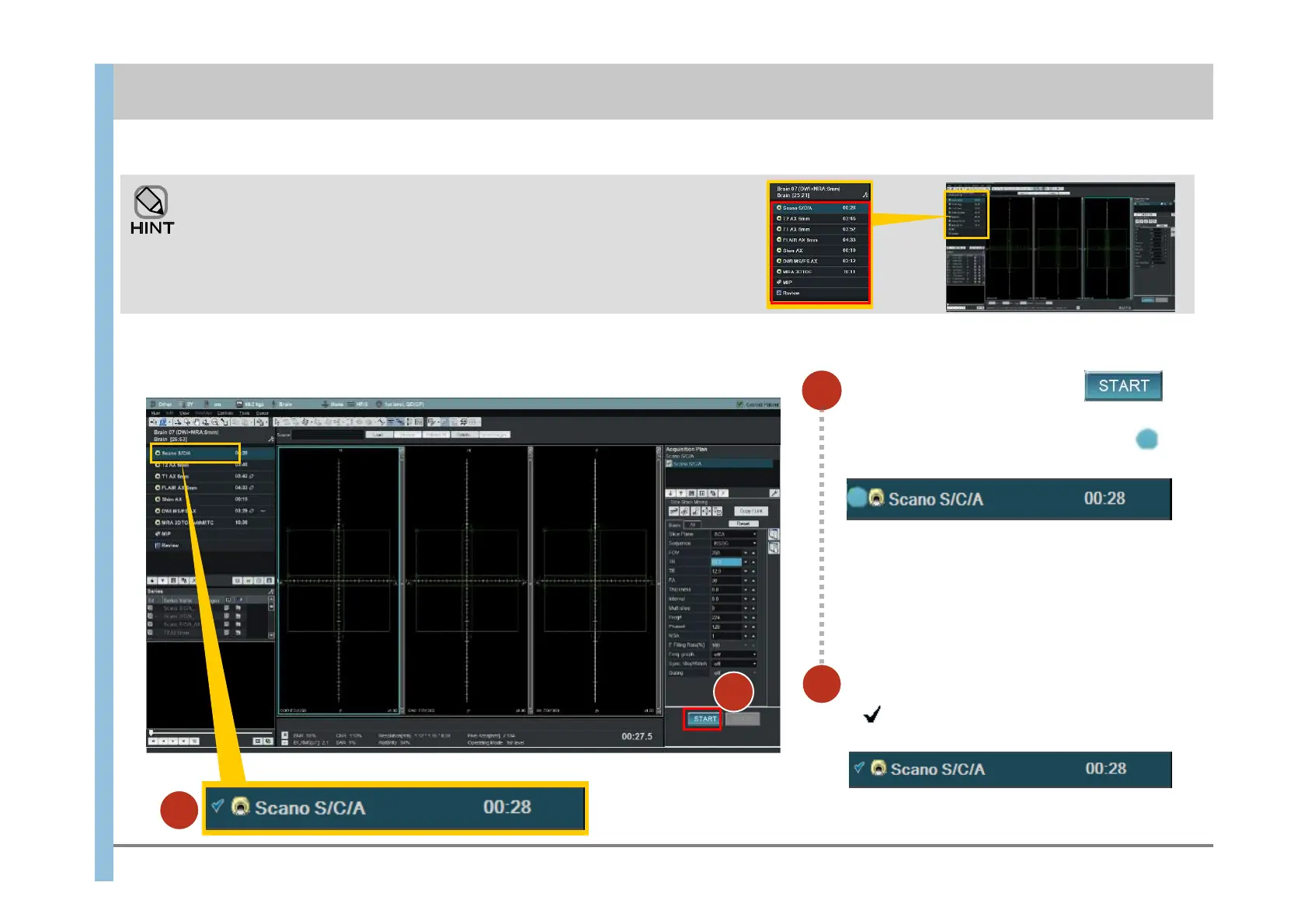
In the Exam window, click .
Imaging starts.
On the left of Scano S/C/A, the indicator
appears, indicating that imaging is in progress.
This chapter explains how to use APERTO Lucent for imaging of the brain by using protocol “Brain [SCANOGRAM-T2-T1-FLAIR-DWI-MRA]” as an
example.
Obtain positioning images (Scanograms).
The types of imaging included in the selected protocol are displayed in the
Protocol Properties display area in the upper left corner of the Exam window.
You do not have to perform all the types of imaging that are displayed. You can
skip unnecessary imaging and continue or terminate the examination.
Chapter 6 Imaging
1
Make sure that imaging has finished.
If appears to the left of Scano S/C/A,
imaging has finished.
2
2













 To Next Page