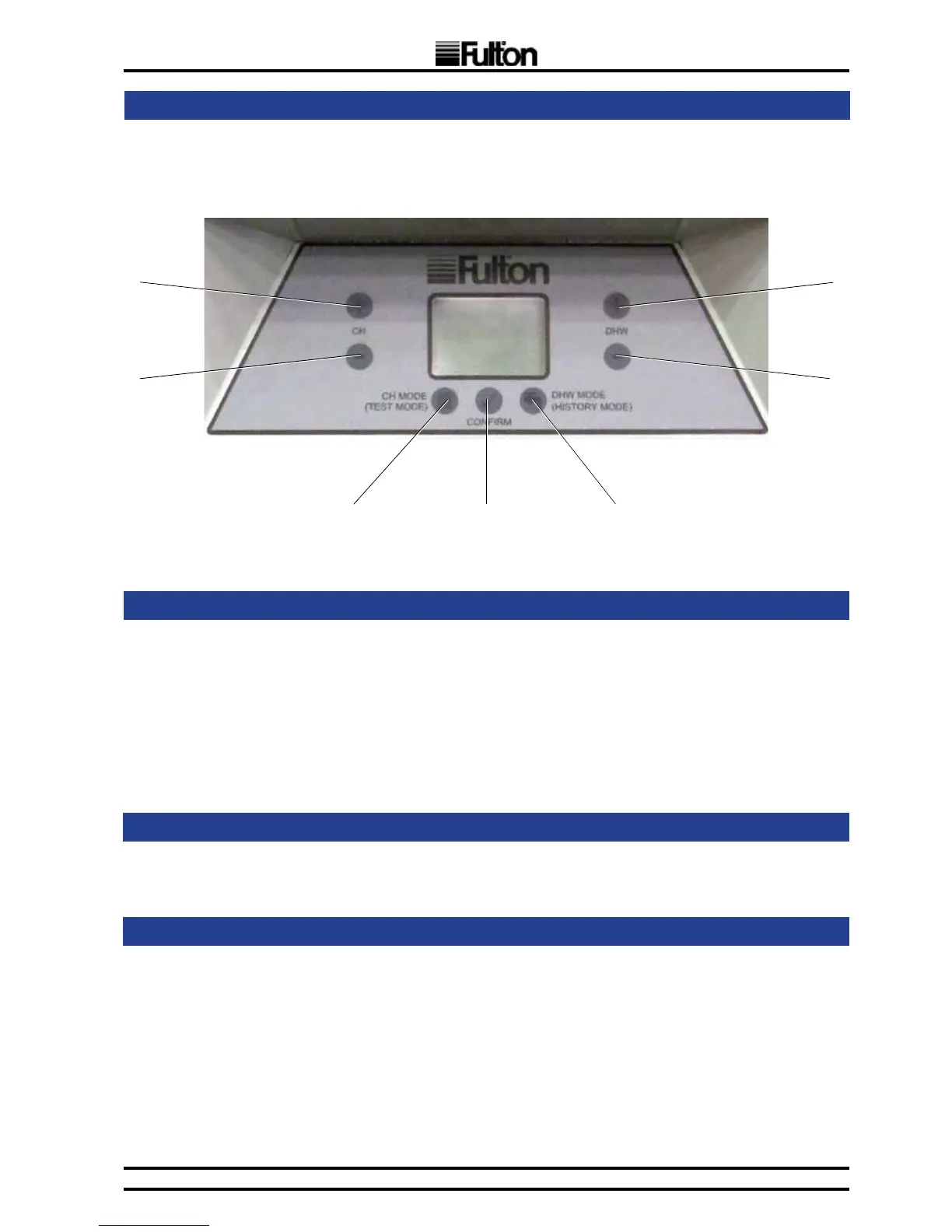
The Display is equipped with 7 push-buttons placed round the LCD display as follows:
A B C
E
F
G
D
FIG. 11 PUSH-BUTTON LAYOUT
The Display is equipped with a blue LED backlight. The backlight operation is as follows:
The Backlight:
• is activated for 10 seconds when Standby mode is entered.
• is turned off immediately, when Suspend mode is entered.
• is on during the Auto Detection procedure.
• is activated for 30 seconds after any button activity.
• blinks when an error is indicated.
3.12
PUSH-BUTTONS
3.13
BACKLIGHT
3.14
USER INTERFACE OPERATING MODES
The display supports switching among various user interface operating modes. The very rst
mode invoked after startup of the system is Initial mode.
3.14.1
INITIAL MODE
LCD- rst screen for 2 seconds
seg1 to seg4 : Displayed text “CASC”
LCD- second screen for next 2 seconds:
seg1 to seg4 : Displayed DSP software version number
Buttons- no activity
Note: After 2 seconds of showing the second screen, the boiler is switched to Standby mode.


 To Next Page