26
Front
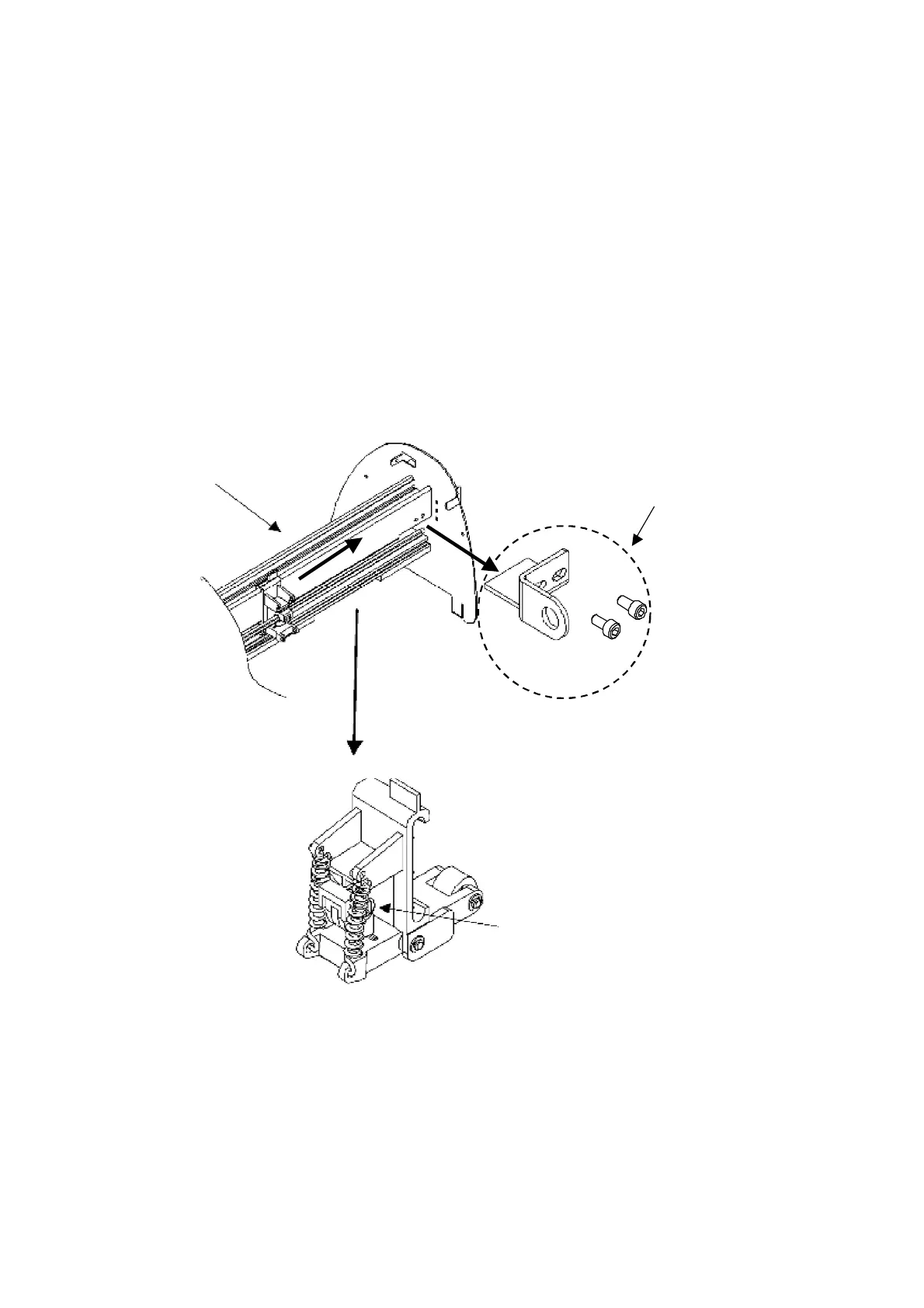
Cam roller pointing
downward squarely when
installing
Replacement of Pinch Roller Set and Lever Assembly
Refer to Fig 1-2 to 1-3 to remove the pinch roller set or lever assembly.
1.
Remove
the
Square
Bar
Holding
Bracket.
Loosen and remove the two screws that fix the bracket to the carriage guide beam.
2.
Remove
Pinch
Roller
Set
Step 1. Move the Pincher Roller Set to the furtherest end (view from rear) where a notch is on
the guide beam.
Step 2. Remove the Pinch Roller Set from the notch.
To install, please keep the inside Cam Roller of the Pinch Roller Set downward squarely and
Lever up.
Front
Square Bar Holding Bracket
Cam roller pointing
downward squarely when
installing
Fig
1-2





 To Next Page