GE_UPS_OPM_TLE_SCE_M60_M80_1GB_V020.docx
User Manual TLE Series 600 & 800 CE S1
7 LCD SCREEN
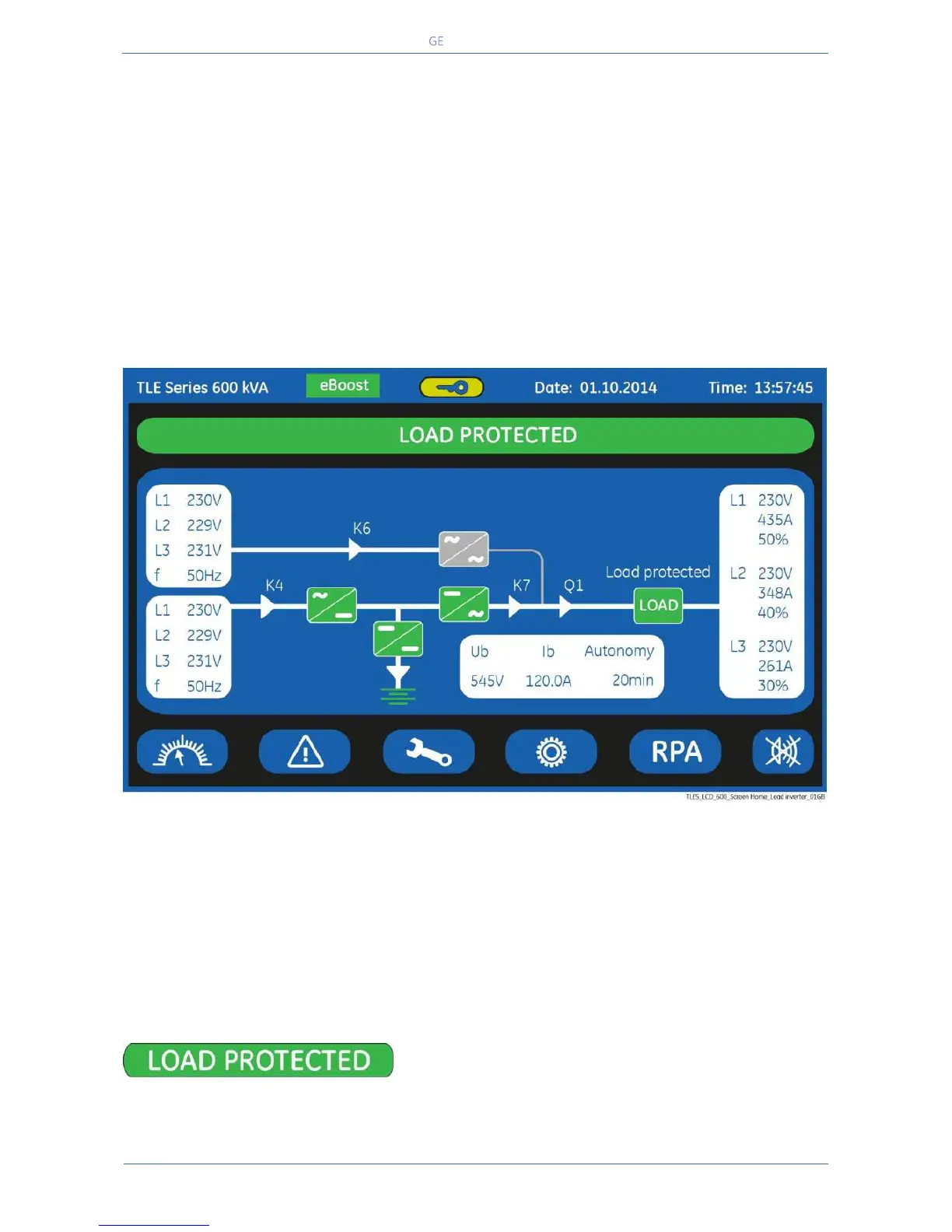
Composed of an LCD colour “Touch Screen” which provides the following information to users:
Synoptic diagram indicating UPS status.
UPS operating, AC and DC metering information.
History of events (alarms and messages).
Functionality can be programmed to meet customer needs by changing parameters.
Operation commands of the UPS.
7.1 HOME SCREEN
The LCD screen, after 5 minutes of inactivity, shuts down the backlight.
To reactivate it, it is sufficient to press any keys mentioned to Section 7.1.1.
If the keypad remains inactive for 5 minutes or longer, during the viewing of a screen such as
MEASURES, EVENTS, SETUP, RPA Parallel System or COMMANDS, the LCD screen returns automatically to
the main screen.
Pressing the key “UPS status” for a few seconds
automatically sets the “ENGLISH” language on the LCD
screen.


 To Next Page