GE_UPS_OPM_TLE_SCE_M60_M80_1GB_V020.docx
User Manual TLE Series 600 & 800 CE S1
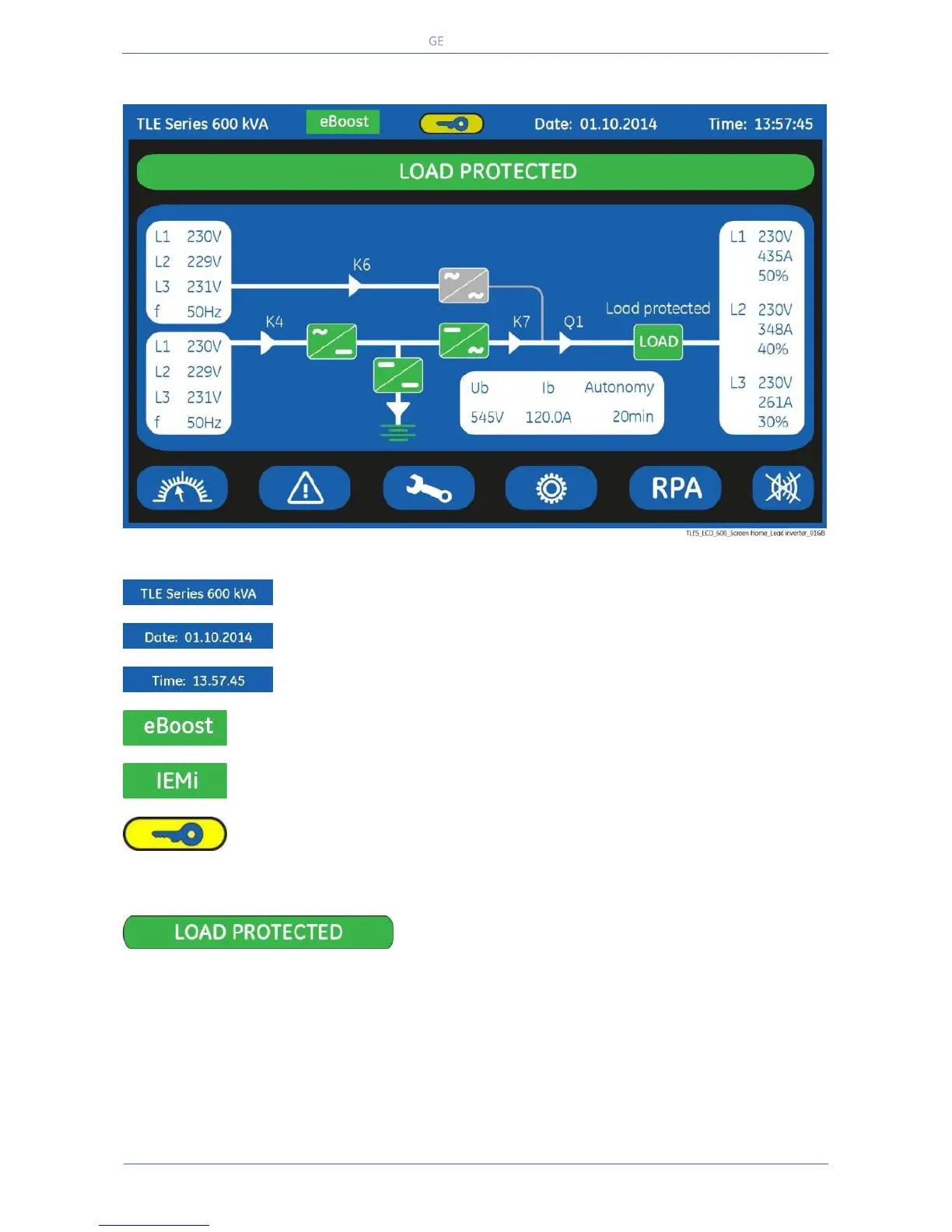
7.1.2 Description of the signalling LEDs
Date (format “DD.MM.YYYY”).
Time (format “HH.MM.SS”).
eBoost (green colour)
LED ON/lit indicates that the UPS is operating in eBoost™ mode.
IEMi (green color)
LED ON/lit indicates that the UPS is operating in IEMi mode.
Service Key (yellow colour)
Key for disabling the Service Key procedure.
Used only by the Service Centre
LED LOAD PROTECTED (green colour)
When lit, indicates that the UPS is functioning correctly and the Load is system protected (Load
supplied either from inverter or from Automatic Bypass in case of eBoost™ Operation Mode).
When blinking, indicates that a regular maintenance service is needed (SERVICE REQUIRED).
May be reset by a SERVICE TECHNICIAN only.
See Section 11 – Maintenance – Service check.
The LED is OFF when the “Q1 - UPS Output switch” is open, indicating that the Inverter is in service
mode, not supplying the Load.


 To Next Page