GE_UPS_OPM_TLE_SCE_M60_M80_1GB_V020.docx
User Manual TLE Series 600 & 800 CE S1
HOURS/DAY
The number of IEMi Operation Mode hours per weekday “Monday to Sunday” is displayed in the
operation mode parameter window (ceiling value).
NOTE !
To avoid undesired IEMi Operation Mode, verify:
Date and Time.
IEMi screen how many hours of IEMi Operation Mode have been selected for
each day of the week.
NOTE !
For IEMi Operation Mode to become active a manual Inverter start is required at
start-up and after a “System shutdown reset”.
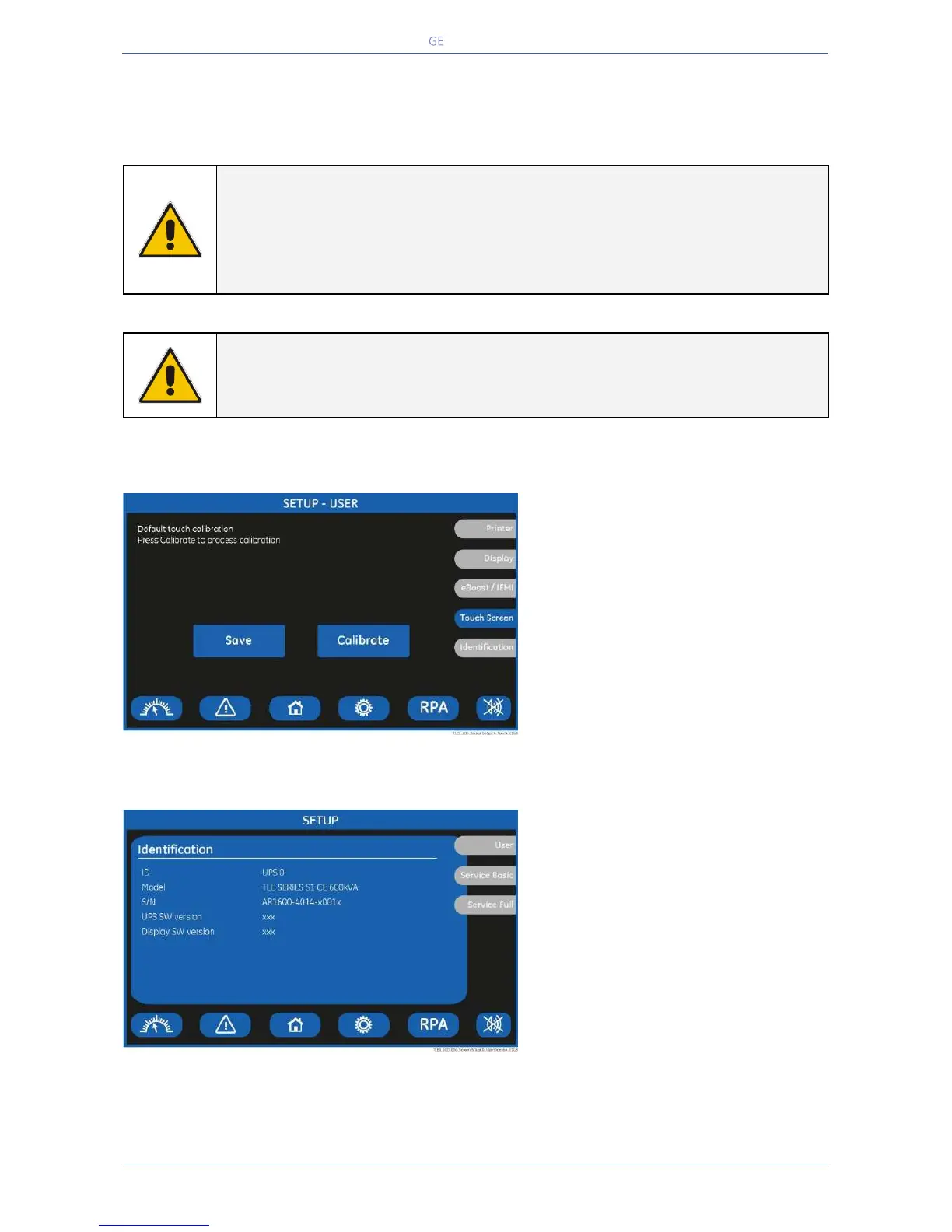
TOUCH SCREEN
This screen permits the adjustment
(“Calibrate” key) of the LCD’s “Touch
Screen” sensitivity.
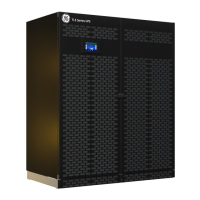
IDENTIFICATION SCREEN
ID
Number of UPS in the RPA Parallel
System (0 for single unit).
Model
UPS model, power range and series
number.
S/N
The UPS serial number.
UPS SW version
The UPS software version.
Display SW version
The LCD display software version.


 To Next Page