Commissioning
Basics of commissioning
7160-9001-560
01. December 2020
37 / 74
Menu: Maintenance (VP8002: Maintenance)
Overview of menu items
MonitorSystem Devices
Maintenance
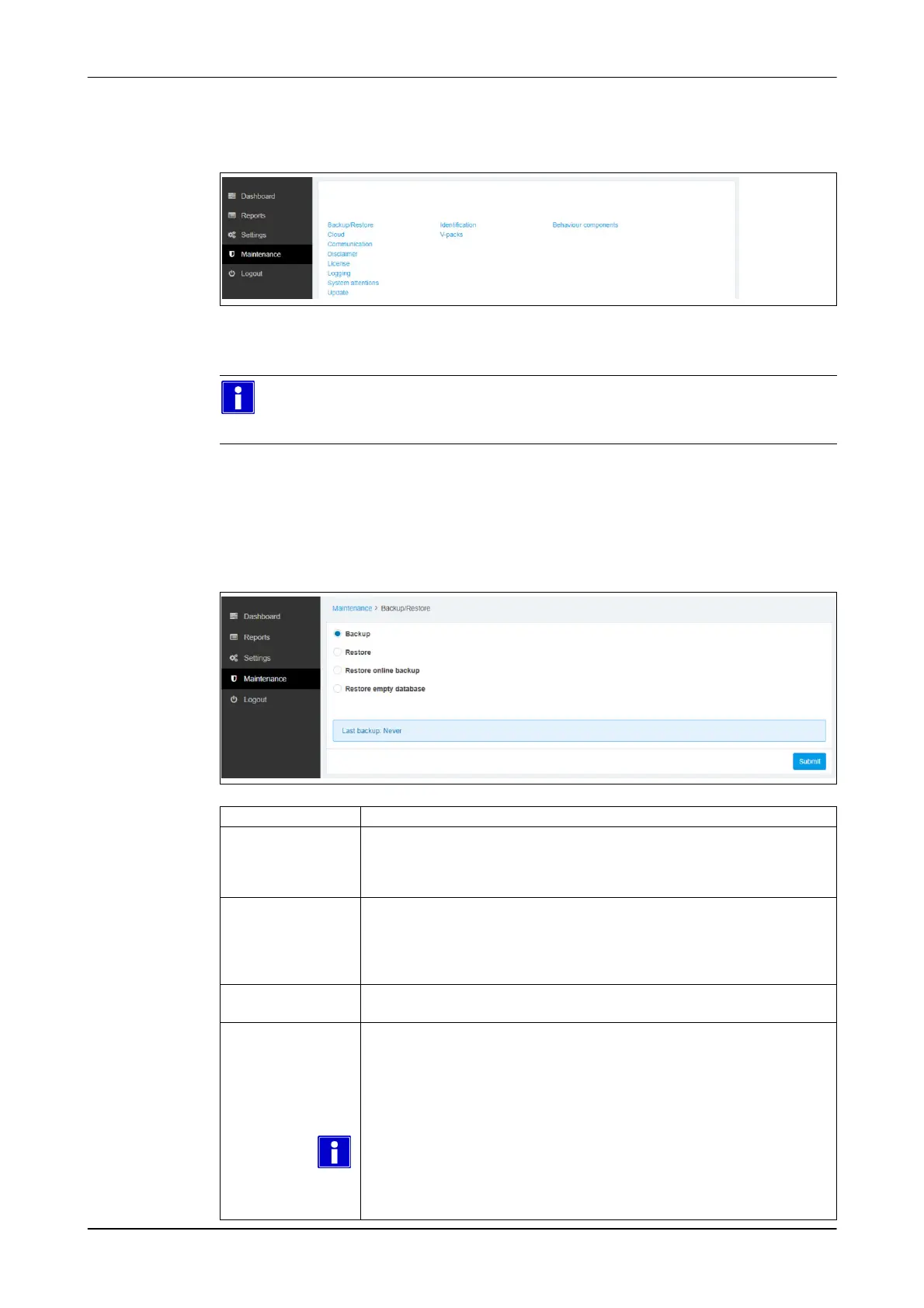
Menu item: Maintenance -> System -> Backup/Restore
Please note
When e-mailing Technical Support, as far as possible, attach one current
backup file.
Function(s):
● backup data manually
● restore data
● restore the factory setting
Funktion Description
Backup Manual data backup
Saves a local backup file
● Select function
● Confirm selection (Submit)
Restore Load backup
Loads a local backup file
● Select function
● Confirm selection (Submit)
● Select the data backup required
Restore
Online-Backup
Restore online backup (VPU-online)
(only applies to CowScout)
Restore empty
Database
Deletes settings and data and restores the database delivery status.
The following settings remain unchanged:
● Network setting: IP-address
● Network setting: device address (logical address)
● Network setting: section
● Licence information
Please note
To reset all of the settings to the default settings, perform Reset via the
menu. - df 99
After resetting the control unit to the default settings, the control unit must be
re-licensed, set up and unlocked.













 To Next Page