ADP200 Application PID-IMM User Manual Pag. 20 of 80
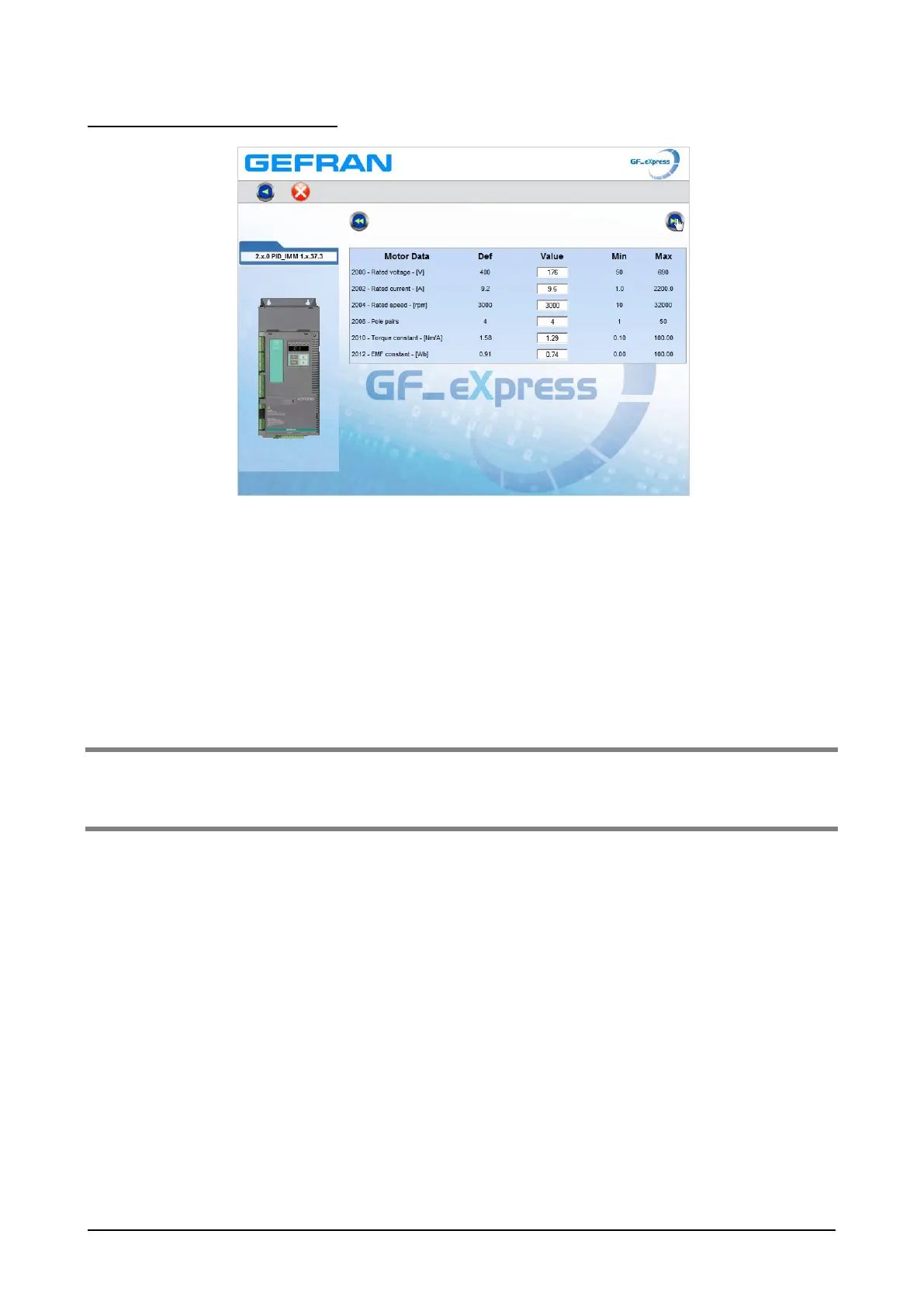
Step 2 - Setting motor parameters
Set the plate data based on the type of motor connected by following the procedures described above
Rated voltage [V]: the rated voltage of the motor indicated on the data plate.
Rated current [A]: motor rated current; approximately, the value should not be less than 0.3 times the
rated current of the drive, output current class 1 @ 400 V on the data plate of the
drive.
Rated speed [rpm]: motor rated speed; see data plate.
Pole pairs: Number of motor pole pairs; see data plate.
Torque constant (KT): (KT) Ratio between the torque generated by the motor and the current required to
supply it.
EMF constant: (KE = KT / √3) Electromotive force constant, which represents the ratio between
motor voltage and motor rated speed.
Note ! When data entry is complete the Take parameters command is executed automatically (menu 16 MOTOR DATA,
PAR: 2020). The motor data entered during the STARTUP WIZARD procedure are saved in a RAM memory to
enable the drive to perform the necessary calculations.
These data are lost if the device is switched off. To save the motor data follow the procedure described in step 12.
Press the forward key to display the next page for autotuning (step 3).



 To Next Page