159
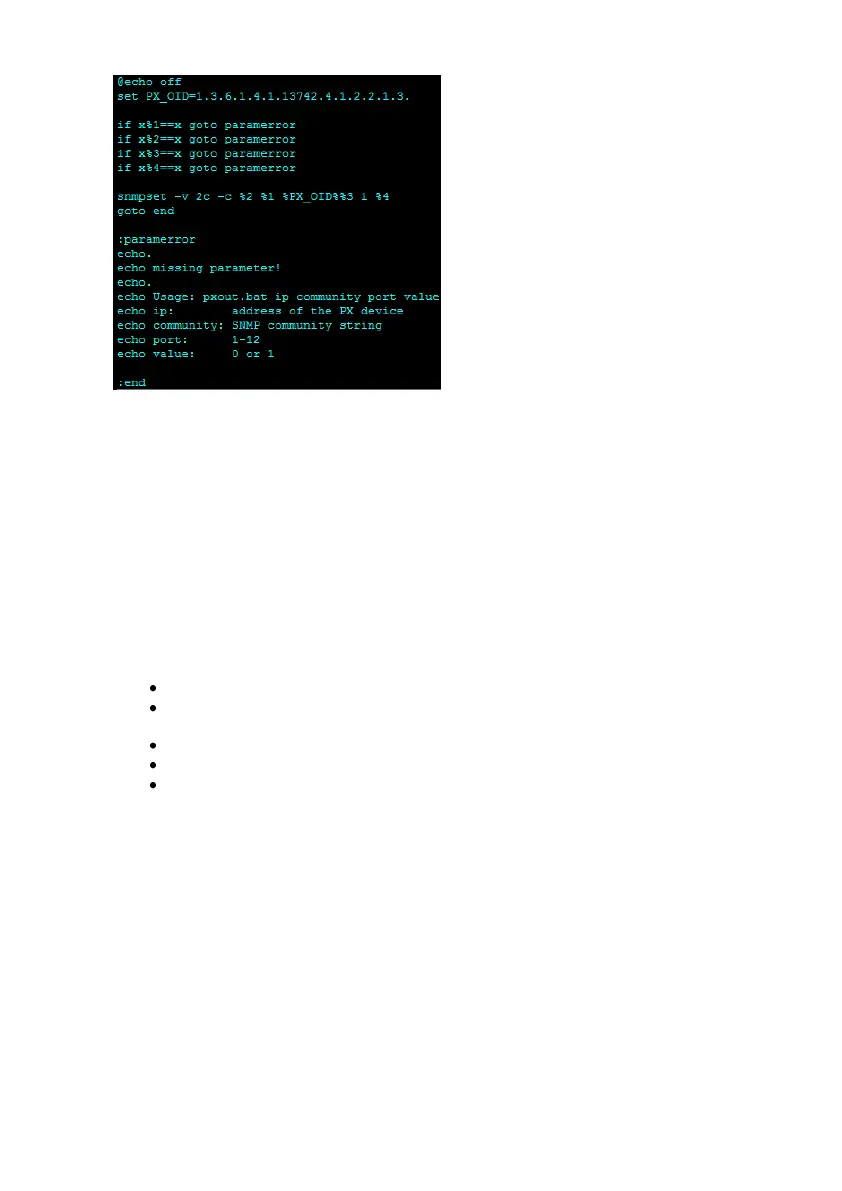
Figure 166: „pxout.bat“
The command is called « pxout.bat » and expect 4 parameters :
- IP address or hostname of the Raritan device
- SNMP community string (the one for write access)
- Outlet number (1 to 12)
- 0 = off, 1 = on
2. The batch file “pxout.bat” accepts now several parameters from incoming RCCMD executes
and translates these into SNMP set commands for the Raritan.
The “pxout.bat” accepts the following command syntax:
“pxout.bat <IP address> <community> <Outlet> <on/off>”
IP address: This is the IP address of the Raritan
Community: This is the community string for “write access”, configured at the
Raritan or SNMP set commands, default is “public”.
Outlet: This is the number of the Raritan Outlet 1 to 12, which you want to switch.
On/Off: This is the signal you want to transmit, where “0” is off and “1” is on.
Example: “pxout.bat 192.168.200.11 public 0” This example will switch the Raritan
with the IP address 192.168.200.11, the outlet 4 to off!
If this works manually from your Windows RCCMD computer, than you can go ahead with step
3.
3. Now you have to select the desired CS121 event and add a RCCMD command, which will
be send to the Windows computer, where RCCMD is running and the “pxout.bat” file is
located.



 To Next Page