61
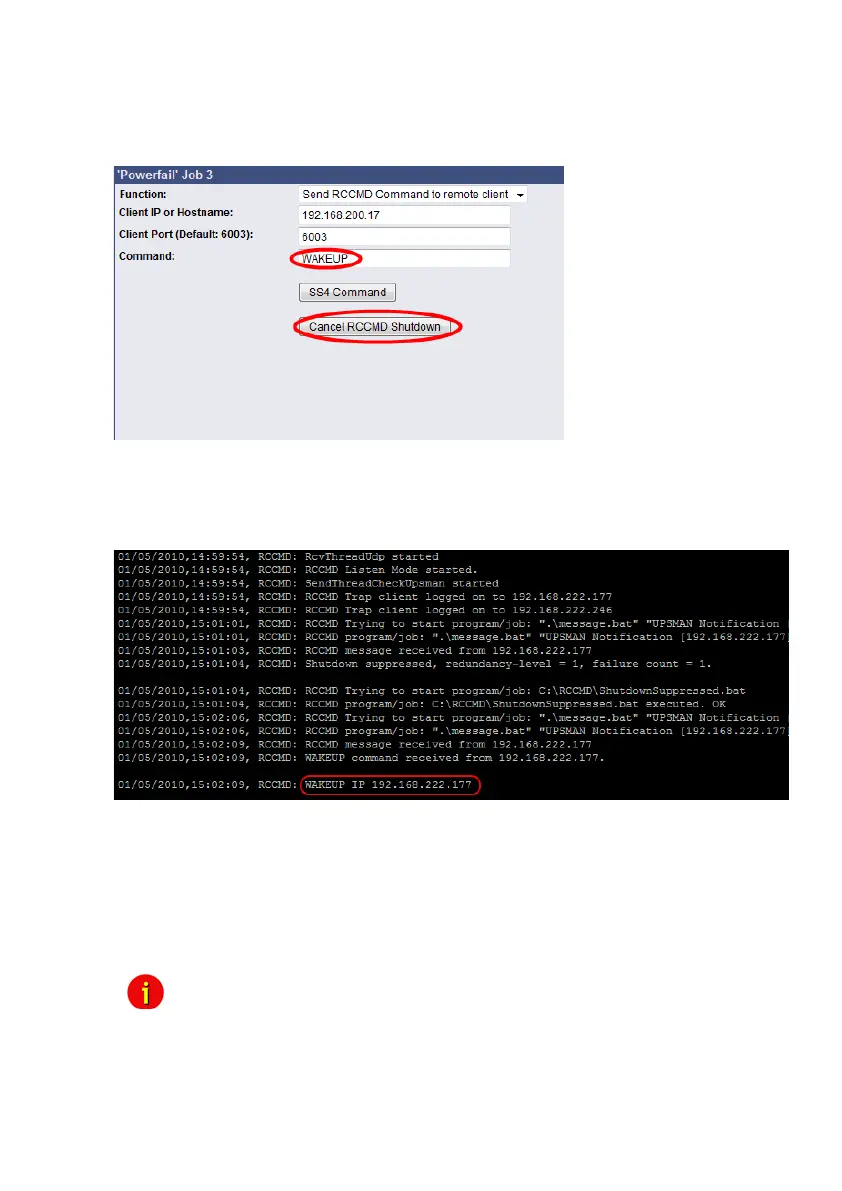
The parameter „WAKEUP“ got the same function like the „Send RCCMD cancel shutdown“
and resets the redundancy alarm of a RCCMD Client into initial state. For this the events
„POWER RESTORED“, „BATTERY LOW OFF“, „UPSMAN STARTED“ and „GENERAL
ALARM OFF“ are suitable too, to configure the function „Send RCCMD command to remote
client“ with the „WAKEUP“ command.
Figure 64: HTTP – Job Editor RCCMD WAKEUP
Click into the CS121 menu “Events/Alarms” onto “Power restored” and add a new job. Select
the function “Send RCCMD command to remote client”, set the accordant IP address of the
RCCMD client and click the “Cancel RCCMD Shutdown” button.
Figure 65: HTTP – Job Editor RCCMD WAKEUP
4.4.6 RCCMD Message
With this job the user can combine and configure a text message with RCCMD event. Text
messages can be sent to RCCMD receivers. This makes it possible to send text messages via
RCCMD (version 2 or higher) to a Windows 2000 server or a UNIX computer, using the “NET
SEND” or the respective “WALL” method. The problem with notifying network users on
different operating systems is therefore solved.
Note: The corresponding RCCMD clients must be running with RCCMD
version 2. RCCMD version 1 can only execute e.g. a shutdown as more
than one action are not supported by version 1. Please contact your
UPS dealer if you want to use these functions.



 To Next Page