58
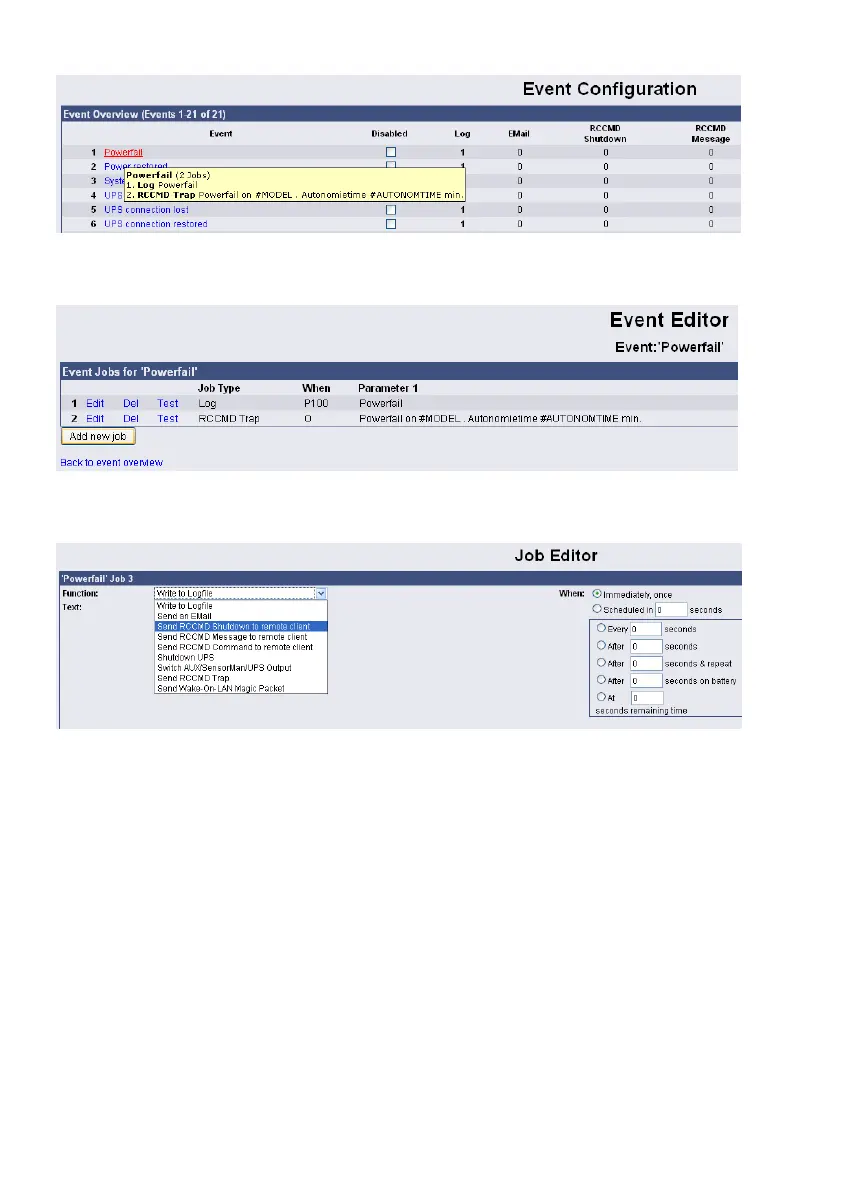
Figure 56: HTTP – Event Configuration
Click the “Add new job” button.
Figure 57: HTTP – Event Editor
Select the function “Send RCCMD Shutdown to remote client” in the Job Editor:
Figure 58: HTTP - Job Editor
Enter the ip-address of the client, that should receive the shutdown.
Description of the scheduler box :
"Immediately, once: Action/Job will be executed in case that this EVENT is true immediately,
only once the Action/Job is started (no repeat)".
"Scheduled in”: Action/Job will be executed in case that this EVENT is true with a scheduled
delay of x seconds. Unregarded if the EVENT is still true or not, after the delay the action will
be started.
The timer settings in the blue framed scheduler box will be executed only, if the EVENT is still
true after the delays/countdowns have run out.
E.g. if any action has been configured at "do after 10 seconds" than this action will NOT be
started, if after 9 seconds the EVENT is no longer true. Only if 10 seconds this EVENT was
present, the action will be triggered.
See below the explanation of all timer event configuration options for this type :
"Always”: Action/Job will be executed in case that this EVENT is true immediately and
repeated always as long as the EVENT is true (every 5 seconds according to poll cycle
default of a CS121).



 To Next Page