64
Syntax : |UPSCMD|20001|x
where x is the Portnr. (1-8). („20001“ is the ACK command for digital signals)
Syntax example: |UPSCMD|20001|2
This command confirms the Digital-Alarm 2 on a SITEMANAGER, SITEMONITOR,
SITESWITCH or CS121 AUX Inputs.
Confirm an analog alarm : The way it works with the ACK of analog alarms like
Temperature thresholds exceed on the UNMS.
Syntax : |UPSCMD|20002|x
where x is the Portnr. (1-8). („20002“ is the ACK command for for analog signals)
Syntax example: |UPSCMD|20001|4
This command confirms the Analog-Alarm 4 on a SITEMANAGER, SITEMONITOR,
SITESWITCH or CS121 AUX Inputs.
4.4.8 UPS shutdown
This event action enables an UPS shutdown. It is possible to configure when to send a
shutdown signal to the UPS in case of an e.g. battery low, fire alarm or if a complete power
down is wanted.
Attention: This command will cut off the power supply – only for UPS which support
this function!
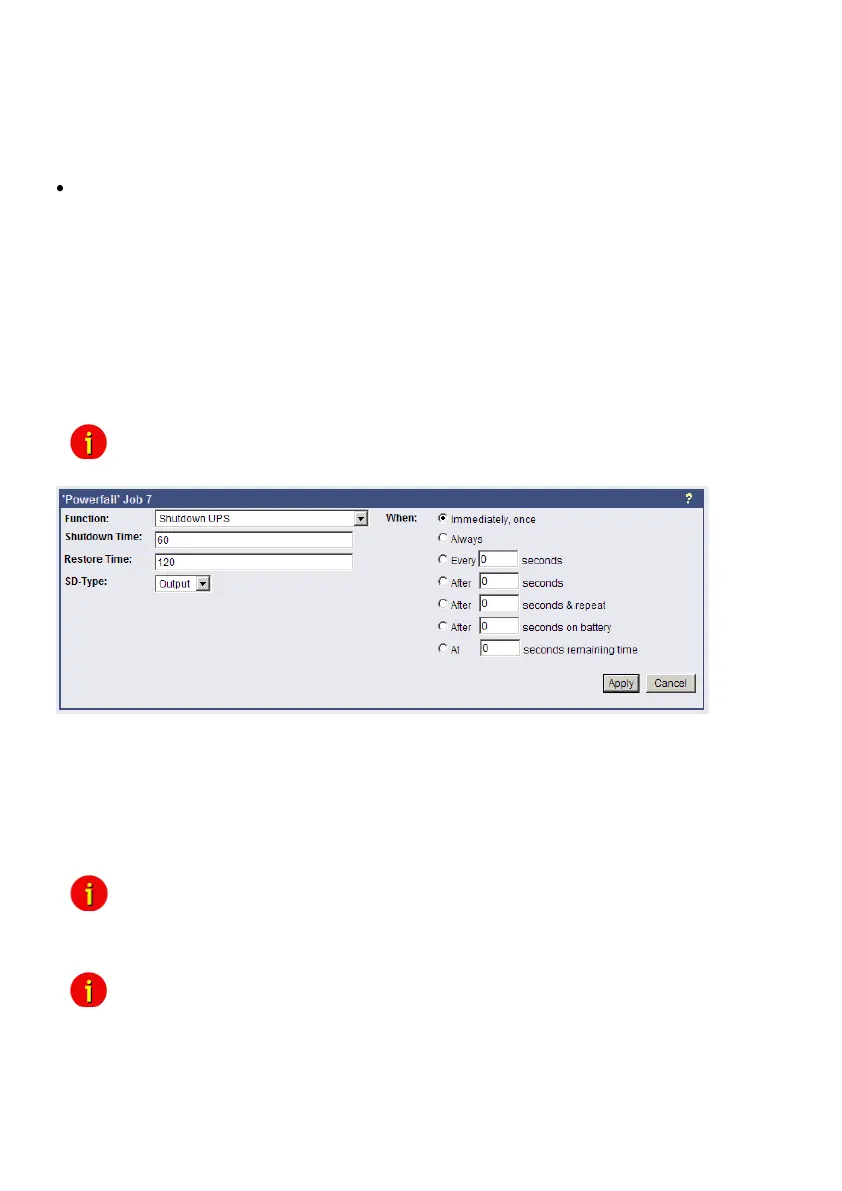
Figure 69: HTTP - Job Editor: Shutdown UPS-Job
The example above configures that 60 seconds after the event powerfail has occurred, the
UPS is initiating a shutdown and the UPS waits another 120 seconds after the event powerfail
is gone (power restored), before the UPS start up is initiated.
4.4.9 Wake On LAN (WOL)
This function sends data packages to wake up other workstations into a local network. Use this
functions into the event “UPSMAN started”. You can also use the event “Power restored”.
Note: Not all network cards are supporting this function. Some cards require a
password. Activate this function into the BIOS settings of the target workstation.
Note: If you want to send WOL signals in different sub-networks, it’s required, that the
switch, the CS121 and the workstation are defined with “Autosensing”!



 To Next Page