2.2.8
DISTANCE MEASUREMENT SYSTEM CHAPTER 2
GEODIMETER SYSTEM 600
Target Data Test On/Off
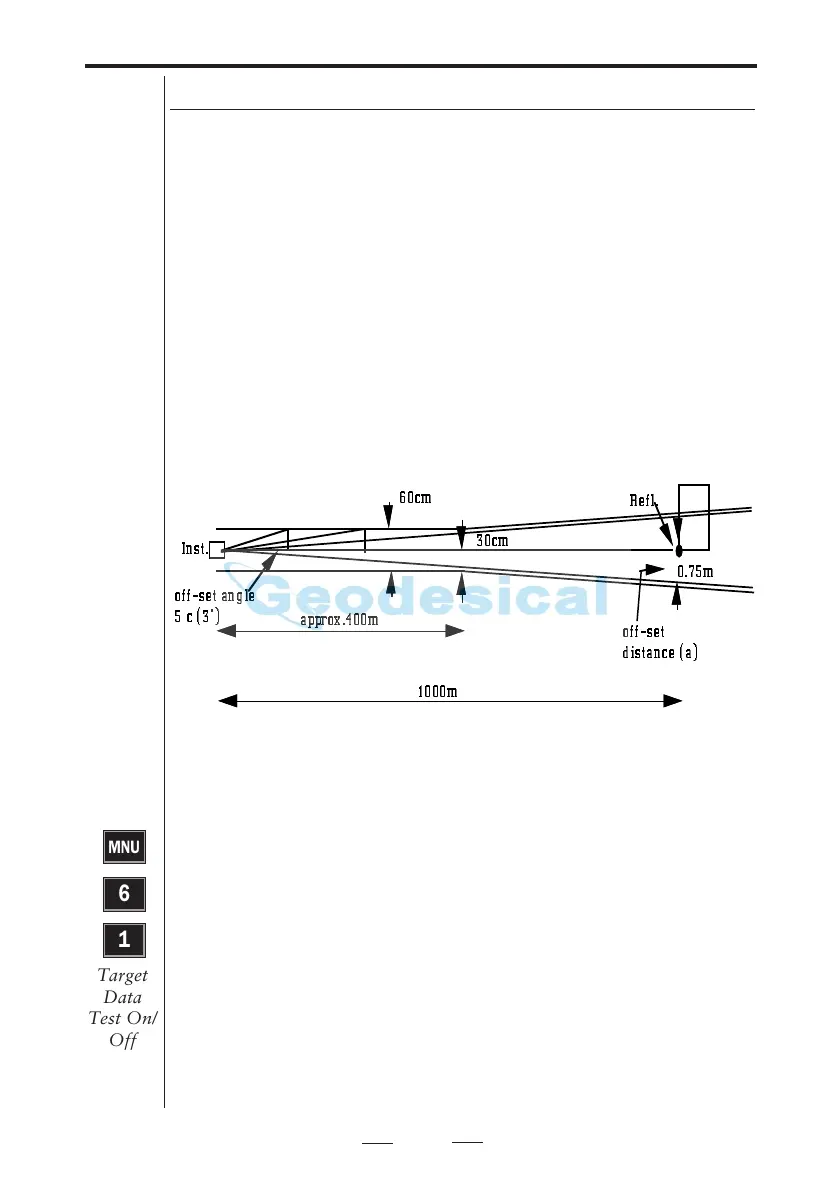
This allows measuring to points over which the prism range
pole cannot be placed – eg., in a corner or at the centre of a
large tree. In such a case the instrument can be redirected to
the correct point after distance measurement. The offset
distance from the inaccessible point is limited to +/-30cm or
50mgon rotation of the instrument for distances within
400m. This limit allows you to calculate and record the
coordinates and elevation of the correct point – i.e. the
eccentric point. For distances in excess of 400m the offset
limit is proportional to the distance to the point – e.g. at a
distance of 1200m, the instrument can be re-directed to the
correct point up to an offset distance of 90 cm.
This +/-30 cm or 50mgon limit can be deactivated by using
the main menu CONFIG function, Option 1, Config Swit-
ches, Target Data Test OFF mode. The default(standard)
setting of this switch will always be ON when the instrument
is first turned on.
Warning!
The target Data Test is created for your safety. It prevents
you from storing an old distance with new angle values.
When Target Data Test is set to Off that risk will occur, if
you forget to measure a distance when measuring the
following points.
Fig. 2.1 Measuring against eccentric point.
60cm
approx.400m
1000m
0.75m
30cm
Inst.
Refl.
off-set
distance (a)
off-set angle
5 c (3')
MNU
6
1
Target
Data
Test On/
Off



 To Next Page