10.2 Setting of the Setting Process Monitoring
Thesettingprocessmonitoringissetbycreatingblindrivet-specificprofilesandthengene-
ratingacomponent-specificprofilelistthatconsidersthesettingsequenceoftheblindrivet
into the specific application. After transferring the profile list file to the processing tool it can be
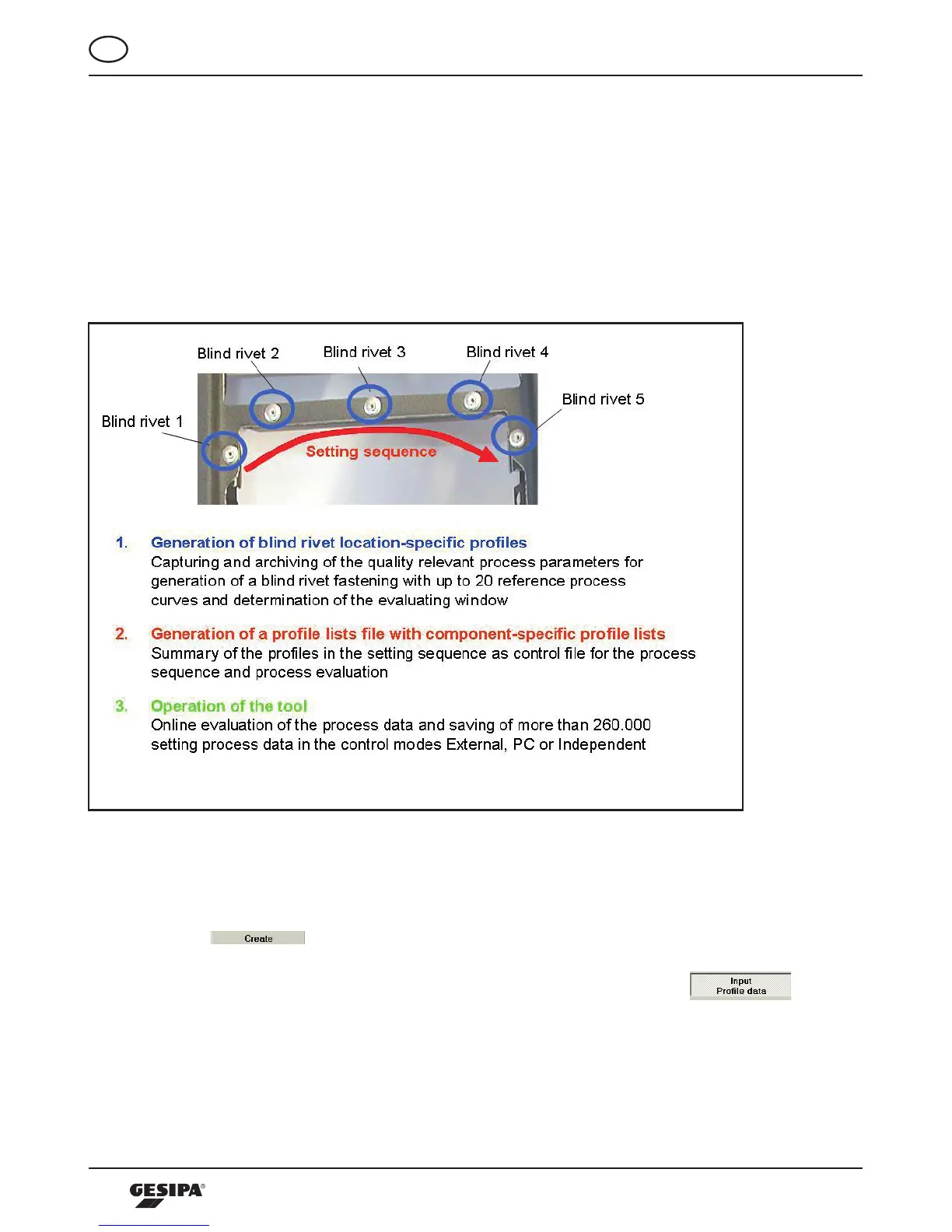
operated, using the setting process monitoring. Illustration 6 shows the general procedure to
set the setting process monitoring.
Illustration 6: General procedure to set and operate the setting process monitoring
10.2.1 SettingandEditingProles
Generating a profile is divided into the operating steps Enter Profile Data, Record Reference
Courses, Define Starting Force, Generate Evaluating Window and Saving the Profile.
Actuatingthe -buttonintheProfilefieldcallsupthescreen“CreateProfile”.
Here, at first the header area Profile Data is active, where the data relating to the application
are entered into the proper fields. This is also signaled by the depressed
-button.Atleastthe“Name”fieldmustbecompletedtoproceedwithgeneratingtheprofile,
Illustration 7.



 To Next Page