10.2.2 GenerationandEditingofProleLists
A profile lists file consists of a maximum of 10 profile lists with up to 224 profiles. This is the
actualcontrolfileoftheprocessingtool.Inaprofilelistfile,theblindrivet-specificprofiles
aresummarizedintheapplication-specificsettingsequence.Generatingaprofilelistfileis
dividedintotheoperatingsteps“EnterProfileListData”,“SelectProfiles”,“DetermineSetting
Sequence”and“Save”.
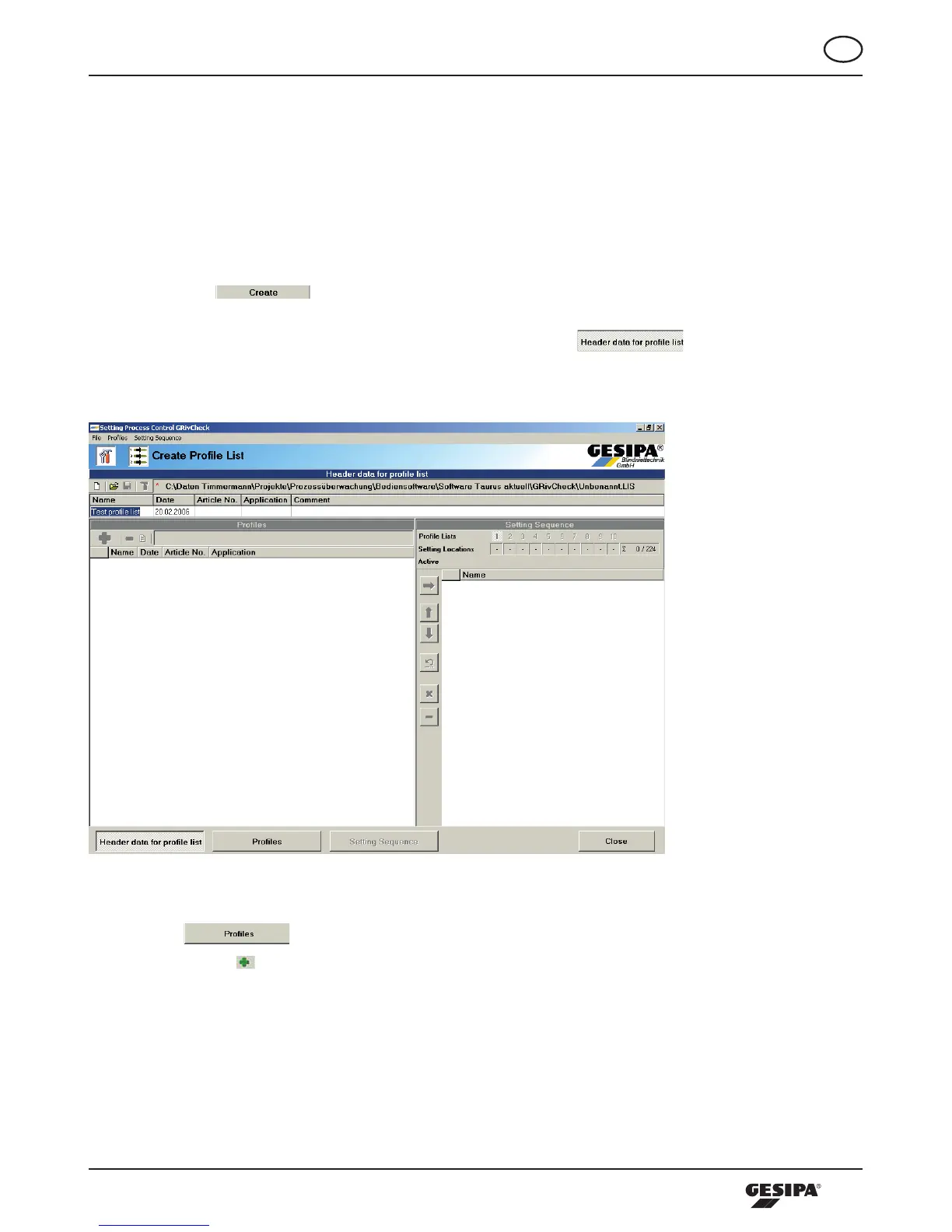
Actuatingthe -buttonintheareaprofilelistcallsuptheprofilelistscreen.Here,
at first the header area is active, where the data relating to the application are entered in each
relevantfield.Inaddition,thisissignaledbythedepressed -button.Atleastthe
“Name”fieldmustbecompletedtoproceedwithgeneratingtheprofilelist,illustration11.
Illustration 11: Entering the data of the profile list
Thenthe -buttoninthelowerareaofthemaskisdepressed,orclickintheProfiles
field.Actuatingthe -buttonwillopenthedialoguetoopentheprofilefilestobefiledintheprofilelist,
illustration 12. Here, the right hand side provides an overview of the relevant data of the profile. Using
double click, you can insert one or several highlighted profiles into the profiles window, illustration 13.



 To Next Page