32
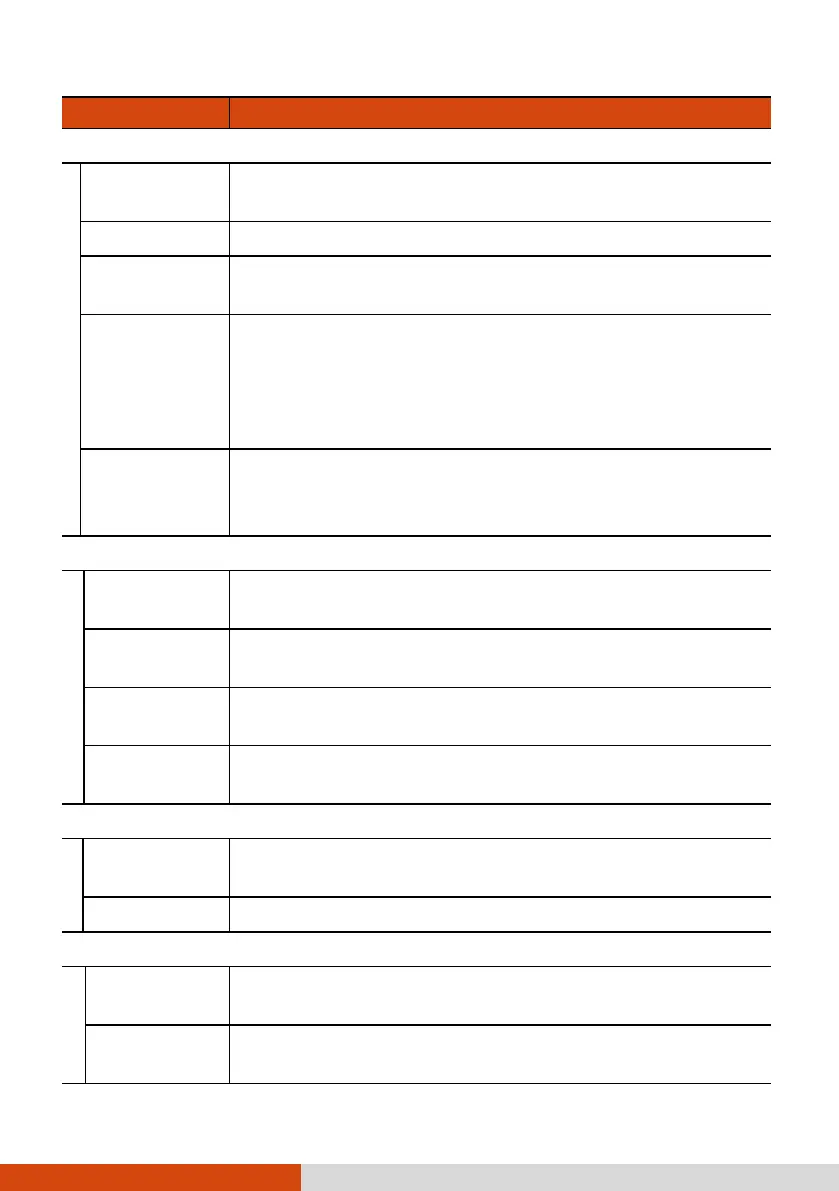
Item Description
Camera
Double tap to
capture
To set if you can take the photo by double tapping
where you want to focus in the preview window.
Timer
To set the countdown timer for taking the photo.
Angle
To set if the device orientation angle is displayed in the
preview window.
Grid
To enable or disable the 3x3 grid feature.
This feature helps you achieve better balance in the
composition of a photo. What you do is place your
points of interest in the intersections or along the grid
lines.
Resolution
To set the camera photo resolution.
Available choices depend on the current camera lens in
use.
Photo Stamp
Date
To select the date format or to select None when you
don’t want the photo stamp to include the date.
Time
To select the time format or to select None when you
don’t want the photo stamp to include the time.
GPS
To enable or disable the adding of geographical
information (if available) in the photo stamp.
Text
To add text in the photo stamp. Tap Custom text and
type the text in the input field. Otherwise, select None.
Sound
Shutter sound
To enable or disable the shutter sound played upon
photo taking.
Timer beep To enable or disable the beep sound for the timer.
File
File name
To add character(s) before the photo/video filename.
Enter the character(s) in the input field and tap OK.
File
information
To set if the information embedded into the image file
includes one or both of the following items.



 To Next Page