33
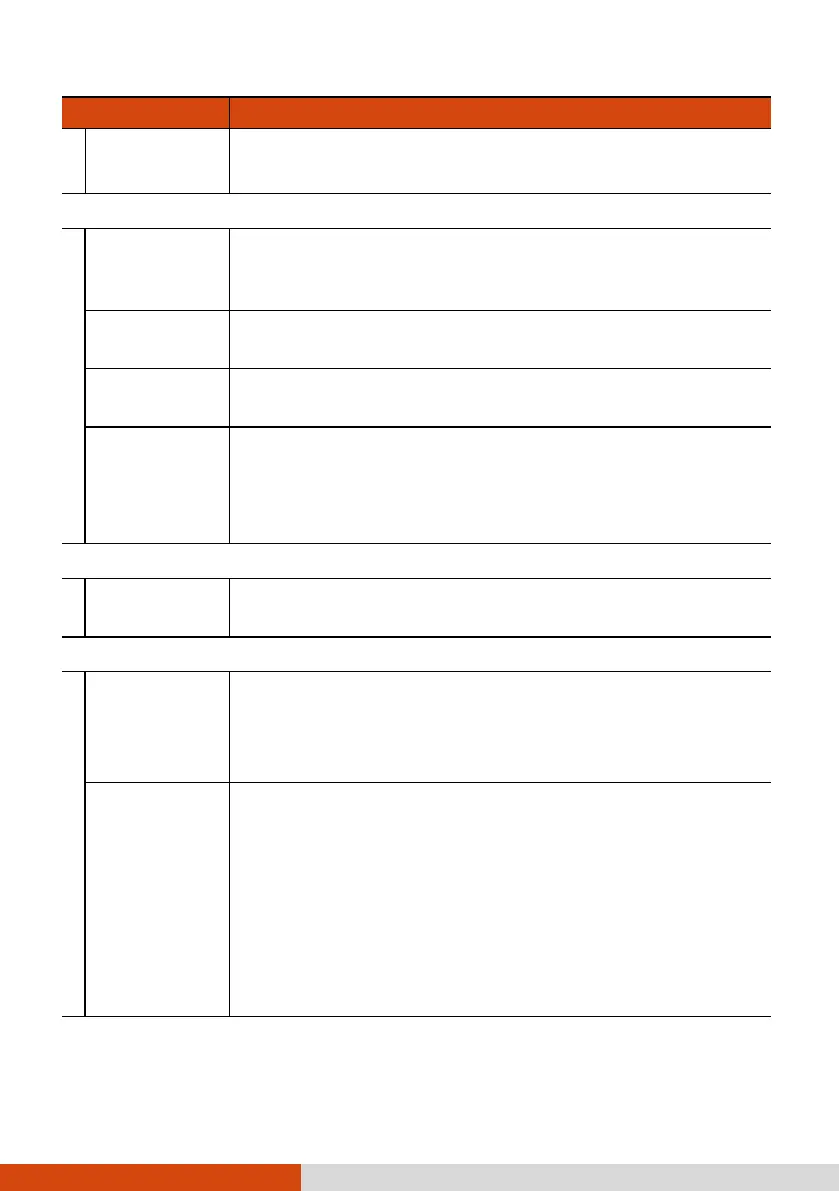
Item Description
• Location data (Geotagging)
• Compass direction
Others
Force
maximum
brightness
To keep the display brightness at the highest level
(overriding the system settings) while in the Getac
Camera main screen.
Keep display
on
To keep the display on (overriding the system settings)
while in the Getac Camera main screen.
JPEG Image
quality
To set the amount of JPEG compression. A lower
percentage means a lower quality.
File path
To specify the location for storing the photos/videos.
Options are:
• Internal Storage
• SD card
Reset Settings
to default
To reset all Getac Camera settings to the default values.
Set Settings Via QR code
Import
settings
To import Getac Camera settings from another device by
scanning the QR code on that device.
This is convenient when you want to copy the settings
from another device.
Export
settings
The QR code in this screen contains the current Getac
Camera settings. When Getac Camera on another device
scans the QR code, the settings will be copied to that
device.
The SAVE button allows you to save the QR code as a
PNG file named GetacQR-Camera in the DCIM folder of
your device.
The SHARE button allows you to share the QR code
image with others through an available sharing option.



 To Next Page