42 |G3 – Owner’s Manual
9.1 SOUND EDITING
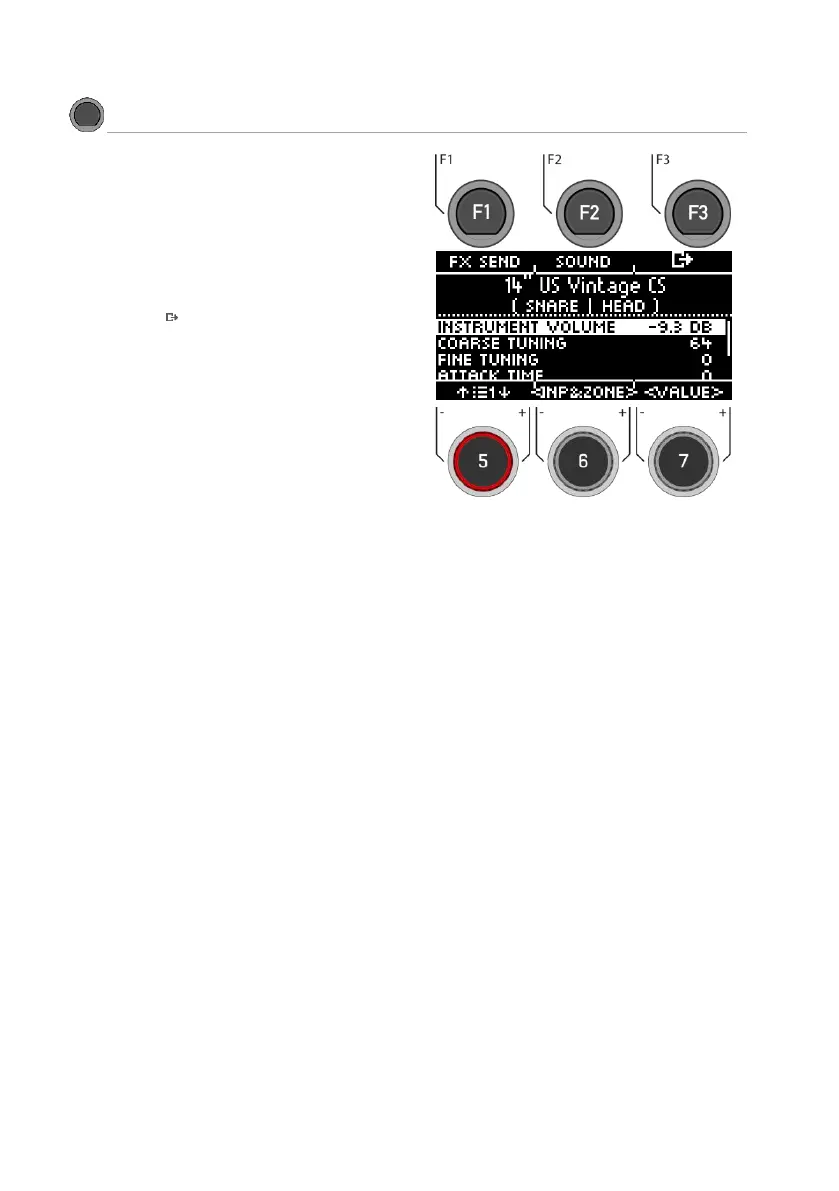
In the view you now have the possibility to edit or exchange
your loaded sound.
Functions:
[F1] [FX SEND] Mixer to add effects to your
sound.
[F2] [SOUND] Sound selection for the selected
input.
[F3] Back to INSTRUMENT main menu
The display window is always overwritten with the currently
loaded sound (e.g. 22" Brooklyn twenty-two) of the selected
zone (KICK I HEAD).
You will find the parameters that you can change in the list.
Use the dial [5] or navigation keys [8] to select the parame-
ter.
You can also select the input and the zone on the level with
the dial [6].
To change a value, use the dial [7] or the navigation keys
[8].
9.1.1 INSTRUMENT VOLUME
This volume control affects the basic volume of the currently active pad and zones. In the [MIX] menu, you can mix the
preset in relation to the master outs.
9.1.2 COARSE TUNING
This control allows a coarse tuning of the drum in steps of semitones up and down.
9.1.3 FINE TUNING
From the selected semitone, you can fine-tune the pitch, which allows fine-tuning by a quarter tone (50 cents).



 To Next Page