EasyManua.ls Logo

Gewa G3 - 11.3.2 LOAD - WAVE;SOUND

Gewa G3
144 pages
Print Icon
To Next Page IconTo Next Page
To Previous Page IconTo Previous Page
Loading...
G3 Owner‘s Manual | 91
11.3.2 LOAD WAVE/SOUND
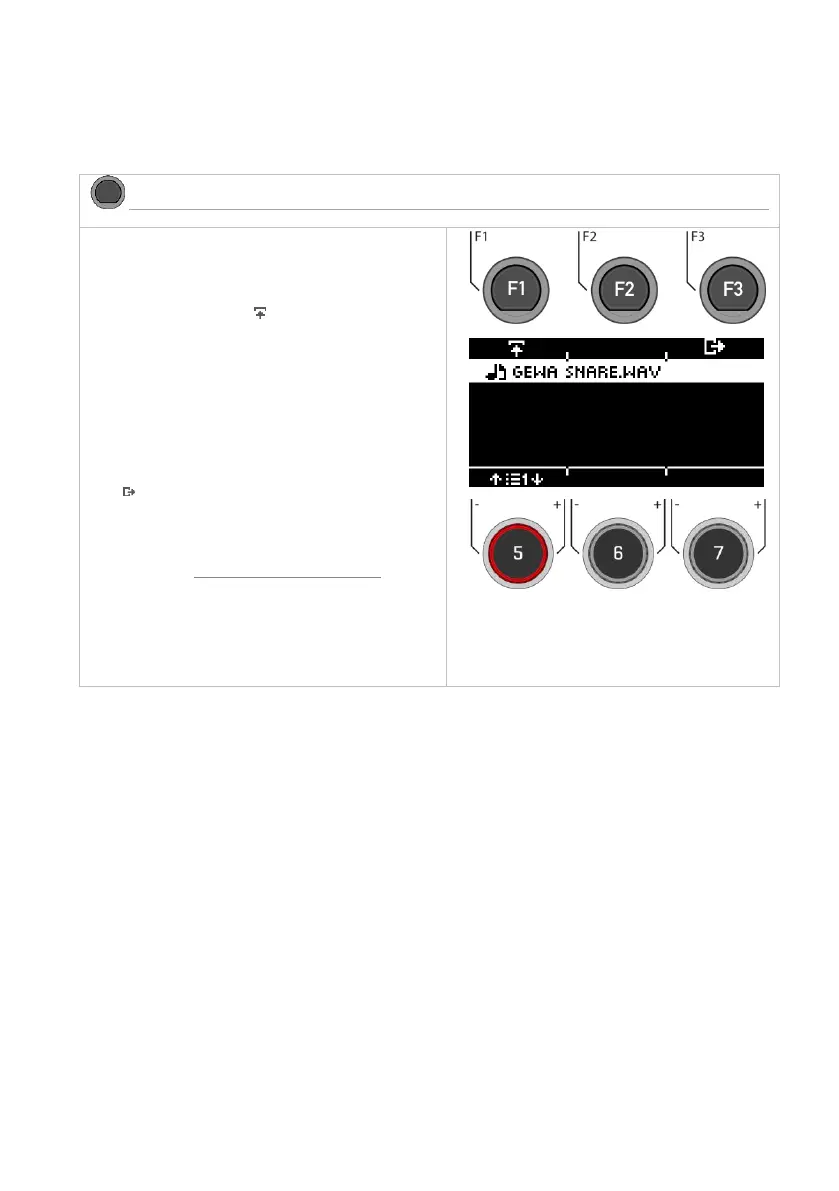
In this menu you can load up to 100 of your own samples from your USB stick into the module.
The total memory is limited to 111MB.
MENU USB Load/Save Wave/Sound
Load Wave/Sound
Selecting the sample
Select your sample with the dial [5] or the navigation keys
[8]. Use the [PLAY/STOP] or [PREVIEW] key to preview the
sound.
Load the sample by pressing [F1] or [ENTER].
Name
After loading, you can give the file a new name to make it
easier to find the sample in the Instrument menu.
Exiting the level
Press [F3 to exit the level or any menu key to exit the
entire menu.
For details on naming and Load/Save, please refer to the
relevant chapter:

Loading and saving from presets.

Table of Contents

Other manuals for Gewa G3

Related product manuals