Installation
2
2-26 Gilson GX-271 Liquid Handler User’s Guide
Rear Panel Connections
Input/Output Ports
You can use the input and output contacts found on the rear panel of the liquid handler to control peripheral devices. Refer to
the diagram on page 2-15
for the location of the input/output ports.
Contact Inputs
The input terminal block of the liquid handler has six contacts. All of the inputs are paired, and each pair includes a GROUND
reference ( ).
The contact input pairs are labeled A and B; there is also a safety contact input.
A contact is connected if it has a short across the input or is held low by a TTL output or other device.
Never connect voltages higher than 5V DC to an input. When using TTL signals, be sure to match GROUND connections.
Contact Outputs and DC Power Outputs
The output terminal block has eight contacts.
Pins 1 through 4 are paired, isolated-relay contact closures and are labeled 1 and 2.
Pins 5 through 8 are DC power outputs and can be turned on (supplying +24V DC) or off (+24V DC output will float) via software
control.
Making Connections
To make connections, you’ll need the following:
• 2-conductor cable (22–30 gauge for each wire)
• wire insulation stripper
•small-blade screwdriver
You can purchase a 6-foot piece of suitable cable (part number 709910206) or a package of five cables with identification
markers (part number 36078155) from Gilson.
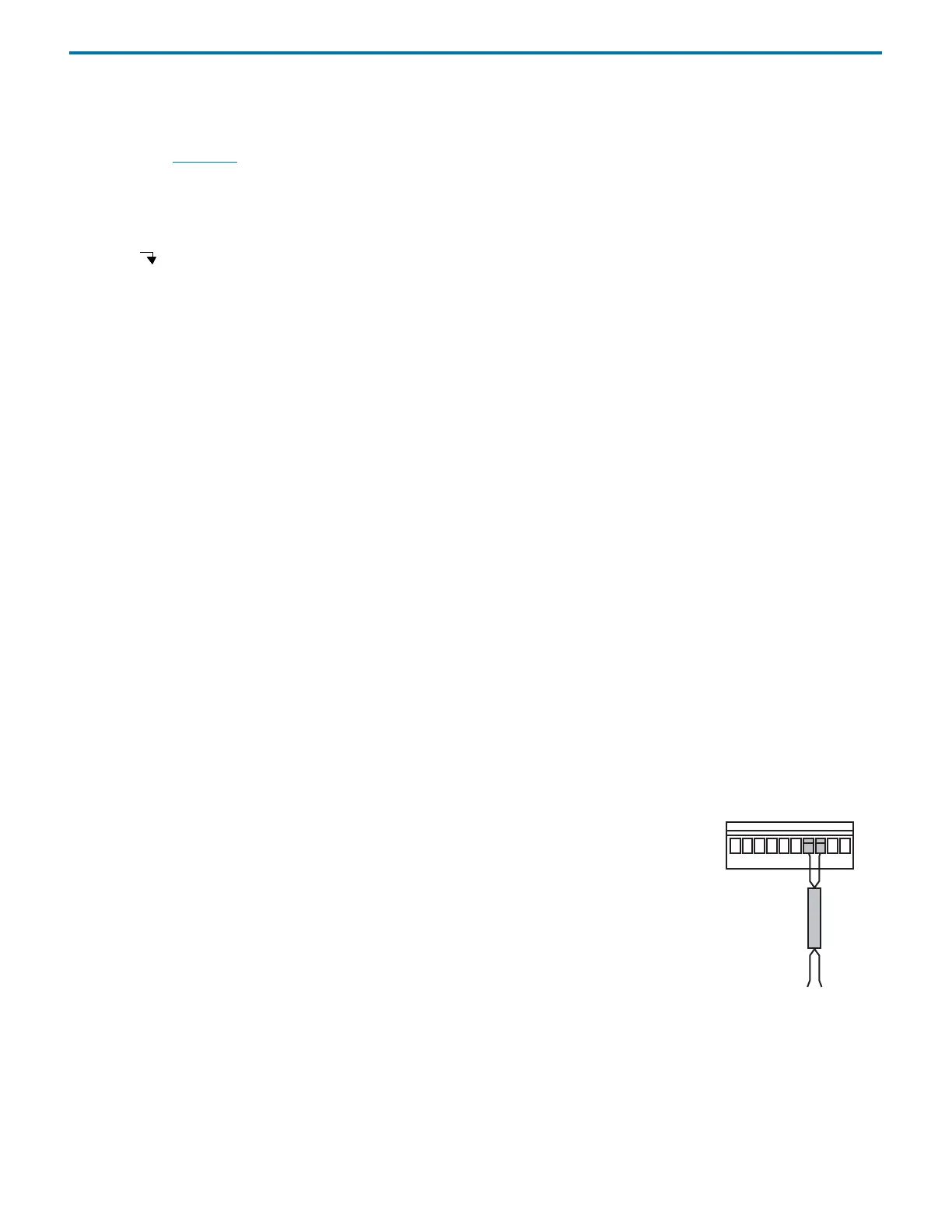
To make connections with the 2-conductor cable:
1 Cut the cable into pieces of appropriate length.
2 Strip about 3 mm of insulation from each end of the cable.
3 Remove the terminal block connector from the liquid handler. Insert each wire into the
appropriate terminal on the terminal block connector.
Note: When making connections, be sure to maintain the correct orientation of the
connector relative to the port.
Push the wire all the way in; then tighten its corresponding pin screw.
4 Reconnect the terminal block connector to the liquid handler. Push the connector in as far as
it will go. It is designed to fit snugly into its receptacle.
5 Connect the opposite ends of the wires to the other device(s). Be sure to match ground
connections.
6 Label each cable to identify the purpose of the connection.
terminal block
connector
2-conductor
cable
to peripheral
equipment
Figure 2-47: Input/Output
Connections



 To Next Page