Gilson GX-271 Liquid Handler User’s Guide 4-9
Maintenance
4
Replacing Parts
Replacing the Syringe
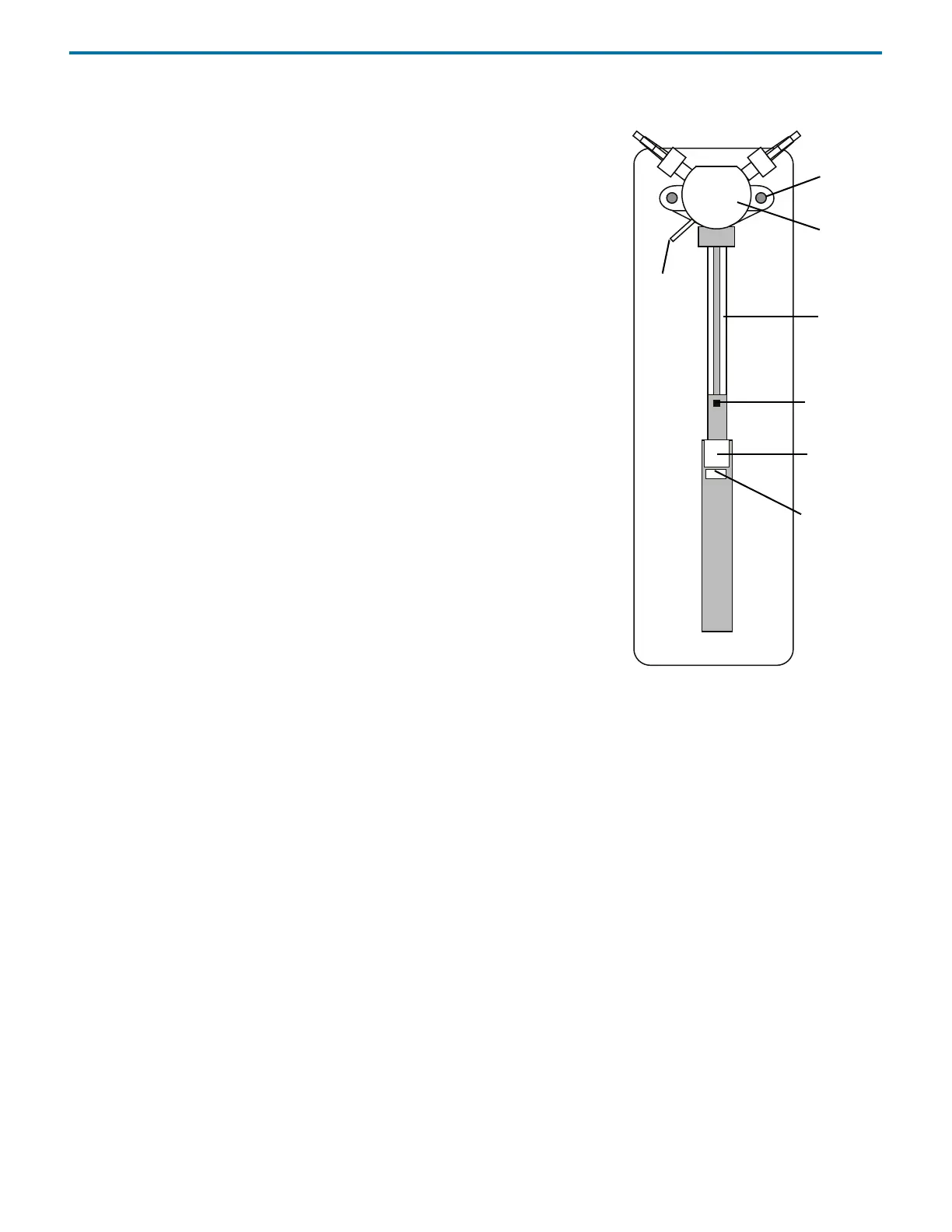
If necessary, refer to the diagram on while performing the procedures below. The
following procedures use TRILUTION® LH Software.
Removing the Syringe
To remove the syringe:
1 Open a TRILUTION LH Software method with a 402 Syringe Pump in the
configuration.
2Click Run to open the Application Builder.
3 Add a method to the sample list.
4 Select the Manual Control tab.
5 Select a method from the drop-down list of methods.
6Click Go. The instruments will initialize.
7 Disconnect the syringe piston from the piston operating rod by unscrewing the
piston holding screw on the underside of the rod.
8Click Lower Syringe.
9 After the syringe has been lowered, unscrew and remove the syringe from the
valve.
Install the New Syringe
To install the new syringe:
1 Fully tighten the syringe into the valve.
2Click Raise Syringe.
3 Firmly tighten the piston holding screw to secure the syringe piston.
valve
valve
to
syringe
piston
piston
piston
vent
tubing
operating
rod
holding
screw
screw
Figure 4-6: 402 Syringe














 To Next Page