Installation
2
2-38 Gilson GX-271 Liquid Handler User’s Guide
Z-Arm Cable Support Rod and Spiral Wrap Installation
Z-Arm Cable Support Rod and Spiral Wrap Installation
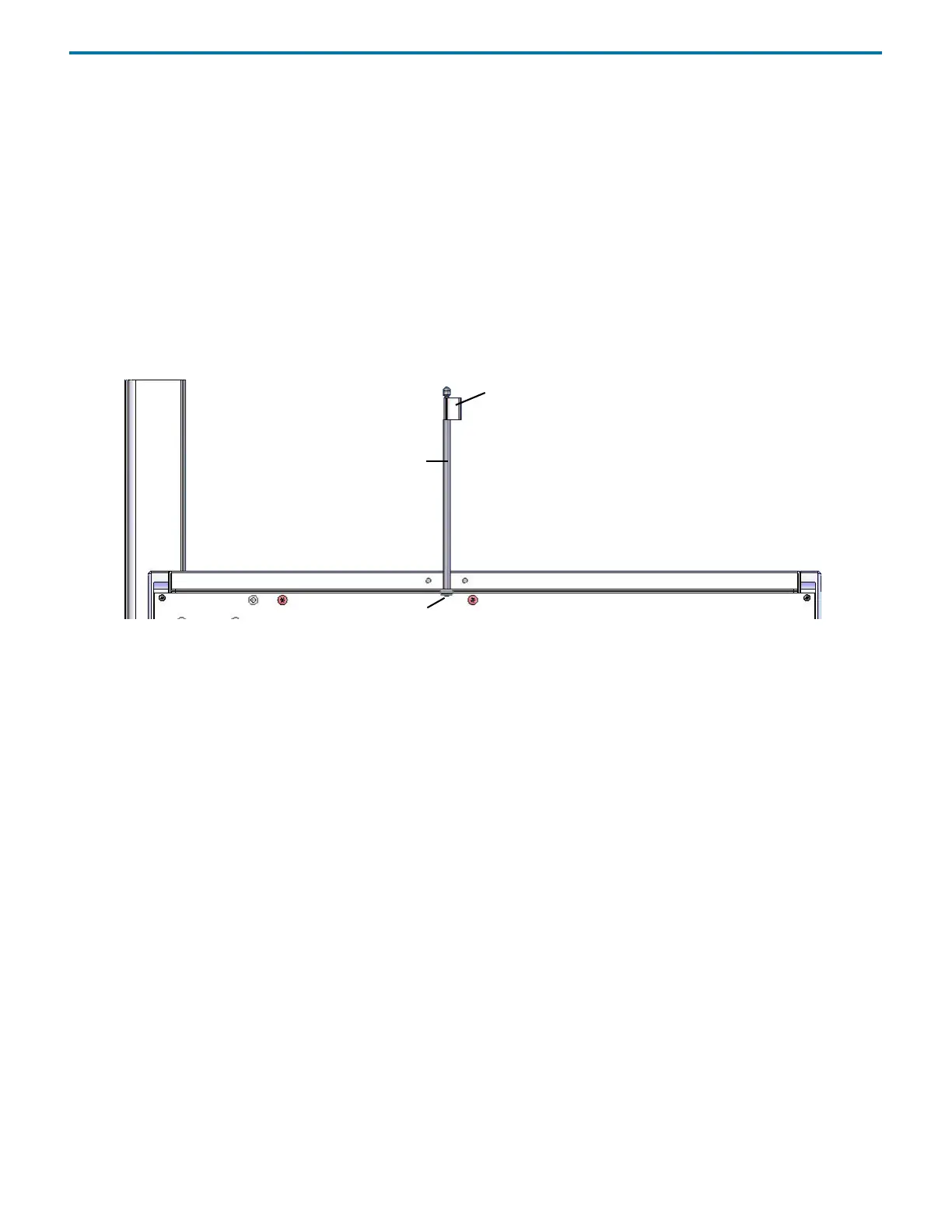
Z-Arm Cable Support Rod
To install the Z-arm cable support rod:
1 Using the Phillips screw included with the Z-arm cable support rod, attach the cable support rod to the rear panel of the
instrument. The hole for the screw is located on the rear panel near the top center of the instrument.
2 Snap the Z-arm control cable into the retaining clip on the Z-arm cable support rod.
3 Use the extra tubing retaining clips (included in the accessory package) to contain the tubing.
Spiral Wrap
Use the spiral wrap included in the accessory package to contain the tubing.
Figure 2-67: Z-Arm Cable Support Rod
rear panel—partial
Z-arm cable support rod
tubing retaining clip
Phillips screw



 To Next Page