Gilson GX-271 Liquid Handler User’s Guide 2-21
Installation
2
Rear Panel Connections
Rear Panel Connections—GX Solvent System (Optional)
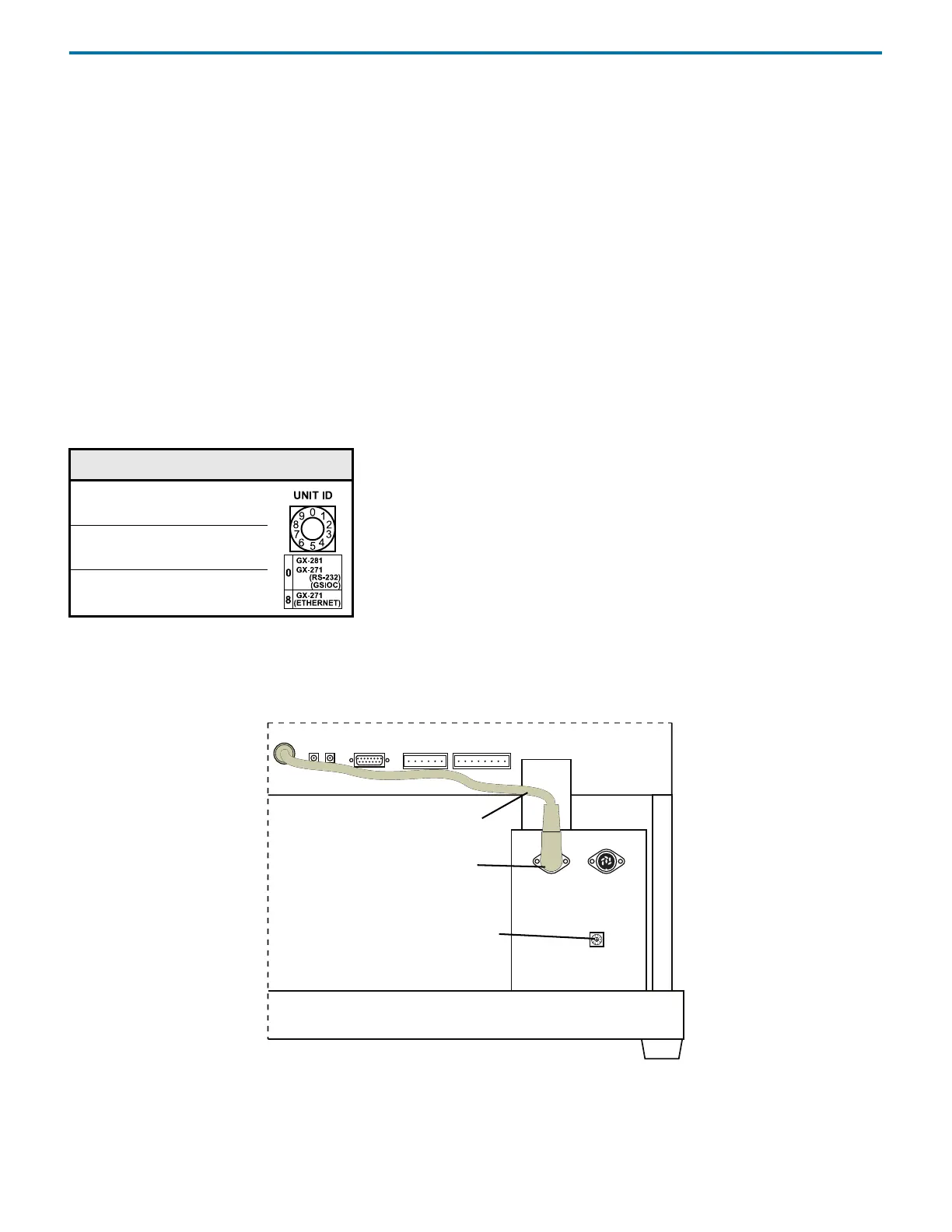
To make connections between the solvent system and the liquid handler refer to the diagram and instructions below.
1 Ensure that the power is turned off to the liquid handler.
Note: Any time the solvent system will be disconnected from the liquid handler ensure that the power is turned off to the
liquid handler.
2 Connect the right-angled end of the power cable (part number 26035455) to the FROM GSIOC ACCY port on the solvent
system.
3 Connect the other end of the power cable to one of the GSIOC ACCESSORIES ports on the rear panel of the GX-271 Liquid
Handler.
Unit ID
At the factory, the unit ID on the solvent system is set to 0.
Refer to the table below for the correct setting, which is dependent on the type of communication to be used.
To change the unit ID:
1 Gently insert a small flat-blade screwdriver into the selector on the rear panel and turn it.
2 Align the arrow with one of the indicated numbers.
Figure 2-40: GX Solvent System Connected to the Liquid Handler
Unit ID Communication
8Ethernet
0RS-232
0GSIOC
power cable
liquid handler rear panel (partial)
GX Solvent System
FROM GSIOC ACCY port
unit ID selector



 To Next Page