Home
Goodmans
TV Receiver
GDR11
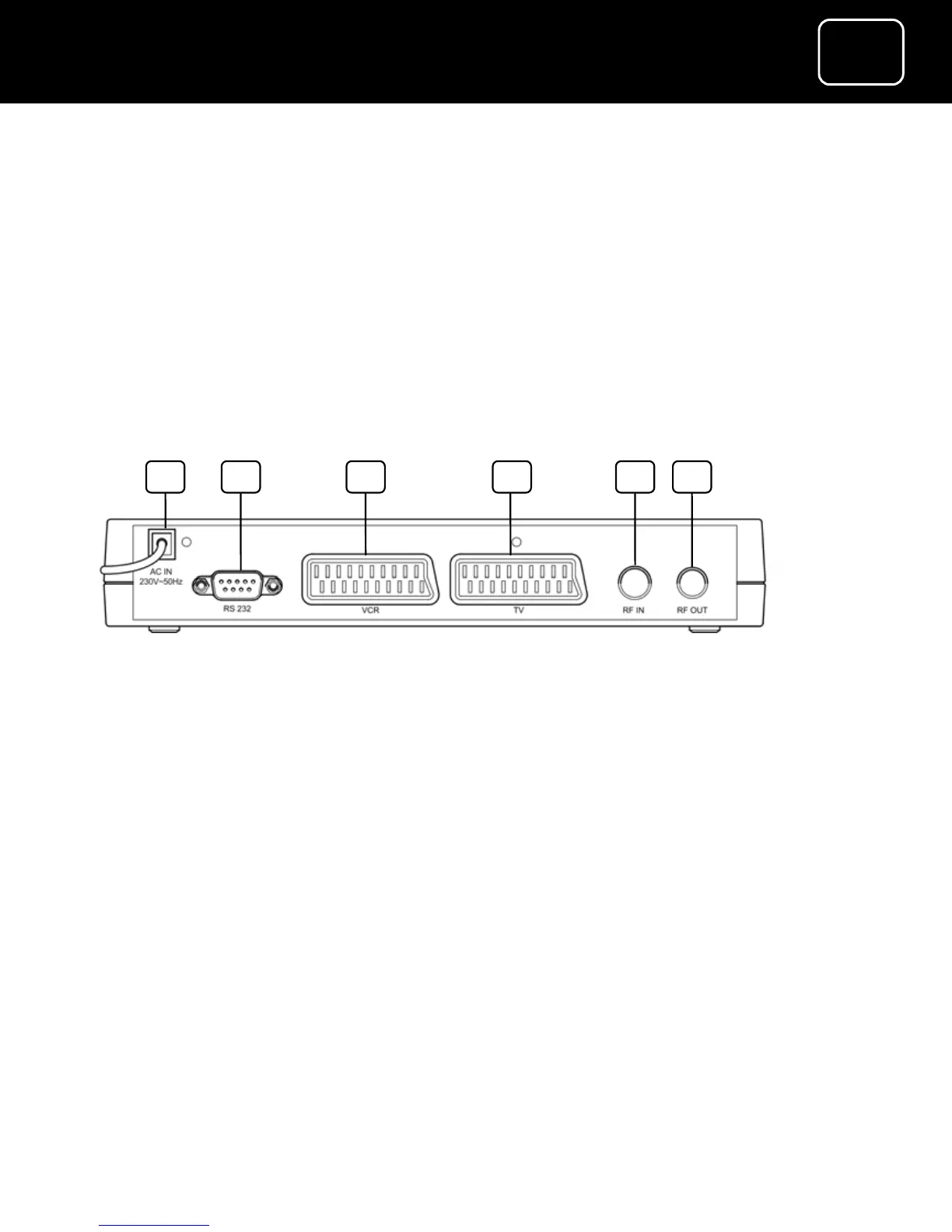
Page 5 (Receiver Back Panel)
Goodmans GDR11 - Receiver Back Panel
88 pages
Manual
Save Page as PDF
To Next Page
To Next Page
To Previous Page
To Previous Page
Loading...
5
5
A
DR10 Set To
p
Bo
x
5
A
DR10 Di
g
ital TV Receiver
5
5
A
DR10 Set To
p
Bo
x
5
GDR11 Digital TV receiver
1.
Mains cable
2.
Socket for factory use only
3.
SCART out socket (to your VCR)
4.
SCART out socket (to your TV)
5.
‘
RF IN
’
socket (to your TV aerial)
6.
‘
RF OUT
’
socket (to your TV or VCR)
2
1
3
4
5
6
Back panel
4
6
Table of Contents
Main Page
Table of Contents
2
ADR10 Set Top Box
3
What's in the Box?
3
Receiver
4
Front Panel
4
Back Panel
5
Remote Control Buttons
6
Putting Batteries in the Remote Control
10
Using the Remote Control
11
How to Use the Remote Control
12
How to Connect the Receiver to Your TV
13
Connection 1 (if Your TV Has a SCART Socket)
14
Connection 2 (if Your TV Does Not Have a SCART Socket)
15
How to Connect Headphones to the Receiver
16
What the On-Screen Symbols Mean
17
How to Turn the Receiver on for the First Time
20
Regional Preferences
24
TV Region Selection Screen
24
How to Turn the Receiver off
25
Important Information about Over-Air Downloads
26
How to Turn the Receiver Back on from Standby
27
How to Tune in TV and Radio Stations
27
Important Information about Searching for New Channels
28
The Channel Select Display
29
How to Choose a TV Channel Using Your Remote Control
30
How to Use the Channel List
31
The Channel List Display
31
How to Choose Your Favourite Channels
32
How to Swap between Channels
33
How to Change the Volume
33
How to Select TV or Radio
33
The On-Screen Help Pages
34
The Information Screen
35
Subtitles
36
How to Use Audio Description
37
How to Use Teletext
39
How to Use the TV Programme Guide
40
The TV Guide (Individual Programme Information)
41
The Main Menu
43
Main-Menu Screen
43
The Menu Screens
43
The Favourite Lists Menu
45
How to Create a Favourite List
46
Create a Favourite List Screen
46
How to Change Your Favourite Channels
52
How to Delete a Favourite List
56
How to Select a Favourite List
57
The Configuration Menu
58
The Channel Installation Menu
59
The Auto Channel-Installation Menu
60
The Auto Channel-Installation Screen
61
Signal Information
64
The TV Configuration Menu
65
The TV Configuration Screen
65
Aspect Ratios
66
TV Output Signal
67
The Languages Menu
68
The Languages Menu Screen
68
The System Parameters Menu
69
The System Parameters Screen
69
System Information
70
The System Information Screen
70
Auto-Standby Settings
71
Auto-Standby Settings Screen
71
Factory Settings
72
The Factory Settings Screen
72
The Retune Messages Menu
73
The Retune Message Display
73
The Audio Description Menu
74
The RF Modulator Configuration Menu
75
The RF Modulator Configuration Display
75
The Parental Control Menu
76
How to Reset the Parental Control PIN
78
Cleaning
80
Ventilation
80
Safety Information
80
Servicing
81
Throwing Your Receiver Away
81
Electrical Safety
82
Help and Advice
84
Product Specification
86
System Features
87
Other manuals for Goodmans GDR11
Quick Start Guide
2 pages
Related product manuals
Goodmans GDR10
76 pages



 To Next Page