Overview
20 3A2098S
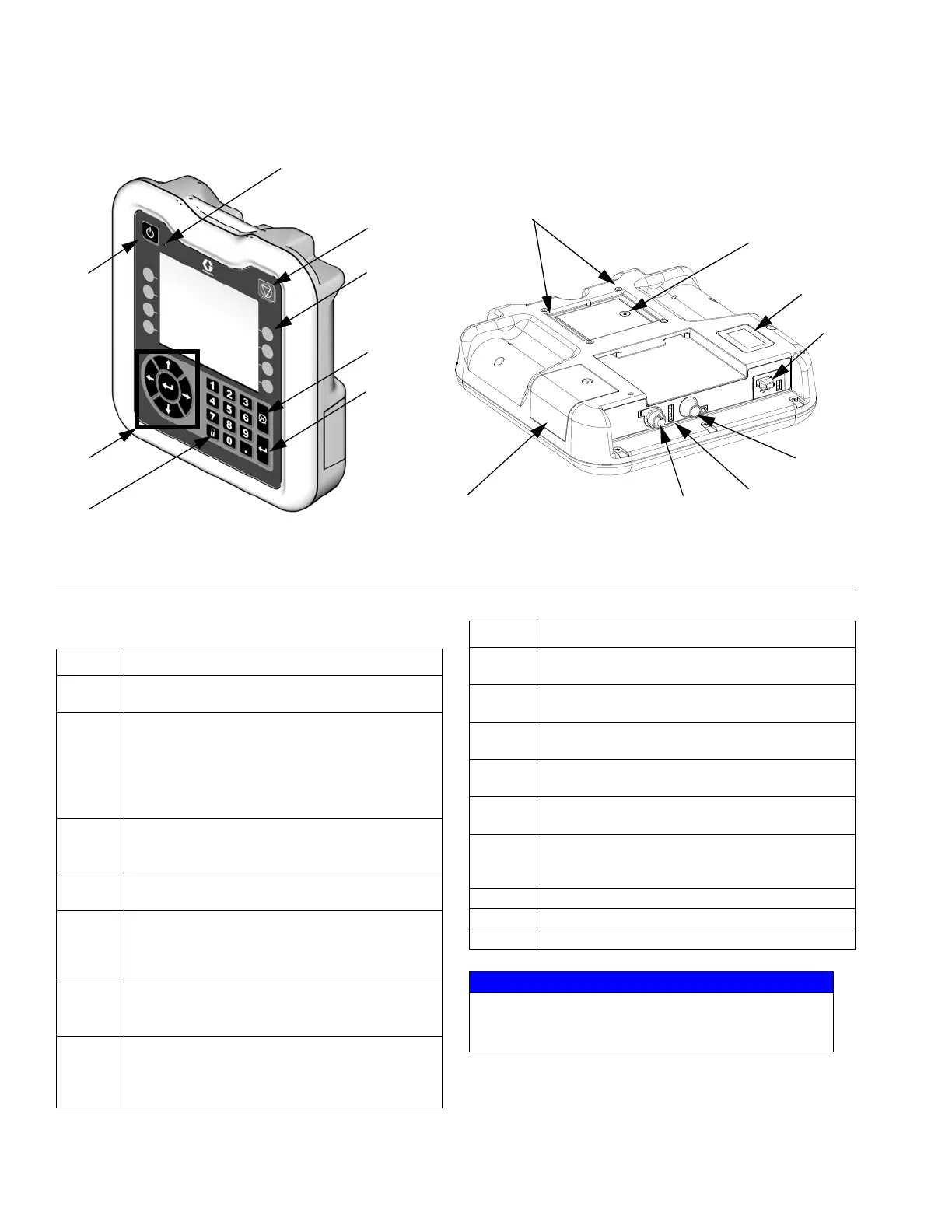
Advanced Display Module (ADM)
KEY:
F
IG. 8: Advanced Display Module Component Identification
TI12362a
BA
BB
BC
BE
BH
BG
BF
BD
r_24E451_3B9900_1a
BJ
BR
BP
BN
BM
BL
BK
BS
Callout Function
BA Power On/Off Button
Enables/disables system.
BB System Status Indicator LED
Displays system status. Green LED indicates the
system is active. Orange LED indicates the sys-
tem is off. Solid LEDs (green or orange) indicate
the system is in Run mode. Flashing LEDs (green
or orange) indicate the system is in Setup mode.
BC Stop Button
Stops all system processes. However, it is not a
safety or emergency stop.
BD Soft Keys
Functions vary depending on the screen.
BE Cancel Button
Clears system errors and cancels a selection or
number entry while in the process of entering a
number or making a selection.
BF Enter Button
Acknowledge changing a value or making a
selection.
BG Lock/Setup
Toggle between run and setup screens. If setup
screens are password protected, button toggles
between run and password entry screens.
Callout Function
BH Navigation Buttons
Navigate within a screen or to a new screen.
BJ Flat Panel Mount
Mounts to control center bracket (optional).
BK Model Number Tag
Model number.
BL USB Module Interface
USB port and USB indicator LEDs.
BM CAN Connector
Power connection.
BN Module Status LEDs
See LED Diagnostic Information, page 69, for
signal definitions.
BP Battery Cover
BR Token Access Cover
BS Digital I/O Port for Light Tower
NOTICE
To prevent damage to the soft key buttons, do not
press the buttons with sharp objects such as pens,
plastic cards, or fingernails.



 To Next Page